 客服热线:
 手机版
 二维码




































Spring
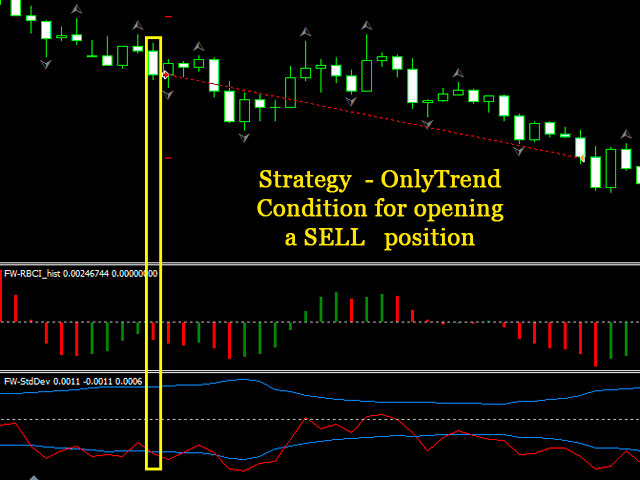
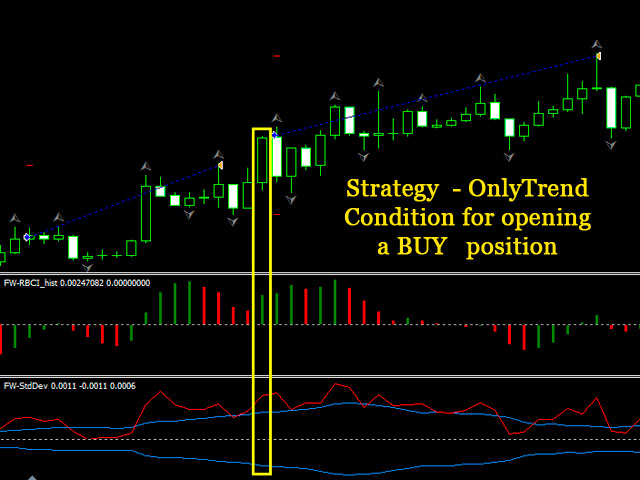
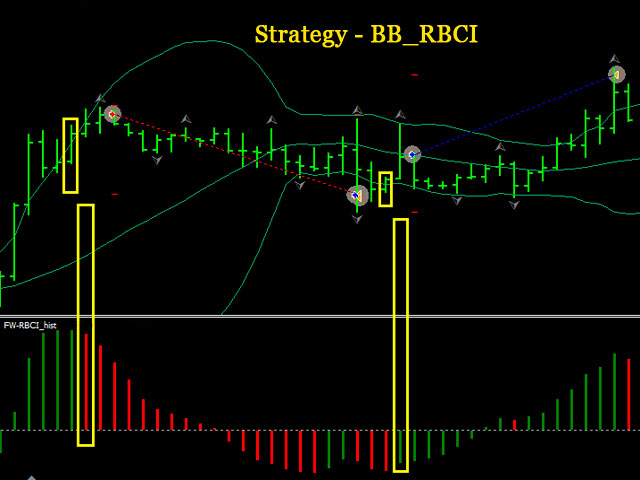
This multifunctional Expert Advisor has been created in the form of a designer and is suitable both automatic and manual trading. Its main advantage is the ability to select and adjust the strategy for the current market conditions. To recover from the drawdown, the EA fully utilizes the feature of the currency market - the price cannot remain in a narrow channel for a long time. A breakout of the flat in one direction or another is inevitable. So, by placing orders in the breakout direction, you trade in the trend direction.
The EA provides the ability to place orders both in manual mode (ManualTrading) and in automatic trading mode when the appropriate strategy is selected.
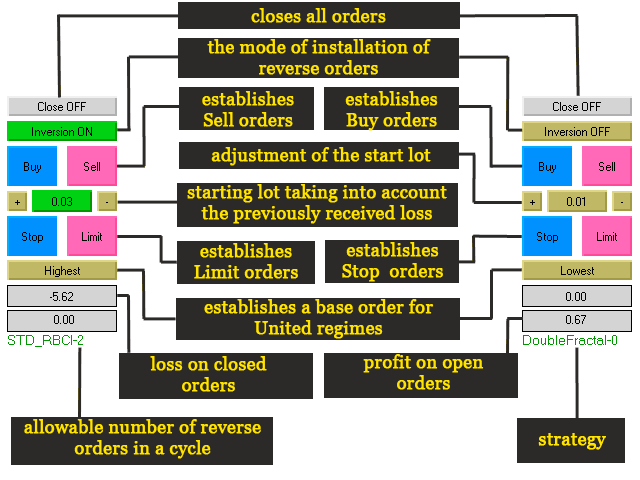
The manual control panel allows you to
- Close all orders on the instrument simultaneously - the "Close" button.
- Enable and disable the ModeAutoInversion mode - the "Inversion" button.
- Open market Buy and Sell orders with the corresponding buttons.
- Adjust the volume of the initial contract.
- Place pending Stop and Limit orders with the corresponding buttons.
- Select the base order for the United_TP and United_SL modes - the "Lowest/Highest" button.
- Shows the accumulated loss on closed orders.
- Displays the current profit/loss on the instrument.
- Shows the selected strategy and the maximum number of reverse orders.
Expert Advisor parameters
- EA_STRATEGY: select the strategy
- WorkTF: timeframe of a signal bar
- DIRECTION: trading direction
- ModeAutoInversion: enable placing reverse orders
- NumberMaxInversion: the maximum number of reverse orders
- ModeCloseCounterMarketOrders: enable closing by opposite orders
- ModeOneDayOneTrade: confine trading within the current day. AnyCycle - in one cycle, LossCycle - when receiving a loss, ProfitCycle - when receiving a profit
- Lots: initial lot
- DistanceStopLimit: distance from the current price for placing pending orders
- LossControl: enable the loss control mode
- AllowableLoss: the maximum allowable loss in the deposit currency
- TYPE_SL and TYPE_TP: stop loss (SL) and take profit (TP) calculation type, respectively. The United_TP and United_SL modes set unified TP and SL for all orders in the same direction. In the automatic mode, BUY orders use the data of the lowermost order, SELL orders use the data of the uppermost order. In the ManualTrading mode, the base order is selected using the "Lowest/Highest" button. In the Each_His_TP and Each_His_SL mode, each order is assigned separate parameters for stop loss and take profit.
- Mode_SL, Mode_TP: stop loss and take profit calculation method
- Dynamic_SL, Dynamic_TP: dynamic take profit and stop loss settings (recommended range of values: 0.5 - 10)
- Constant_TP, Constant_SL: static take profit and stop loss settings
- Mode_FC: close market orders based on the indicator signals
- Timeframe_FC: timeframe for calculation of the indicators in the Mode_FC mode
- Mode_BE: the mode for transferring orders to breakeven
- Distance_BE: distance from the price to move the order to breakeven
- Profit_BE: breakeven profit
- Timeframe_BE: timeframe for calculating the signals to move orders to breakeven in the modes BE_RBCI, BE_Stoch, BE_Fractal, BE_Bar
- Mode_TS: trailing stop setting mode
- Distance_TS: distance from the price to activate trailing stop, if the TS_Distant calculation mode is selected
- Step_TS: trailing calculation step when the TS_Distant mode is selected
- Timeframe_TS: timeframe to calculate the signals of trailing when the TS_Fractal and TS_Bar modes are selected
- TimeBegin, TimeEnd: the EA operation time in the hh:mm:ss format
- CloseOrdersOnTime: enable closing all market orders and deleting pending orders at the end of the EA operation time
- ModeLockOnTime: this parameter works only in the manual trading mode. When enabled, reverse orders are not placed outside the time parameters TimeBegin and TimeEnd, unless the ModeAutoInversion mode is enabled
- MagicNumber: unique identifier
- OpenOrderSound: sound signal
- Slippage: slippage
- const_Spread: average spread on the instrument

本店最新上架
-
- MT4 MT5跟单EA 本地跟单远程跟单 绝不

- ¥1100.00
-
- 在MetaTrader市场购买MetaTrader 5的&#

- ¥3988.00
-
- 在MetaTrader市场购买MetaTrader 5的&#

- ¥3988.00
-
- 在MetaTrader市场购买MetaTrader 5的&#

- ¥3988.00
-
- 在MetaTrader市场购买MetaTrader 5的&#

- ¥3988.00
全网为您推荐
-
- AlgoTradeSoft

- ¥3988.00
-
- 国际期货套利软件

- ¥3988.00
-
- MT4 MT5跟单EA 本地跟单远程跟单 绝不
- ¥1100.00
-
- 在MetaTrader市场购买MetaTrader 5的&#
- ¥3988.00
-
- 在MetaTrader市场购买MetaTrader 5的&#
- ¥3988.00


