 客服热线:
 手机版
 二维码




































GS Assist
It is used as an administrator of open orders, setting them with Stop Loss and Take Profit, if they didn’t have such when creating them.
It has a built-in news feed from Forex Factory for the ability to automatically close orders before the news is released.
It can be attached to any currency pair, and will work with all open orders.
Advisor provides:
-
The installation of Stop Loss and Take Profit of all orders opened in
the terminal is not dependent on the currency pair and the way they are
created (manually or by other advisors), if they do not have them.
- Automatic closure of group orders upon reaching the target total profit (loss)
- Closing orders of the group before the release of news for a set time (mins before an event News)
- Group orders close on Friday at 10 pm
- Close group orders using the CloseGroup button or with buttons for order subgroups on the Members of Group panel
- Limit the loss on the parameter Use EquityStop - the percentage of risk to the current deposit
- Trading on the BUY and SELL buttons, provided by the adjustable parameters of the order Lot, TakeProfit and StopLoss
The Expert Advisor has a redesigned FFCal indicator for getting information about the news release time. Forex Factory Developer.
In the Options menu on the Expert Advisors tab, you must enable WebRequest: http://cdn-nfs.faireconomy.media/ff_calendar_thisweek.xml
Implements trading strategy Target Group
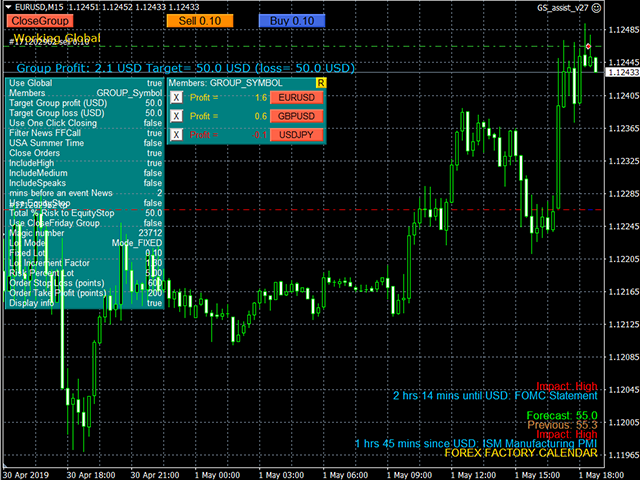
The main parameters are Target Group Profit and Target Group Loss , which set the limits for the amount of profit / loss of a group of orders.
The group of orders is set on the special Members of Group panel.
For UseGlobal mode = false, this is one line of the current character or GS Assist magic number.
For UseGlobal = true mode, the panel lines are formed by the "R" button in the upper right corner, by the list of open orders for the account.
They can consist of characters or magic numbers (the Members of group parameter).
Marking lines (button at the beginning of the line) indicates the
inclusion / exclusion of the corresponding orders in the group.
There are red buttons for manually closing the corresponding orders.
Can manage orders of other currency pairs and the work of advisers
To manage orders of only one other adviser, it is enough to mark only its magic number in the list. His orders will be automatically closed when the target values of Target Group Profit and Target Group Loss are reached.
The parameters of profit / loss are set in cents.
Information is displayed on the screen with the input parameters actually used, with Loss and Profit recalculated from Cents to Points.
Input parameters
- Use Global = true - work with all orders open for an account
- Members of group = GROUP_SYMBOL - order group formation mode (GROUP_SYMBOL or GROUP_MAGIC)
- Target Group profit (USD, 0-not use) = 5 - the amount of the acceptable profit of the sum of all open orders
- Target Group loss (USD, 0-not use) = 5 - limiting the acceptable loss of the sum of all open orders
- Use One Click Closing = true - closes orders without asking for confirmation
- Filter News FFCall = true; - news filter enable mode
- USA Summer Time = true; - summer time mode in USA
- Close Orders = true; - closing the order before the news
- IncludeHigh = true; - inclusion of important news
- IncludeMedium = false; - inclusion of news of medium importance
- IncludeSpeaks = true; - inclusion of speakers
- mins before an event News = 2; - minutes before the news for closing orders
- Use EquityStop = true - loss limiting mode, closes ALL orders.
- Total% Risk to EquityStop = 50.0 - the percentage of risk to the current deposit
- Use StopFriday Group = false - closes all orders of the group on Friday at 22:00
- Magic number = 23712;
- Lot Mode = MODE_FIXED // or Grid_Increment - the lot is increased for each subsequent order, or From_Account_Balance
- Fixed Lot = 0.01;
- Lot Increment Factor = 1.3 - lot size lots = lots * MathPow (Lot Increment Factor, num); where num is the order number
- Risk Percent Lot = 5.0 - the percentage of risk to the available balance
- Order Stop Loss (cents, 0-not use) = 600 - Stop Loss Orders
- Order Take Profit (cents, 0-not use) = 200 - Take Profit Orders
- Display info = true - output of the table of input parameters
本店最新上架
-
- MT4 MT5跟单EA 本地跟单远程跟单 绝不

- ¥1100.00
-
- 在MetaTrader市场购买MetaTrader 5的&#

- ¥3988.00
-
- 在MetaTrader市场购买MetaTrader 5的&#

- ¥3988.00
-
- 在MetaTrader市场购买MetaTrader 5的&#

- ¥3988.00
-
- 在MetaTrader市场购买MetaTrader 5的&#

- ¥3988.00
全网为您推荐
-
- AlgoTradeSoft

- ¥3988.00
-
- 国际期货套利软件

- ¥3988.00
-
- MT4 MT5跟单EA 本地跟单远程跟单 绝不
- ¥1100.00
-
- 在MetaTrader市场购买MetaTrader 5的&#
- ¥3988.00
-
- 在MetaTrader市场购买MetaTrader 5的&#
- ¥3988.00


