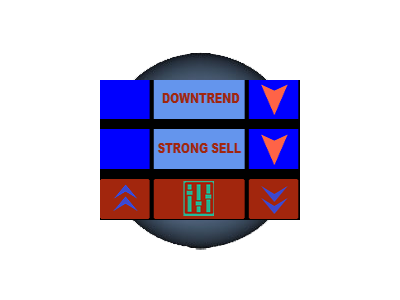
- Panel is used to show the buy/ sell signal depending on the MA.
- Panel is used by traders to keep track of trends currently being held in the market.
Features
- This panel uses MOVING AVERAGE CROSSOVER to generate signals.
- This panel also uses MTF(MULTIPLE TIME frameS) to define a trend/generate a signal.
- This panel checks for TWO MOVING AVERAGES on THREE TIMEframeS.
- This panel is Highly Configurable as we can ConFIGURE the MA in EACH TIME frameS.
Input Parameters
- Timeframes: There are three sets of timeframes which checks for the two moving averages.
- MINIPIPS: It is the distance from the point of CROSSOVER where the trades should be placed.
- Moving Average Inputs:
- Moving Average Period: Input the period of moving average
- Moving Average Shift: Input the shift of the moving average
- Moving Average Method: Input the Method of the moving average (Simple,Exponential,Smoothed,Linear Weighted)
- MA Applied Price: Input the applied price of the moving average (Open,Close,High,Low,Median,Typical,Weighted)
Panel Description
- It consist the Moving Averages logic to give alerts for Strong Buy/ Strong Sell.
- Left box on the first two row displays the UP ARROW and Right box on the first two row displays the DOWN ARROW.
- Center box on first row displays the UPTREND / DOWNTREND / NO TREND depend on the MA logic.
- Center box on second row displays the STRONG BUY / STRONG SELL / NO SIGNAL depend on the MA logic.
- Left Side of last row is Buy (up arrow) Button, Click to enable/ disable alerts for buy.
- Right Side of last row is Sell (down arrow) Button, Click to enable/ disable alerts for sell.
- Center of last row is Setting Button, Click to enable/ disable overall alerts.
- Red/Gray color shows the enable for alerts.
|
|
ta itemprop="image" content="https://c.mql5.com/31/233/moving-average-trend-signal-panel-screen-4960.png" />
|
|
 客服热线:
 手机版
 二维码