 客服热线:
 手机版
 二维码






































SPD Parabolic Sar
The Expert Advisor is based on the principles of Parabolic SAR indicator and uses the elements of the hedging strategies.
This mechanism uses the momentum of trading volatility that works on all the timeframe, day trading and swing trading.
If two Parabolic SAR dots are below the price they represent the buy signal, and if the two Parabolic SAR dots are above the price they indicate the sell signal.
This algorithm uses a hedging strategy that works with the volatility zone system, which we apply by adding the Average true range (ATR), Standard deviation (STD), and Average daily range (ADR) to filter trading signals. These functions are used to calculate the area of loss recovery with two methods, dynamic and fixed.
Key Features
- This Expert Advisor works in any pair and timeframe. However, the greatest efficiency has been observed on M15.
- This Expert Advisor uses the recovery zone algorithm.
- Uses dynamic or fixed pending orders.
- Recommended initial deposit $1000+ {minimum Lots = 0.01}.
- Use only five-digit accounts.
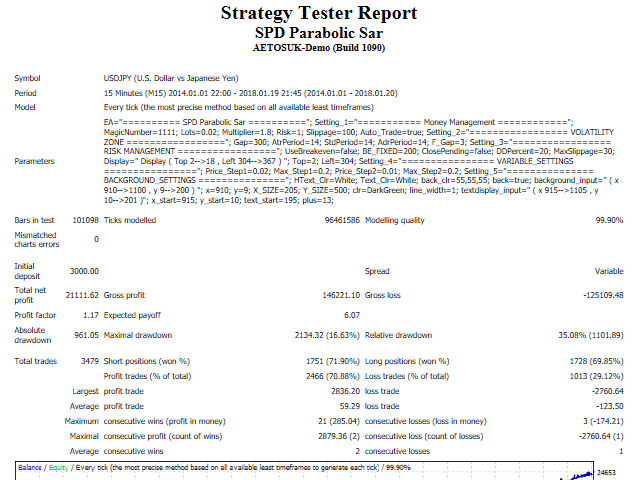
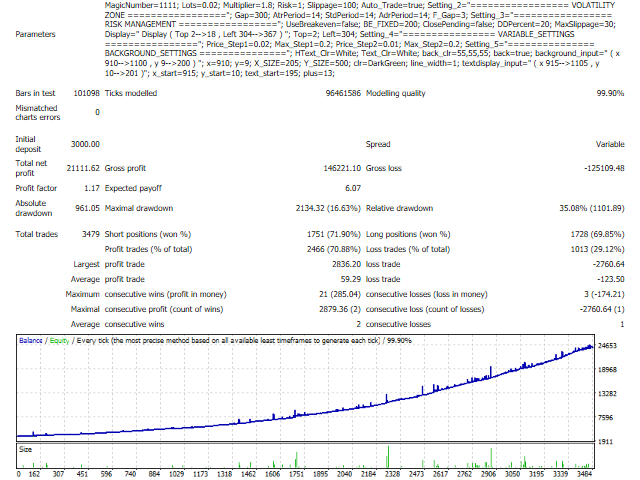
- Using real tick data in backtest with 99.9% modeling quality.
Parameters
- MagicNumber - Magic number to set the ID for each EA.
- Lots - initial lot size.
- UseLotsize - set as Auto_Lots or Fixed_Lots.
- Multiplier - previous lot size will be multiplied.
- Risk - set the percentage of risk.
- Slippage - slippage size.
- Auto_Trade - set as default.
- UseRecoveryGap - set as Dynamic_Gap or Fixed_Gap.
- Gap - recovery zone, pips.
- UseDynamicMethod - set as ATR, STD or ADR method.
- ATR - Average true range.
- STD - Standard deviation.
- ADR - Average daily range.
- AtrPeriod - ATR averaging period.
- StdPeriod - STD averaging period.
- AdrPeriod - ADR averaging period.
- F_Gap - Gap factor.
- UseBreakeven - set as true or false.
- BE_FIXED - “BE_FIXED=200” simply means that this Expert Advisor will move your stop loss to breakeven once 200 points profit has been achieved.
- Drawdown Percent Settings
- ClosePending - set as true or false.
- DDPercent - set the percentage to cut off the loss, % drawdown.
- MaxSlippage - Max slippage size, pips.
- Variable_Settings - use default or change values of variables by optimizing.
- Price_Step1 - price increment step1.
- Max_Step1 - maximum value of step1.
- Price_Step2 - price increment step2.
- Max_Step2 - maximum value of step2.
- News Filter Function:
- URL_News "http://ec.forexprostools.com/"
- NewsSymbol - Set true or false, true = download news for only currency on chart, false = download news for all currencies on chart
- BrokerGMTOffset - Your Broker GMT Offset
- LowVolatilityNews - Set true or false for Low Volatility News filter
- ModerateVolatilityNews - Set true or false for Moderate Volatility News filter
- HighVolatilityNews - Set true or false for High Volatility News filter
- NonfarmPayrollsNews - Set true or false for Nonfarm Payrolls News filter
- StopBeforeLowNews - Set minutes for Stop Before Low News
- StopAfterLowNews - Set minutes for Stop After Low News
- StopBeforeModerateNews - Set minutes for Stop Before Moderate News
- StopAfterModerateNews - Set minutes for Stop After Moderate News
- StopBeforeHighNews - Set minutes for Stop Before High News
- StopAfterHighNews - Set minutes for Stop After High News
- StopBeforeNFPNews - Set minutes for Stop Before Nonfarm Payrolls News
- StopAfterNFPNews - Set minutes for Stop After Nonfarm Payrolls News
- CloseAllOrdersBeforeNews - Set true or false for Close All Orders Before News
- DrawNewsLines - Set true or false for drawing the news lines
- LowColor - Set color for Low Volatility News filter
- ModerateColor - Set color for Moderate Volatility News filter
- HighColor - Set color for High Volatility News filter
- Day Of Week Filter Function:
- StartTradeTime - Set time to start trading
- EndTradeTime - Set time to end trading
- TradeFriday_Mode - Set ON/OFF for Friday trading
- start_time - Start trading hour on Friday
- end_time - End trading hour on Friday
- Display Settings - apply default or change display position
- Top - distance from the top
- Left - distance from the left




本店最新上架
-
- MT4 MT5跟单EA 本地跟单远程跟单 绝不

- ¥1100.00
-
- 在MetaTrader市场购买MetaTrader 5的&#

- ¥3988.00
-
- 在MetaTrader市场购买MetaTrader 5的&#

- ¥3988.00
-
- 在MetaTrader市场购买MetaTrader 5的&#

- ¥3988.00
-
- 在MetaTrader市场购买MetaTrader 5的&#

- ¥3988.00
全网为您推荐
-
- AlgoTradeSoft

- ¥3988.00
-
- 国际期货套利软件

- ¥3988.00
-
- MT4 MT5跟单EA 本地跟单远程跟单 绝不
- ¥1100.00
-
- 在MetaTrader市场购买MetaTrader 5的&#
- ¥3988.00
-
- 在MetaTrader市场购买MetaTrader 5的&#
- ¥3988.00


