 客服热线:
 手机版
 二维码




































IRobot Alligators
IRobot Alligators is an Expert Advisor based on the chaos theory and the Alligator technical indicator.
This expert advisor consists of three lines, overlaid on a price chart, that represent the jaw, the teeth and the lips of the Alligator. It was designed to help confirm that a trend is in effect and in what direction. As with all moving averages, the shortest one (green) moves first, followed by the middle (red) and then longer average (blue).
If the three lines are entwined, then the Alligator’s mouth is closed and he is said to be sleeping. The Gator Oscillator alternates between green and red bars. Supposedly, during sleep the Alligator gets hungry, waiting for a breakout from his sleep so he will eat. When the trend begins, the Alligator wakes and starts eating. The Gator Oscillator shows large green bars. once full, the Alligator closes his mouth once again and goes to sleep. Red bars appear on the Gator Oscillator. The Alligator returns to sleep and bars on both sides of the Gator oscillator are red. Creator Bill Williams used 13, 8 and 5-period averages, brought forward 8, 5 and 3 periods, respectively. Colors are usually blue, red and green, respectively.
Three lines:
- Green line is Alligator’s lips
- Red line is Alligator’s teeth
- Blue line is Alligator’s jaw
Long Trade Signal:
- Green line above red line
- Red line above blue line
- Bullish two-bar reversal
Short Trade Signal:
- Green line below red line
- Red line below blue line
- Bearish two-bar reversal
Key Features
- This Expert Advisor can trade in currency pairs such as EURUSD, GBPUSD, NZDUSD, USDCAD, USDCHF, USDJPY, AUDUSD, AUDCAD, EURCHF, EURGBP, EURJPY, EURAUD, GBPCHF, CADJPY, GBPJPY, AUDNZD, AUDCHF, AUDJPY, CHFJPY, EURNZD, EURCAD, CADCHF, NZDJPY and XAUUSD
- Expert Advisors work in M15, M30 and H1 timeframes.
- Money management by opening a real account. If the dollar, the minimum deposit is $1000, which must correspond to the minimum deposit defined by the broker.
- Risk management is protected by stop loss and take profit. The procedure is defined in the parameter function shown in the parameter description below.
- Maximum drawdown can be defined by the percentage of acceptable losses. This can be set in the parameter function shown in the parameter description below.
Parameters
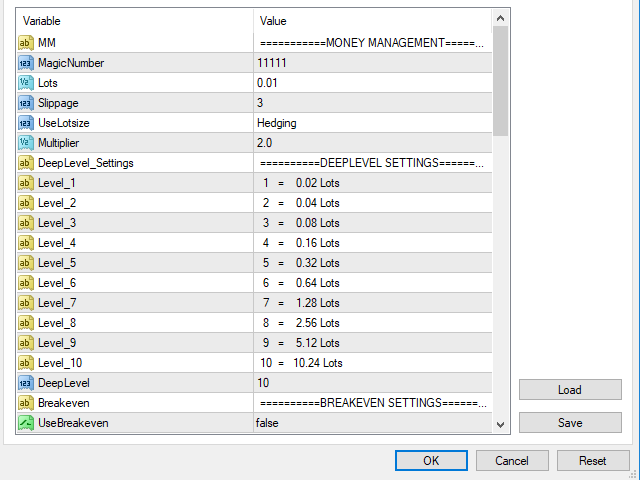
- MagicNumber - Magic number to set the ID for each EA.
- Lots - initial lot size
- Slippage - slippage size
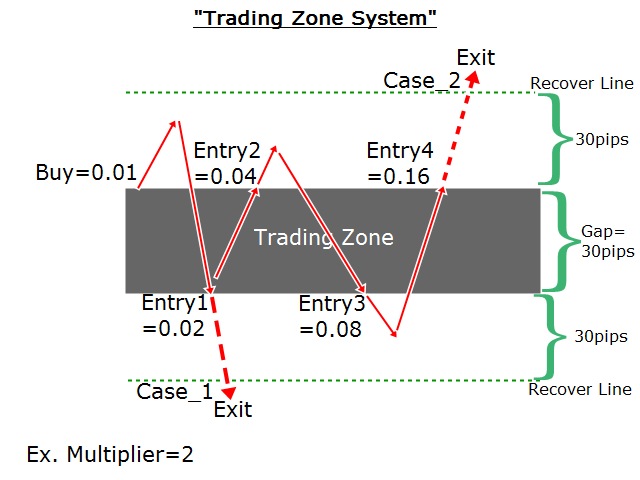
- UseLotsize - set as Initial_Lots or Hedging
- Multiplier - previous lot size will be multiplied
- DeepLevel - how many continuous losses
- UseBreakeven - set as true or false
- BE_FIX_Pips - note that “BE_FIX_Pips=20” simply means that this Expert Advisor will move your stop loss to breakeven once 20 pips profit has been achieved.
- UseTrailingStop - choose trailing stop type
- TL_Fixed
- TL_Dynamic
- TL_Recoverstop
- UseDelete_pending_order - set as default
- UseRecoveryLoss - set as Dynamic or Fixed
- UseRecoveryDynamic
- F_Gap - factor of recovery area, 1.0-3.0
- F_tp - factor of take profit target, 1.0-3.0
- F_hedge - factor of take profit hedging, 1.0-3.0
- F_sl - factor of stop loss, 1.0-3.0
- UseRecoveryFixed
- Gap - recovery area, pips
- tp - take profit target, pips
- tp_hedge - take profit hedging, pips
- sl - stop loss, pips
- Drawdown Percent Settings
- DDPercent - set the percentage to cut off the loss, % drawdown
- MaxSlippage - Max slippage size, pips
- ClosePending - set as true or false
- System Support Settings - use default or change values of variables by optimizing
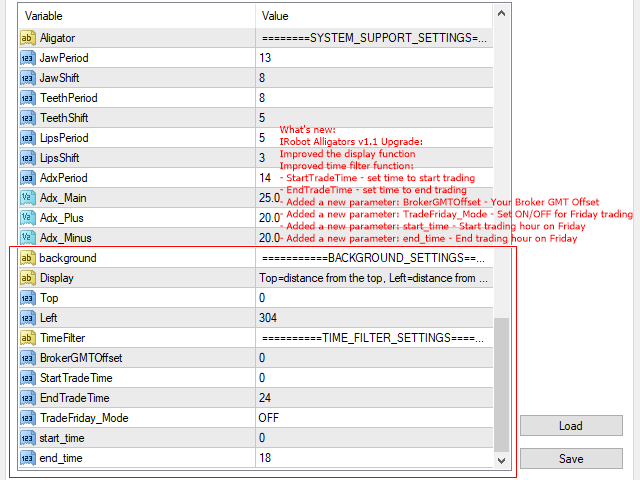
- Alligator Variables:
- JawPeriod - 13
- JawShift - 8
- TeethPeriod - 8
- TeethShift - 5
- LipsPeriod - 5
- LipsShift - 3
- AdxPeriod - Average Directional Movement Index, period
- ADX Variables:
- Adx_Main - 25
- Adx_Plus - 20
- Adx_Minus - 20
- Background Settings - apply default or change display position
- Top - distance from the top
- Left - distance from the left
- Time Filter Function:
- BrokerGMTOffset - Your Broker GMT Offset
- StartTradeTime - Set time to start trading
- EndTradeTime - Set time to end trading
- TradeFriday_Mode - Set ON/OFF for Friday trading
- start_time - Start trading hour on Friday
- end_time - End trading hour on Friday
- Timeframe - This system works on timeframes
- M15
- M30
- H1




 nload="if(window.viewGallery_GalleryManager) viewGallery_GalleryManager.ImageonLoad(this,7);" />
本店最新上架
-
- MT4 MT5跟单EA 本地跟单远程跟单 绝不

- ¥1100.00
-
- 在MetaTrader市场购买MetaTrader 5的&#

- ¥3988.00
-
- 在MetaTrader市场购买MetaTrader 5的&#

- ¥3988.00
-
- 在MetaTrader市场购买MetaTrader 5的&#

- ¥3988.00
-
- 在MetaTrader市场购买MetaTrader 5的&#

- ¥3988.00
全网为您推荐
-
- AlgoTradeSoft

- ¥3988.00
-
- 国际期货套利软件

- ¥3988.00
-
- MT4 MT5跟单EA 本地跟单远程跟单 绝不
- ¥1100.00
-
- 在MetaTrader市场购买MetaTrader 5的&#
- ¥3988.00
-
- 在MetaTrader市场购买MetaTrader 5的&#
- ¥3988.00


