 客服热线:
 手机版
 二维码




































TBP All in One
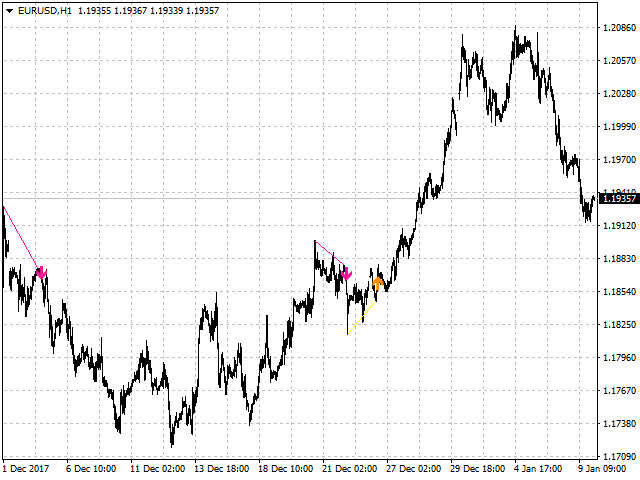
All patterns from Encyclopedia of Chart Patterns by Thomas N. Bulkowski in one indicator. It draws an up or down arrow whenever a pattern is identified.
Patterns are selected in the drop-down list of the Pattern variable (located at the beginning of the properties window).
The indicator has numerous external parameters, some of them apply to all patterns, while others are selective. To see more information on the parameters used for the selected pattern, enable the ShowHelp variable (located at the bottom of the properties window). The top left corner of the chart contains information on the name of the pattern, its number(s) in the book, the list of applied parameters and a note about the appearance of the arrow: "bar-0, do not disappear" - the arrow appears on the current bar and does not disappear afterwards; "bar-0, can disappear, wait new bar" - the arrow appears on the current bar and may disappear, wait for the new bar. With default parameters, some patterns are not recognized. Therefore, certain parameters have the recommended value specified in brackets, at which the arrows are most likely to appear.
All external parameters
- Pattern - select the pattern.
- alerts - show alert when an arrow appears. Note: the alert is shows immediately once an arrow appears for patterns that have their arrows remain during the formation of the bar. For the patterns with arrows that can disappear, the alert is shows at the Open of the next bar (if the arrow remains).
- Push - send Push-notifications when an arrow appears (requires configuration in the terminal). See the note for the alerts variable.
- Variant1, Variant2 - enable the display of various pattern variants.
- BarsInsideFrom, BarsInsideAdd - the BarsInsideFrom variable defines the minimum number of bars between the tops. The maximum number of bars is defined as BarsInsideFrom+BarsInsideAdd-1.
- K, K1, K2, K3 - additional parameters affecting the accuracy of recognition and the shape of the patterns.
- GapSize - the minimum gap size in points.
- Head1, Head2, Head3, Head4, Head5 - enable various variants of the "Head and Shoulders" pattern: Head1 - with one head (standard "Head and Shoulders"), Head2 - with two heads, etc.
- AdamAdam, AdamEve, EveAdam, EveEve - enable variants of the "Double top or bottom" pattern.
- InclInDir, Expanding, Tapered, Parallel - enable various variants of the "Flag" pattern: InclInDir - the arrow is directed toward the flag slope or in the opposite direction, Expanding, Tapered, Parallel.
- MinMovment - the minimum value of the main movement (in points).
- BackMovment - the maximum value of the reverse movement (as decimals). The larger the value, the more frequent the trading signals.
- VertexCount - the number of tops and bottoms: 2, 3, 4.
- ArrowType - a symbol from 1 to 17
- ArrowVShift - vertical shift of arrows in points.
- ShowLevels - show lines connecting tops/bottoms.
- ShowFlag - show patterns as lines.
- ColUp - color of upward lines.
- ColDn - color of downward lines.
- Color - color of lines.
- Auto5Digits - automatic multiplication of ArrowVShift by 10 when working with 5 and 3 digit quotes.

本店最新上架
-
- MT4 MT5跟单EA 本地跟单远程跟单 绝不

- ¥1100.00
-
- 在MetaTrader市场购买MetaTrader 5的&#

- ¥3988.00
-
- 在MetaTrader市场购买MetaTrader 5的&#

- ¥3988.00
-
- 在MetaTrader市场购买MetaTrader 5的&#

- ¥3988.00
-
- 在MetaTrader市场购买MetaTrader 5的&#

- ¥3988.00
全网为您推荐
-
- AlgoTradeSoft

- ¥3988.00
-
- 国际期货套利软件

- ¥3988.00
-
- MT4 MT5跟单EA 本地跟单远程跟单 绝不
- ¥1100.00
-
- 在MetaTrader市场购买MetaTrader 5的&#
- ¥3988.00
-
- 在MetaTrader市场购买MetaTrader 5的&#
- ¥3988.00


