 客服热线:
 手机版
 二维码






































Trading Comfort
Trading Comfort provides a large set of tools for comfortable trading. A large number of settings are available. The tools that you do not need can be disabled.
The tool consists of four integrated modules:
- Information panel only shows the most important information and has flexible settings.
- Multi-candlestick shows daily candlesticks on smaller timeframes.
- Sessions show High, Low, Open, Close of trading sessions.
- Levels show High, Low of the previous day, of a trading session or over the last few hours.
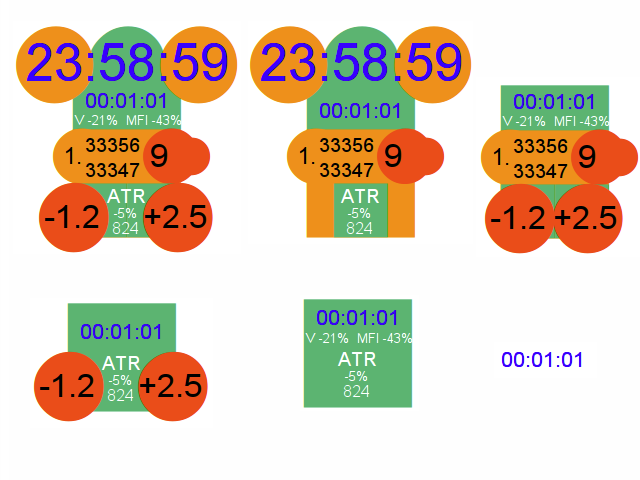
The information block consists of a right-side panel and a comment block on the left.
The time, Ask, Bid, Spread, percentage change of daily volume, MFI and ATR are displayed on the left. The panel also displays the current risk-reward ratio of one open deal in red circles as a percentage of deposit.
Two clocks are shown in the panel. They can show the terminal time, remaining time until current bar completion or local time.
Three figures are displayed in the upper left part of the chart:
- SPR shows the current spread as percentage of daily ATR. The indicator will only show the Ask level if SPR exceeds min_spread. (min_spread — input parameter)
- KTR = ATR(5)D1 * fibo_d1 (fibo_d1 — input parameter).
- KVL is volume ratio.
When opening an order, you should divide KVL by the stop loss value in points to calculate the desired trading volume based on stop loss and risk. Remember that 10 points for a 4-digit broker are equal to 100 points for a 5-digit broker.
Indicator parameters
Information panel
__________INFO_PANEL__________
- x_panel - indent from the right edge
- y_panel - indent from the top edge
- show_panel - show the panel
- NO - hide the panel
- DO_H4 - show on all timeframes up to H4
- DO_D1 - show on all timeframes up to D1
- show_main_clock - show the large clock
- show_V_MFI - show volume and MFI
- show_A_B_spread - show Ask, Bid, Spread.
- show_ATR - show ATR
- show_profit - show details of an open trade
_________COLOR_PANEL__________
- c_ears - the background color of ears, Ask, Bid
- c_body - the background color of the body, the head and ATR
- c_feet - the background color of trade information and Spread
- c_time - the color of clock text
- c_info - the color of volume, MFI and ATR text
- c_prof - the color of Ask, Bid, Spread and trade information
__________TIME_ON_PANEL__________
- main_clock - large clock
- mini_clock - small clock
- CURRENT - terminal time
- CLOSE_BAR - remaining time until bar close
- SHIFT - local time
- input int shift_clock - parameter for the local time
__________THREE_MAGIC_NUMBERS__________
- show_magic_numbers - show SPR, KTR, KVL
- min_spread - SPR trigger spread
- fibo_d1 - KTR = ATR(5)D1 * fibo_d1
- risk - risk per trade (0.01 = 1%)
Multi-candlestick
Daily candlesticks on lower timeframes.
__________D1_BARS__________
- max_bars - the maximum number of bars
- show_D1_bars - show candlesticks
- color_candle - the color
- width_candle - line width
__________D1_SEPARATOR__________
Daily separator
to replace the standard separator available in the terminal.
- long_separ - the number of separator
- None - do not show
- ToDay - only one between today and yesterday
- Maxbars - between all daily candlesticks on lower timeframes
- c_separ - color
- width_separ - width
- type_separ - style
Trading Sessions
__________LEVELS_SESSION__________
Common settings
- session_width - the width of the vertical line
- session_width_HL- the width of session High and Low levels
- type_session_line_HL - the style of session High and Low levels
- show_OC_session - show session Open and Close levels
__________ASIA__________
- SHOW_ASIA - show the Asian session
- a_Color - the color of all lines of the session
- a_start - session beginning time
- a_end - session end time
Settings for the European and American sessions are similar
High and Low levels
________LEVELS________
- Type_Level levels1 - the source of the first group of High and Low levels
- Type_Level levels2 - the source of the second group of High and Low levels
- NONE - do not show
- LAST_BAR - the last bar of the current timeframe
- LAST_TIME - the last few hours
- YESTERDAY - yesterday
- THIRDDAY - day before yesterday
- ASIA - Asian session
- EURO - European session
- USA - American session
- hour_HL_level - the number of hours for LAST_TIME
- shift_level - the level shift value
- color color_HL_level - color
- width_HL_level - width
The color and width for sessions are taken from session settings.



 nload="if(window.viewGallery_GalleryManager) viewGallery_GalleryManager.ImageonLoad(this,7);" />
 nload="if(window.viewGallery_GalleryManager) viewGallery_GalleryManager.ImageonLoad(this,8);" />
 nload="if(window.viewGallery_GalleryManager) viewGallery_GalleryManager.ImageonLoad(this,9);" />
 nload="if(window.viewGallery_GalleryManager) viewGallery_GalleryManager.ImageonLoad(this,10);" />
 nload="if(window.viewGallery_GalleryManager) viewGallery_GalleryManager.ImageonLoad(this,11);" />
本店最新上架
-
- MT4 MT5跟单EA 本地跟单远程跟单 绝不

- ¥1100.00
-
- 在MetaTrader市场购买MetaTrader 5的&#

- ¥3988.00
-
- 在MetaTrader市场购买MetaTrader 5的&#

- ¥3988.00
-
- 在MetaTrader市场购买MetaTrader 5的&#

- ¥3988.00
-
- 在MetaTrader市场购买MetaTrader 5的&#

- ¥3988.00
全网为您推荐
-
- AlgoTradeSoft

- ¥3988.00
-
- 国际期货套利软件

- ¥3988.00
-
- MT4 MT5跟单EA 本地跟单远程跟单 绝不
- ¥1100.00
-
- 在MetaTrader市场购买MetaTrader 5的&#
- ¥3988.00
-
- 在MetaTrader市场购买MetaTrader 5的&#
- ¥3988.00


