 客服热线:
 手机版
 二维码




































Info Trader
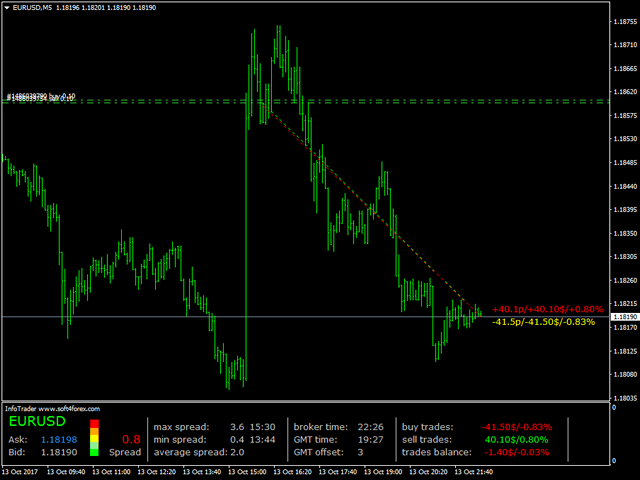
We are happy to present you the "Info Trader" information indicator.
As we are traders ourselves, we create software that we primarily use in our own trading practices. During intraday multicurrency trading we were constantly in need of a "ready to use" info panel.
You have probably noticed that it is necessary to make a decision on taking profit on the account with consideration of profit on multiple instruments. To do this, you need to see the whole picture of each trade in detail.
“Info Trader” will inform you about:
- Current spread
- Bid and Ask prices, with the price color changing relative to previous price. Falling prices are shown in red, rising prices in blue.
- The history of the maximum and minimum spread with indication of the event time within the trading day. And also the average spread value for the current trading day.
- Broker time and GMT 0 time. And also the broker's time zone relative to GMT. This clock will help you adjust your trading systems that use the time functions.
- Balance status informer for buy and sell orders, and total result of all trades opened on the instrument the indicator is running on.
All data displayed by the indicator is updated each tick/change in the instrument price.
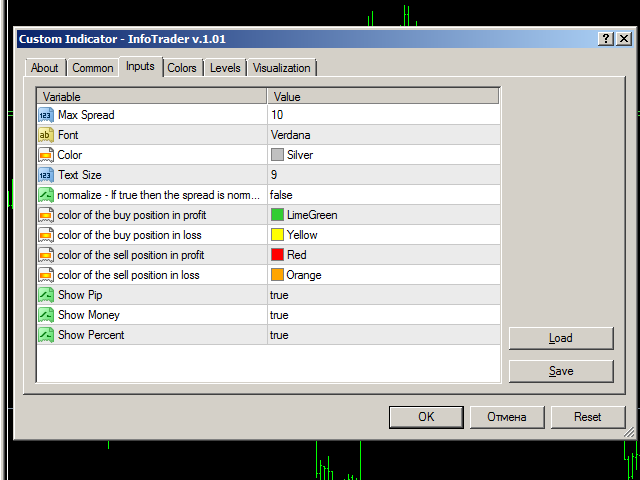
Settings
- Max Spread - the maximum spread. Set at the discretion of the user. Set the maximum spread you consider necessary. The indicator will display the current spread value from 0 to the specified value in color.
- Font - used font type. Verdana by default.
- Color - color of the main indicator font.
- Text Size - indicator font size. Available values are 7, 9, 12.
- normalize - If true then the spread is normalized to traditional pip - true = the values in points are displayed in standard points with decimal places (100 standard points as 100.0). False = 100 standard points are displayed as 1000 points in five-digit quotes.
- color of the buy position in profit - text color of profitable buy positions.
- color of the buy position in loss - text color of unprofitable buy positions.
- color of the sell position in profit - text color of profitable sell positions.
- color of the sell position in loss - text color of unprofitable sell positions.
- Show Pip - true = show the position profit in points on the chart. False = hide.
- Show Money - true = show the position profit in the deposit currency on the chart. False = hide.
- Show Percent - true = show the position profit in percent on the chart. False = hide.
We wish you successful trading and favorable trend!
本店最新上架
-
- MT4 MT5跟单EA 本地跟单远程跟单 绝不

- ¥1100.00
-
- 在MetaTrader市场购买MetaTrader 5的&#

- ¥3988.00
-
- 在MetaTrader市场购买MetaTrader 5的&#

- ¥3988.00
-
- 在MetaTrader市场购买MetaTrader 5的&#

- ¥3988.00
-
- 在MetaTrader市场购买MetaTrader 5的&#

- ¥3988.00
全网为您推荐
-
- AlgoTradeSoft

- ¥3988.00
-
- 国际期货套利软件

- ¥3988.00
-
- MT4 MT5跟单EA 本地跟单远程跟单 绝不
- ¥1100.00
-
- 在MetaTrader市场购买MetaTrader 5的&#
- ¥3988.00
-
- 在MetaTrader市场购买MetaTrader 5的&#
- ¥3988.00


