 客服热线:
 手机版
 二维码






















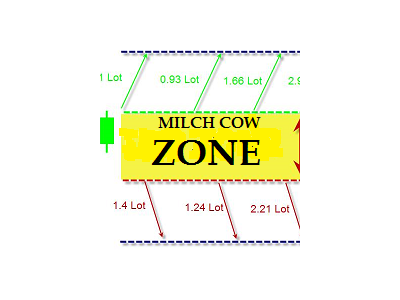














Milch Cow Zone
Milch Cow Zone EA is an amazing tool designed to handle your losing trades in a different concept rather than using Stop Loss feature and ensure almost a profitable outcome regardless of market direction when closing orders according to a smart hedging mechanism "back-and-forth".
It works by changing net direction of your trade using larger hedging trades in opposite directions. The Expert Advisor starts opening one order with a market trend or opening one order of your choice or opening the hedge orders according to the trading strategy you choose. The recovery area will be created when the market price moves in the wrong direction or after closing one of the hedging orders.
Each time a new position is opened, the system estimates the new lot size, which is required to profit. This leads to a set of open positions that in the end will always close to profit, when the market will go in any direction up or down and the gross profit will reach the preset profit level.
The EA is profitable as long as there is an adequate level of free margin to be able to open new trades.
The robot works according to three strategies you can choose from:
- Automatically detect the direction of the pair
- Choose the orders manually
- Hedging strategy
- In the first strategy, the EA chooses the type of order (buy or sell) depending on the direction of the currency.
- In the second strategy, you can choose the type of order manually.
- The third strategy does not rely on the direction of the market, but on opening the hedge to ensure that a profit is obtained from the hedging orders before the recovery zone is created. The second target, which is set by the profit factor, is obtained when closing all open positions.
- You can specify the profit factor based on the percentage or the multiples of the recovery zone (0.15, 0.25, 0.5, 1, 2, 3, 4, 5 ....etc).
- If you want to enable hedge orders in the recovery zone with one of these three strategies, set Hedge Orders = true.
- Suitable for trading news time.
- We recommend using the EA with a pair of high volatility, such as GBPAUD or AUDCAD.
- The EA's interface allows the user to directly open and close orders manually.
- You can also close all open positions with the one click, stop the EA's work and restart.
- Currency: the EA works on any currency pair.
- Operating timeframe: the EA works on any timeframe, all periods.
- Minimum recommended amount and leverage: Min Leverage: 1:100, Deposit: 65000 USD - lot 0.1, 6500 USD - lot 0.01, 650 USD - ECN ACCOUNT 10 cent lot or equivalent amount.
- Recommended broker and spread: spread < 4 points.
No specific brokerage but it is highly recommended to open account with the ECN broker.
More information available upon request on the Comments tab.
Parameters
- Choose Strategy - ِautomatically detect the trend of the pair, choose the orders manually or hedging strategy.
- Type Order - choose a buy or sell order.
- Hedge Orders - open the hedge orders in the recovery zone.
- Auto choose lot - enable/disable auto selection of a lot.
- Lots – fixed lot.
- Zone Pips - recovery zone in pips.
- Profit Factor - % or multiples of the recovery zone as profit (0.12, 0.15, 0.25, 0.5, 1, 2, 3, 4, 5....etc).
- Max Multiple Orders - number of max multiple orders for trade - minimum = 1.
- Magic – magic number.
- Click S or s - directly trading open Sell order and manual close.
- Click B or b - directly trading open Buy order and manual close.
- Click Trade ON - enable/disable the EA.
- Click Sell only - allow sell orders only.
- Click Buy only - allow buy orders only.
- Click Close All Sell - close all sell orders.
- Click Close All Buy - close all buy orders.
- Click Close All Trade - close all orders.


 nload="if(window.viewGallery_GalleryManager) viewGallery_GalleryManager.ImageonLoad(this,7);" />
 nload="if(window.viewGallery_GalleryManager) viewGallery_GalleryManager.ImageonLoad(this,8);" />
本店最新上架
-
- MT4 MT5跟单EA 本地跟单远程跟单 绝不

- ¥1100.00
-
- 在MetaTrader市场购买MetaTrader 5的&#

- ¥3988.00
-
- 在MetaTrader市场购买MetaTrader 5的&#

- ¥3988.00
-
- 在MetaTrader市场购买MetaTrader 5的&#

- ¥3988.00
-
- 在MetaTrader市场购买MetaTrader 5的&#

- ¥3988.00
全网为您推荐
-
- AlgoTradeSoft

- ¥3988.00
-
- 国际期货套利软件

- ¥3988.00
-
- MT4 MT5跟单EA 本地跟单远程跟单 绝不
- ¥1100.00
-
- 在MetaTrader市场购买MetaTrader 5的&#
- ¥3988.00
-
- 在MetaTrader市场购买MetaTrader 5的&#
- ¥3988.00


