 客服热线:
 手机版
 二维码




































Trailing SL Plus
Open your orders with preset parameters and a trailing Stop Loss.
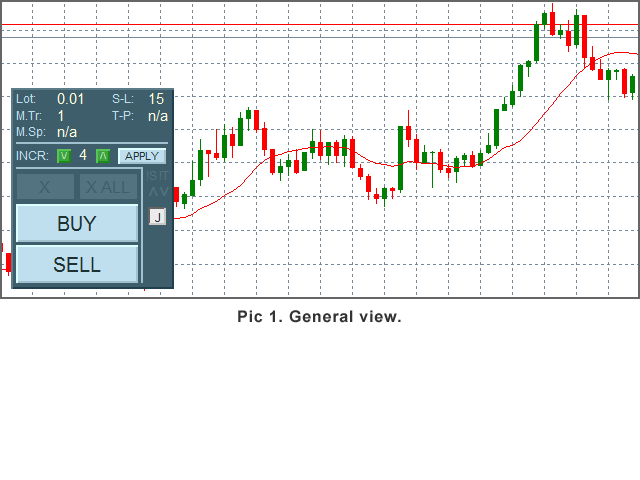
A simple to use, customizable graphical panel to open and manage your orders.
Parameters
- Color Theme - choose one of 4 themes for the panel.
- Zoom - panel size: 6 sizes available.
- Slippage - only applicable for 'Instant Execution'.
- Max Trades
- Max Spread
- Lot Size
- Stop-Loss
- Take-Profit - optional.
- S-L Increment
- Trailing Mode
- Jump To Break Even?
- only Own Trades
Features
- Current parameters display.
- Buttons BUY, SELL
- Button 'X' (Close) - activates after an order opens.
- Button 'X ALL' - close all orders, activates when 2nd order opens.
- In-Panel Form - use if you want to change SL Increment.
- '!' Indicators - show up when Spread > Max Spread or 'Max Trades' reached.
- Arrow-indicators - show current order type.
- Jump To B-E Button - click if you want the SL to jump to Order Price ASAP.
Set your parameters up and open an order by clicking a button. You can open as many orders as the parameter Max Trades is set to (one click - one order opens).
Order will not be opened if current Spread > Max Spread - useful if you trade fast-moving markets, e.g. around economic news.
There are 3 modes for Trailing SL (Trailing Modes):
- Mode 1 - SL trails the price from the order opening;
- Mode 2 - SL is first modified when it can be moved to Break Even, then it trails the price;
- Mode 3 - SL follows price from order opening UNTIL Break Even, then it stops;
- Set the mode to 0 if you want a static (non-moving) Stop Loss.
SL Increment controls how many (minimum) pips the SL can move in one step. Use the In-Panel Form to change the parameter any time.
If the Jump To Break-Even is active, the Stop Loss jumps to Order Price as soon as it can. Use the 'J' button on the panel to toggle the parameter.
Set 'only Own Trades' to 'yes' if you want the EA to modify and close orders only opened by itself - useful if you have another EA or the same in a different time frame.
Close the order(s) by clicking an appropriate button ('X' if you want to close one order, 'X ALL' if you want to close all orders).
You can move the panel across the chart window: just double-click the top part of the panel, then click, hold and drag the panel to another place. Double-click the area again to keep the panel in the new position.
Notes:
If you make any changes to the parameters using the MT 'Inputs' window (F7), the SL Increment and Jump To BE will be reset to their initial values.
If you want to test the robot in the Strategy Tester, use the 'Visual Mode'. Note that the In-Panel Form and the 'J' Button are not working in the Strategy Tester.

本店最新上架
-
- MT4 MT5跟单EA 本地跟单远程跟单 绝不

- ¥1100.00
-
- 在MetaTrader市场购买MetaTrader 5的&#

- ¥3988.00
-
- 在MetaTrader市场购买MetaTrader 5的&#

- ¥3988.00
-
- 在MetaTrader市场购买MetaTrader 5的&#

- ¥3988.00
-
- 在MetaTrader市场购买MetaTrader 5的&#

- ¥3988.00
全网为您推荐
-
- AlgoTradeSoft

- ¥3988.00
-
- 国际期货套利软件

- ¥3988.00
-
- MT4 MT5跟单EA 本地跟单远程跟单 绝不
- ¥1100.00
-
- 在MetaTrader市场购买MetaTrader 5的&#
- ¥3988.00
-
- 在MetaTrader市场购买MetaTrader 5的&#
- ¥3988.00


