 客服热线:
 手机版
 二维码





































TemplateSwitcher
The TemplateSwitcher utility allows automatically switching the set of indicators and objects used on the chart depending on the current timeframe and/or symbol.
It often happens that an indicator with a certain period is used on a chart of a higher timeframe, while the same indicator with an increased calculation period is required for a smaller timeframe. Of course, it is possible to open two charts of different timeframes with the required indicator periods. But what if duplication of charts of the same symbol cannot be afforded? In this case, it remains only to switch between the two timeframes, constantly reconfiguring the chart template.
However, if you attach TemplateSwitcher to the chart, it will be sufficient to create all the required templates for any chart timeframes and symbols once, and then forget about the reconfiguration of the chart appearance whenever its timeframe is switched.
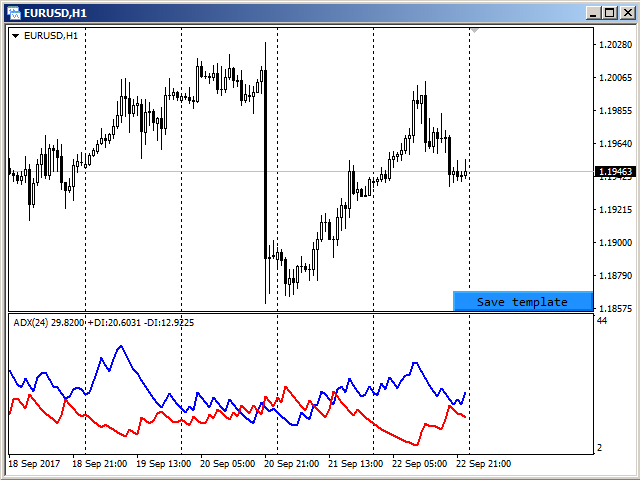
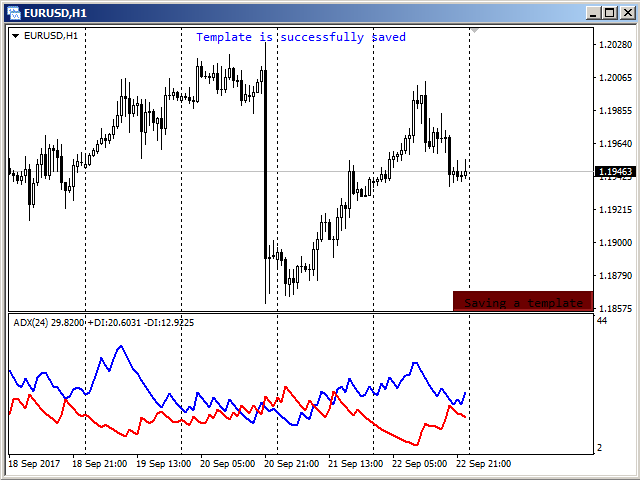
The chart template can be created by pressing the button, which appears in the bottom right corner of the chart when hovered by mouse (se screenshot 1). Pressing the button saves the template (see screenshot 2). The template will be automatically loaded when switching to the EURUSD H1 chart.
Parameters
The utility can be used for creating templates, which depend on the symbols and timeframes, or depend solely on timeframes. To do this, simply select the required option to separate templates in the "Templates difference" parameter.
If the "By symbol and timeframe" option is selected, then each symbol will have individual templates for all timeframes used. In other words, the EURUSD H1 template will not be used for any other symbol, i. e. opening a GBPUSD H1 chart will not give the chart appearance configured for EURUSD H1.
In case the "By timeframe only" option is selected, the loaded and saved templates will be the same for all symbols used. For example, after creating a template on the EURUSD H1 chart and later attaching the utility to the GBPUSD H1 chart, the chart will look the same as previously configured for EURUSD H1.
The "Templates name suffix" parameter allows you to create different templates for the same symbol. For example, you can install the utility on two GBPUSD charts, but on each of them use a different suffix for the template name. In this case, different templates will be used for each chart. If, within the same symbol, the difference in patterns is not required, then the parameter must be left blank, as by default.
The "Hide save button" parameter allows you to control the visibility of the button to save the template. By default, the button appears only when you hover over the lower right corner of the chart. For cases where other indicators / experts do not provide the ability to track the mouse cursor, this parameter should be set to "No". Then the button will always be visible on the chart.
本店最新上架
-
- MT4 MT5跟单EA 本地跟单远程跟单 绝不

- ¥1100.00
-
- 在MetaTrader市场购买MetaTrader 5的&#

- ¥3988.00
-
- 在MetaTrader市场购买MetaTrader 5的&#

- ¥3988.00
-
- 在MetaTrader市场购买MetaTrader 5的&#

- ¥3988.00
-
- 在MetaTrader市场购买MetaTrader 5的&#

- ¥3988.00
全网为您推荐
-
- AlgoTradeSoft

- ¥3988.00
-
- 国际期货套利软件

- ¥3988.00
-
- MT4 MT5跟单EA 本地跟单远程跟单 绝不
- ¥1100.00
-
- 在MetaTrader市场购买MetaTrader 5的&#
- ¥3988.00
-
- 在MetaTrader市场购买MetaTrader 5的&#
- ¥3988.00


