 客服热线:
 手机版
 二维码




































Trading Chaos Map
For those who studies Bill Williams' books "New Trading Dimensions" and "Trading Chaos (Second Edition)" and tries trading using these methods, it becomes evident that the standard set of indicators is not sufficient for full-fledged work. The Trading Chaos Map indicator draws the "market map", thus allowing you to the charts the same way as the author of the trilogy.
Parameters provide options for enabling and disabling each signal. You can use any of the methods, or use them in conjunction. You can independently determine the signals to be used, selecting them according to your trading style. The indicator settings also provide the ability to customize the color scheme for displaying the signals.
Trading Chaos Map
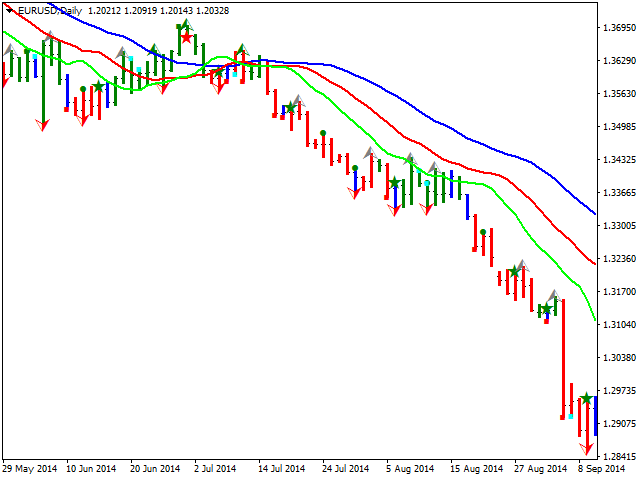
- Paints the bars in certain colors according to the selected method.
- Identifies the signal of the "First Wise Man", and also separates the signal enhanced by the bar configurations, described in the first book "Trading Chaos".
- Shows the signal of the "Second Wise Man" - three consecutive bars of the AO oscillator of the same color.
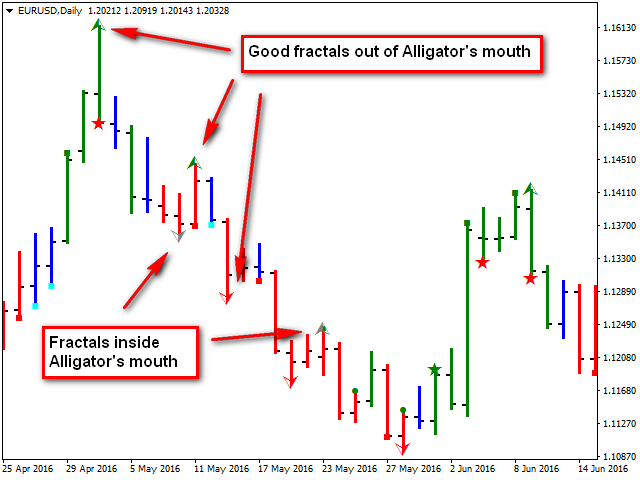
- Draws the signals of the "Third Wise Man" - fractals, denoting the valid and invalid signals in different colors.
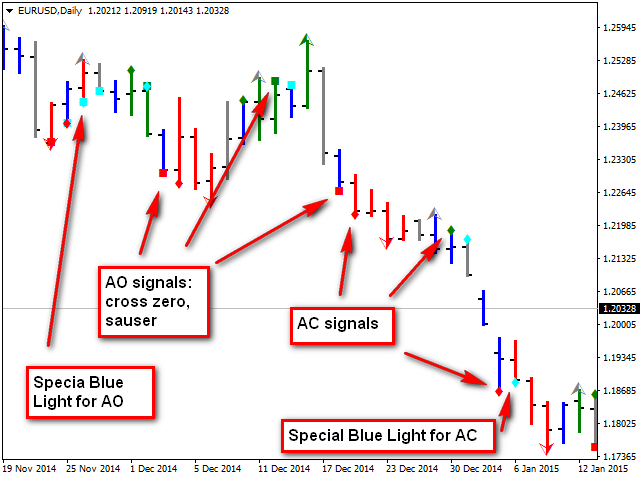
- Indicates the "saucer" and "zero line cross" signals of the AO oscillator.
- Shows the signals of the AC oscillator.
- Signals the "Blue Light Special" for signals from AO and AC.
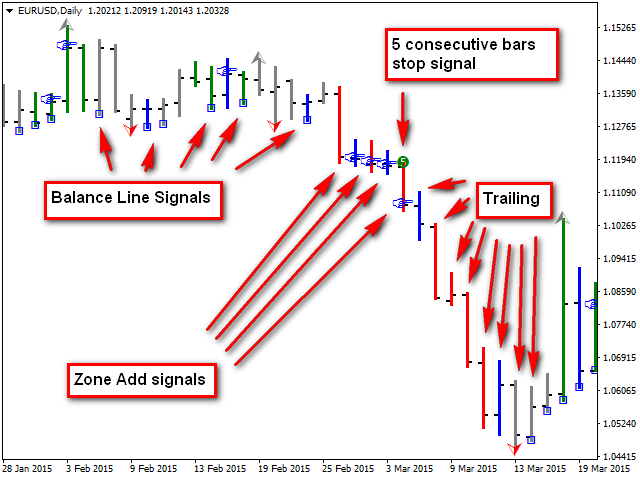
- Indicates the signals of adding in the Zone.
- Determines the signals of the Balance Line.
- Shows the signals to place the initial stop loss based on 5 consecutive bars of the same color.
- Switches the chart display mode to bars, as the candlestick chart becomes difficult to read.
- Informs about the formation of signals selected bu user.
Indicator Input Parameters
- Chart Type - chart display type according to the methodologies outlined in the books:
- New Trading Dimensions.
- Trading Chaos 2.
- Drawing bars options - section of parameters for coloring bars.
- Bar width - bar width.
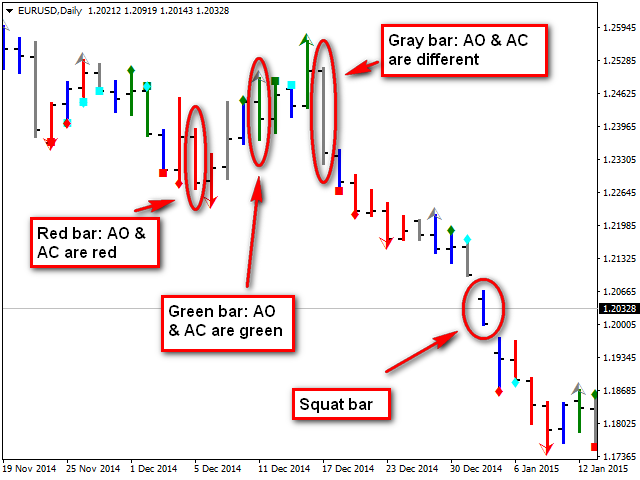
- Squat bar - color of the "squat" bar (see the first book of the trilogy).
- Green bar (momentum up) - color of the bar with the momentum directed upwards (green zone).
- Red bar (momentum down) - color of the bar with the momentum directed downwards (red zone).
- Gray bar (momentum changes) - color of the bar with the momentum changing direction, not defined (gray zone).
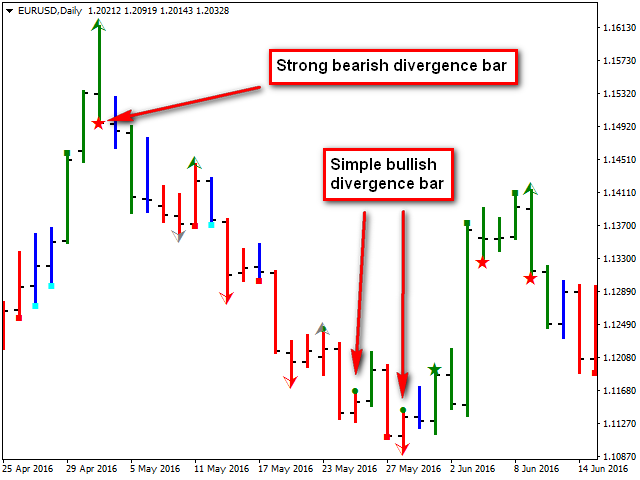
- Divergence bar signal options - section of the reversal bar signal parameters. Denoted by a circle. Amplified signal - star.
- Show signals - enable/disable the calculation and display of signals. This parameter is repeated for each signal.
- Label size - the size of the signal label on the chart. This parameter is also repeated for each signal.
- Color of Buy signal - color of buy signals.
- Color of Sell signal - color of sell signals.
- AO signal options - section of the АО oscillator signal parameters. Denoted by a square.
- Color of Buy signal - color of buy signals.
- Color of Sell signal - color of sell signals.
- AC signal options - section of the АС oscillator signal parameters. Denoted by a rhombus.
- Color of Buy signal - color of buy signals.
- Color of Sell signal - color of sell signals.
- Special Blue Light signals options - section of the "Blue Light Special". signal parameters.
- Color of signal - use only one color.
- Zone Add signal options - section of the parameters of signals of adding in the Zone. Denoted by an index gesture.
- Color of Stop signal for Long - color of buy signals.
- Color of Stop signal for Short - color of sell signals.
- Balance Line signal options - section of the Balance Line signal parameters. Denoted by a hollow square.
- Color of signal - use only one color.
- 5 Consecutive Bars Stop signal options - section of the parameters of stop signal based on 5 consecutive bars of the same color. Denoted by the number 5 in a circle.
- Color of Buy signal - color of buy signals.
- Color of Sell signal - color of sell signals.
- Fractal options - section of the parameters for displaying fractals. Denoted by an arrow.
- Color of Good Fractal Up - color of a valid fractal up.
- Color of Good Fractal Down - color of a valid fractal down.
- Color of Bad Fractal - color of an invalid fractal.
- Message options - section of parameters for displaying messages about the indicator signals.
- Send Message - enable/disable printing/sending the message.
- Message Type - type of the message. There are three types.
- Terminal alert - signals in the terminal.
- Push Notification - push notification to mobile device via metaQuotes ID.
- E-mail - email to the address specified in the terminal settings.
By default, the template based on the "Trading chaos (second edition)" method is used.
It is recommended to use the indicator with the "Black on White" color scheme in the chart properties (F8), together with the standard Bill Williams indicators included in the terminal, as well as the Wawe Viewer indicator.

 nload="if(window.viewGallery_GalleryManager) viewGallery_GalleryManager.ImageonLoad(this,7);" />
本店最新上架
-
- MT4 MT5跟单EA 本地跟单远程跟单 绝不

- ¥1100.00
-
- 在MetaTrader市场购买MetaTrader 5的&#

- ¥3988.00
-
- 在MetaTrader市场购买MetaTrader 5的&#

- ¥3988.00
-
- 在MetaTrader市场购买MetaTrader 5的&#

- ¥3988.00
-
- 在MetaTrader市场购买MetaTrader 5的&#

- ¥3988.00
全网为您推荐
-
- AlgoTradeSoft

- ¥3988.00
-
- 国际期货套利软件

- ¥3988.00
-
- MT4 MT5跟单EA 本地跟单远程跟单 绝不
- ¥1100.00
-
- 在MetaTrader市场购买MetaTrader 5的&#
- ¥3988.00
-
- 在MetaTrader市场购买MetaTrader 5的&#
- ¥3988.00


