 客服热线:
 手机版
 二维码






















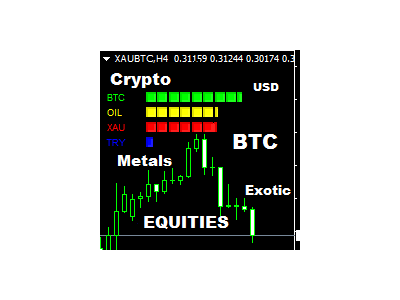














All Currency Strength Meter Crypto Exotic metals
Think of the rarest pair you can think of. And I assure you that this indicator can compute it's strength.
This Currency Meter will literally calculate any currency pairs, either it is the Major Pairs, metals, CFD's, Commodities, Crypto Currency like Bitcoin/BTC or Ethereum/ETH and even stocks. Just name it and you will get it! There is no currency pair this Currency Meter can solve. No matter how rare or exotic is that currency, it will always be solved by this Currency meter which on a real-time basis. Sounds good right? Check it out and backtest it, because I really mean it.
All you need to do is name 4 currencies and let the currency meter do all the calculations. This currency meter also has a very useful specification, just name the currency you want and the meter will scan all the pairs on your metaTrader 4 and look for the best pair that will fit your currency and all of this is on a real-time basis.
If the currency you named is strong, the currency meter will simply scan all your pairs and look for the WEAKEST currency that could be traded on your currency of choice. And if your Currency is WEAK, the indicator will scan all your pairs to look for the STRonGEST Pair that can be traded with your currency of CHOICE! You can refer to the Photos below.
So this is how to use it:
- TIME_frame - Choose time frame from Minute 1, to Monthly. *Note: choosing "current" means your choosing your current timeframe on your chart.
- PERIOD - Input number of candles you want to choose. *Note: Period "0" zero means choosing the current candle.
- First_Currency - Name the 1st Currency You want to get the strength. (Note that this are case-sensitive)
- Second_Currency - Name the 2nd Currency You want to get the strength. (Note that this are case-sensitive)
- Third_Currency - Name the 3rd Currency You want to get the strength. (Note that this are case-sensitive)
- Fourth_Currency - Name the 4th Currency You want to get the strength. (Note that this are case-sensitive)
- First_COLOR - Color of 1st Currency.
- Second_COLOR - Color of 2nd Currency.
- Third_COLOR: Color of 3rd Currency.
- Fourth_COLOR - Color of 4th Currency.
- Font_1 - Font of Objects on the right side of the chart.
- Font_2 - Font of Objects on the left side of the chart.
- alert
- alert_PAIR - This will alert you if there are two currencies going on different direction. Meaning, one is STRONG the other one is WEAK. This would mean that one currency is above 70% and the other one is below 30%.
- alert_CURRENCY - This will alert you if there is one currency that is strong or weak. Meaning, either it is higher than 70% or lower than 30%.
- alert_OFF - Choose if you don't want alerts.
- Sound_alert__1 - Choose sound alert when a currency is above 70% (alert_LEVEL_1_STRONG) or below 30% (alert_LEVEL_1_WEAK).
- Sound_alert_2 - Choose sound alert when a currency is above 90% (alert_LEVEL_2_STRONG) or below 10% (alert_LEVEL_2_WEAK).
- alert_WHEN_STRONG
- alert_LEVEL_1_STRONG - This is the first level where the Currency is getting STRONG. This must be lower than alert_LEVEL_2_STRONG. By default, it's value is 70.
- alert_LEVEL_2_STRONG - This is the second level where the Currency is getting EXTREMELY_STRONG. This must be higher than alert_LEVEL_1_STRONG. You will hear a different sound alert here which can be edited on Sound_alert_1. By default, it's value is 90.
- alert_WHEN_WEAK
- alert_LEVEL_1_WEAK - This is the first level where the Currency is getting WEAK. This must be higher than alert_LEVEL_2_WEAK. By default, it's value is 30.
- alert_LEVEL_2_WEAK - This is the second level where the Currency is getting WEAK. This must be lower than alert_LEVEL_1_WEAK. By default, it's value is 30.
- alert_INTERVAL - This is in seconds. Where you can edit the Interval of alerts like 1 alert tone every 10 seconds.
- SUGGESTED_PAIRS_SPREAD - This will narrow your suggested pairs based on SPREAD. Example: if you put 5 pips, pairs that have 5.1 pips and above will not be suggested by the indicator.
- First_CURRENCY_SPREAD - Max spread for the first currency. *Note that this are in PIPS and 1 PIP = 10 Points.
- Second_CURRENCY_SPREAD - Max spread for the second currency.
- Third_CURRENCY_SPREAD - Max spread for the third currency.
- Fourth_CURRENCY_SPREAD - Max spread for the fourth currency.


 nload="if(window.viewGallery_GalleryManager) viewGallery_GalleryManager.ImageonLoad(this,7);" />
 nload="if(window.viewGallery_GalleryManager) viewGallery_GalleryManager.ImageonLoad(this,8);" />
本店最新上架
-
- MT4 MT5跟单EA 本地跟单远程跟单 绝不

- ¥1100.00
-
- 在MetaTrader市场购买MetaTrader 5的&#

- ¥3988.00
-
- 在MetaTrader市场购买MetaTrader 5的&#

- ¥3988.00
-
- 在MetaTrader市场购买MetaTrader 5的&#

- ¥3988.00
-
- 在MetaTrader市场购买MetaTrader 5的&#

- ¥3988.00
全网为您推荐
-
- AlgoTradeSoft

- ¥3988.00
-
- 国际期货套利软件

- ¥3988.00
-
- MT4 MT5跟单EA 本地跟单远程跟单 绝不
- ¥1100.00
-
- 在MetaTrader市场购买MetaTrader 5的&#
- ¥3988.00
-
- 在MetaTrader市场购买MetaTrader 5的&#
- ¥3988.00


