 客服热线:
 手机版
 二维码






































AlfaZeta Binary Indicator
AlfaZeta is an efficient indicator for binary options trading.
It is designed for use in the metaTrader 4 terminals.
The recommended timeframe is М1 with the expiration of 5 candlesticks. It can also be used on M5, M15, M30, H1 with the expiration of 5 candlesticks. Indicator parameters feature an option for selecting the number of expiration candlesticks, so you can choose the required currency pair and timeframe, which currently shows the highest percent of profitable trades. The indicator is not intended for timeframes above H1. If you try to switch to H4 or higher, the indicator will show a message requesting to return to a lower timeframe.
The indicator is equipped with an audible and visual alert, and generates entry signals. The indicator also sends email and push notifications (metaTrader 4 should be configured accordingly).
The indicator analyzes the current market state on multiple parameters and generates entry signals after checking all these parameters according to a certain algorithm with respect to each other.
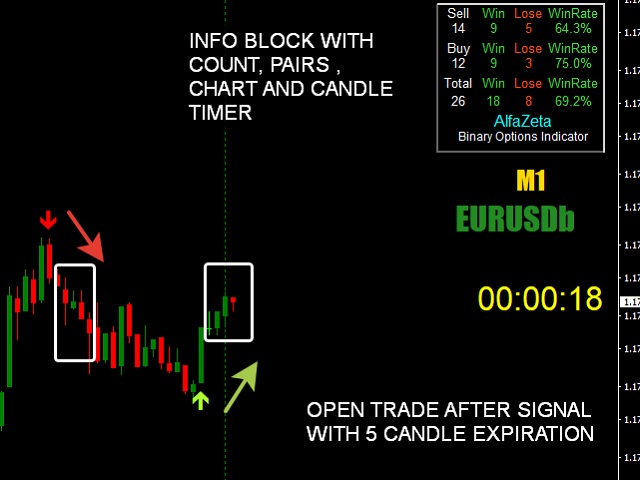
An entry signal: a red/green (sell/buy) arrow. once you receive a signal in the form of an arrow, you should wait until the candlestick closes. If the arrow remains in its place and does not disappear, enter a trade with an expiration of 5 candlesticks. If closed with a loss, wait for the next arrow signal and enter a trade following the money and risk management rules.
The indicator is provided with a trade counter, it also displays the selected timeframe, currency pair and timer showing time left before the end of the current candlestick. All these parameters can be configured in the indicator settings.
Configurations
- alertsMessage - a text notification about an entry signal
- alertsSound - a sound alert
- alertsEmail - am email notification
- alertsMobile - a push notification on your smartphone
Information panel settings:
- Expiration in candles - specify the number of candlesticks for expiration to calculate trades.
- count signals - choose the signal counting method from the following options:
- From this point in time - calculate from the given time point. once you select this option, the counter will be reset and will start counting trades anew.
- For a given number of bars - the specified number of bars, i.e. 144 bars on M5 means the last 12 hours.
- From a given date - start counting on the specified date.
- Function disabled - counting is not used.
- count signals from date : set here the date, starting from which signals should be counted.
- count bars: the number of bars for calculation.
The panel displays the number of successful and unsuccessful trades separately. It also shows the total counter of all deals and the total winrate.
- Start work from (include) - set the indicator operation start time.
- End work here (include) - set the indicator operation end time.
Below are currency pair and timeframe display settings
- Currency display ON/OFF - enable or disable the display of the current currency pair
- Currency display on - enabled
- Currency display off - disabled
- Timeframe display ON/OFF - enable or disable the display of the current timeframe
- Timeframe display on - enabled
- Timeframe display off - disabled
Below are the settings of the timer that counts down the time until the end of the current candlestick. The advantage of the timer is that it works without delay. Using settings, you can move the timer along the chart, change its color, the size of the clock, etc.
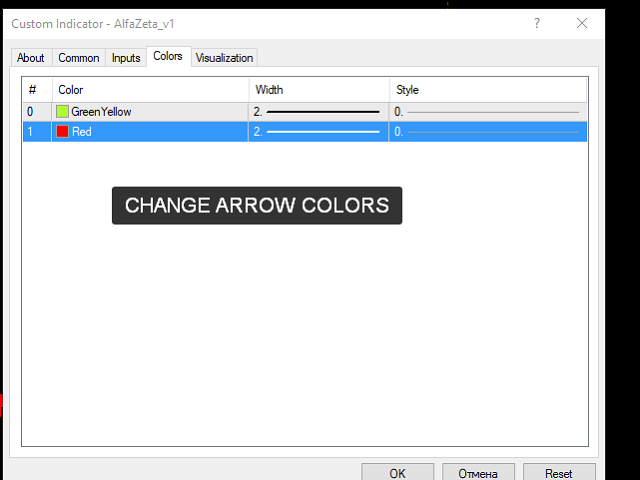
=== ARROWS DESIGN==
- Select design please:
- Regular Arrows
- Modern Arrows
=== One Bar Back === - draws a vertical line in the chart
The line is drawn in the first candlestick. It is used for convenience to draw your attention to the point where the price moves.



本店最新上架
-
- MT4 MT5跟单EA 本地跟单远程跟单 绝不

- ¥1100.00
-
- 在MetaTrader市场购买MetaTrader 5的&#

- ¥3988.00
-
- 在MetaTrader市场购买MetaTrader 5的&#

- ¥3988.00
-
- 在MetaTrader市场购买MetaTrader 5的&#

- ¥3988.00
-
- 在MetaTrader市场购买MetaTrader 5的&#

- ¥3988.00
全网为您推荐
-
- AlgoTradeSoft

- ¥3988.00
-
- 国际期货套利软件

- ¥3988.00
-
- MT4 MT5跟单EA 本地跟单远程跟单 绝不
- ¥1100.00
-
- 在MetaTrader市场购买MetaTrader 5的&#
- ¥3988.00
-
- 在MetaTrader市场购买MetaTrader 5的&#
- ¥3988.00


