 客服热线:
 手机版
 二维码




































SimpleStop
SimpleStop is a utility for professional traders:
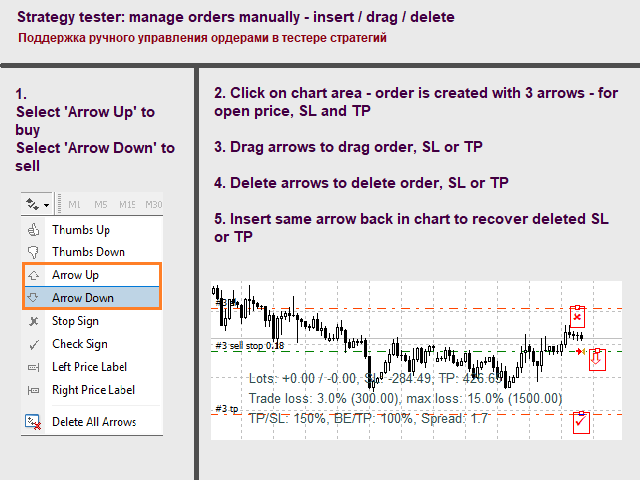
- full support for the strategy tester for manual trading (Backtest) - placing, dragging, deleting orders (also available in the demo version);
- placing orders in one click at the price with no limits on the maximum allowed offset level, as well as in a closed market. The EA places an appropriate order at the appropriate time - stop, limit or opening a position by market within the maximum slippage;
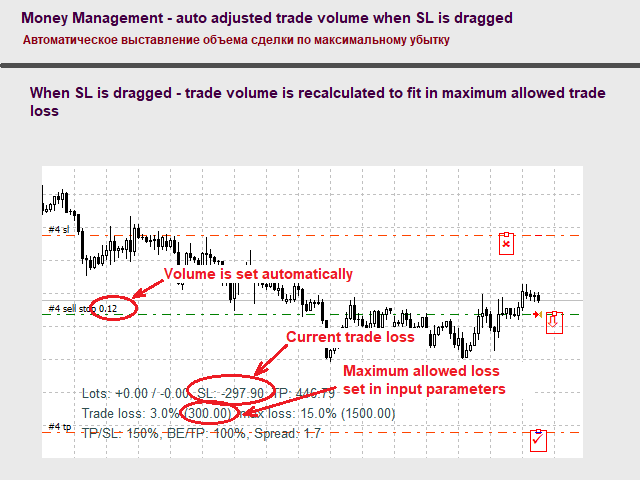
- automatic Money Management;
- automatic placement of StopLoss and TakeProfit;
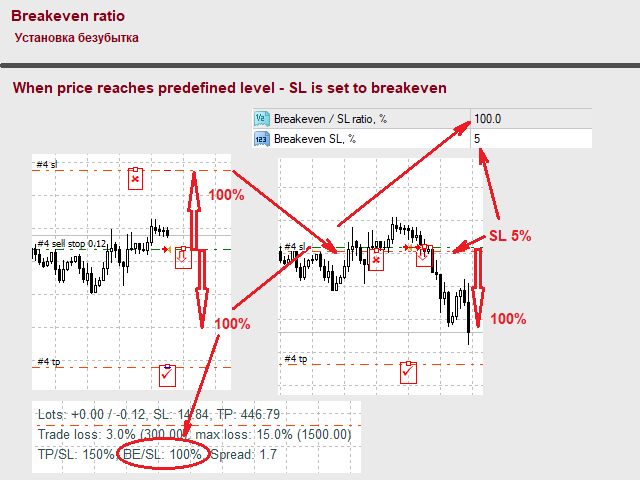
- management of the Breakeven level;
- automatic Trailing stop.
Placing orders:
- press the Buy stop/limit button for a buy order or the Sell stop/limit button for a sell order.
- Hover the mouse cursor over the desired place on the chart and click the left mouse button. The EA will place the most appropriate order type: market buy-stop or limit order. If it is impossible to place an order (price is too close to the market price, market is closed, etc.), the EA creates a "virtual" pending order, which is placed on the market when a suitable case arises (price leaves the range, market opens, etc.).
- graphical objects are displayed for the virtual pending orders - horizontal lines.
Moving the StopLoss and TakeProfit levels
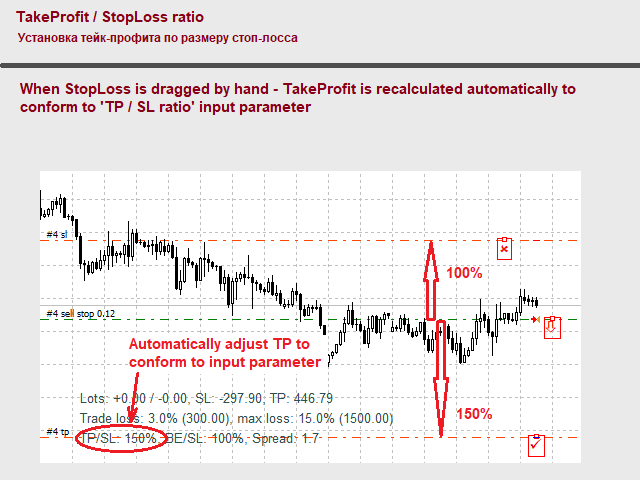
- move SL to the required distance, TP is calculated automatically according to the TP / SL ratio parameter. If Ratio=150, SL=200, then TP will be placed at 300 (=200 * 150%). The number of lots is recalculated to meet the MM conditions.
- move TP to the required distance, SL is not recalculated.
Managing breakeven and trailing stop
Price must reach a certain level (the Breakeven / SL ratio parameter), then SL is automatically moved to breakeven (the Breakeven SL parameter).
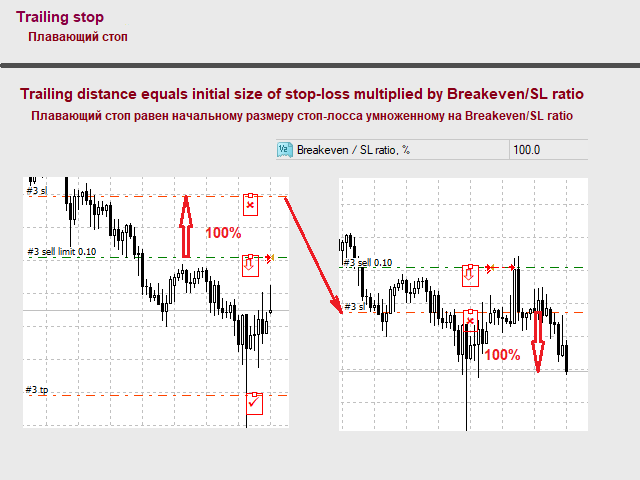
If the Trailing button is pressed, the SL level will follow the price.
Input parameters
Money Management:
- Use fixed lots - fixed lot size (true) or a percentage of the deposit (false)
- Trade lots - volume for trading a fixed lot
- 1 Trade loss, % of Balance - size of the allowed loss in one trade as a percentage of the deposit
- Gross loss, % of Balance - maximum allowed loss of all orders placed simultaneously as a percentage of the deposit
- Max. margin, % Balance - maximum total margin of all orders placed simultaneously as a percentage of the deposit
Ratios:
- Initial SL type - the StopLoss level when placing an order:
- Fixed offset in points - fixed StopLoss offset in the price points
- ATR(24) - StopLoss based on the value of Average True Range (24)
- Min / max of price channel - StopLoss at the level of the price channel, if placing at the channel price is not possible - fixed offset in points
- Initial SL, points - the number of price points for the StopLoss offset if the Fixed offset in points option is used
- TP / SL ratio, % - the TakeProfit level as a percentage of StopLoss
- Breakeven / SL ratio, % - price level as a percentage of StopLoss, at which StopLoss is moved to breakeven
- Breakeven SL, % - price level as a percentage of StopLoss, where the StopLoss is moved once the Breakeven level is reached
Slippage - used for opening deals by market:
- Max. slippage same dir. - maximum slippage in the price points in the order execution direction
- Max. slippage opposite dir. - maximum slippage in the price points in the opposite direction
Deleting orders:
- Remove order on - delete the pending order if the following condition is met:
- Do not remove orders - never delete orders
- SL break - delete the order if the price exceeded the StopLoss
- SL and TP break - delete the order if the price exceeded the StopLoss or TakeProfit
Notifications:
- Notification - type of notifications:
- None - do not send notifications
- alert - alert in the metaTrader 4 terminal
- Print - output text in the terminal window
- Push notification - push notification to mobile device
Colors:
- Text color - color of the main text
- Order label color - color of the pending order labels
- Open line color - color of the Open price level of the pending order
- SL line color - color of the StopLoss level of the pending order
- TP line color - color of the TakeProfit level of the pending order
本店最新上架
-
- MT4 MT5跟单EA 本地跟单远程跟单 绝不

- ¥1100.00
-
- 在MetaTrader市场购买MetaTrader 5的&#

- ¥3988.00
-
- 在MetaTrader市场购买MetaTrader 5的&#

- ¥3988.00
-
- 在MetaTrader市场购买MetaTrader 5的&#

- ¥3988.00
-
- 在MetaTrader市场购买MetaTrader 5的&#

- ¥3988.00
全网为您推荐
-
- AlgoTradeSoft

- ¥3988.00
-
- 国际期货套利软件

- ¥3988.00
-
- MT4 MT5跟单EA 本地跟单远程跟单 绝不
- ¥1100.00
-
- 在MetaTrader市场购买MetaTrader 5的&#
- ¥3988.00
-
- 在MetaTrader市场购买MetaTrader 5的&#
- ¥3988.00


