 客服热线:
 手机版
 二维码




































Fx4lights
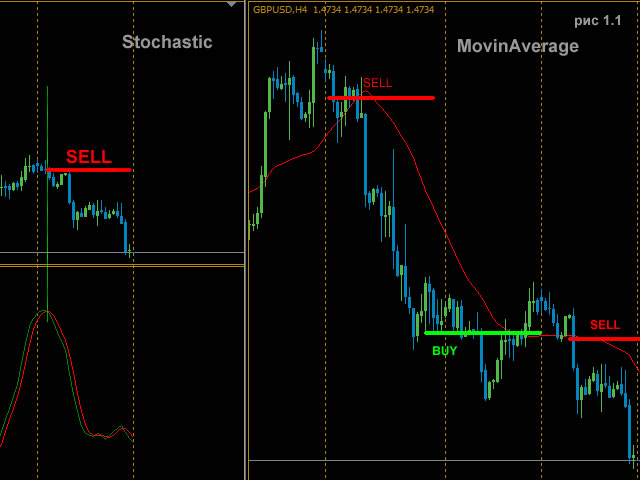
The Expert Advisor consists of four popular indicators:
- MovingAverage
- Stochastic
- MACD
- ZigZag
It is possible to use all four indicators both together, and individually, selecting the necessary combination.
Basic settings of the Expert Advisor
- Magic - order magic number
- Volume - volume for opened trades
- Slippage - price slippage when opening orders.
- StopLoss - close orders after reaching a certain loss in points,
- TakeProfit - desired profit in points.
- TrailingStop - move StopLoss to order's opening price when a positive profit specified in points is reached (if TrailingStop=0, parameter is disabled)
- StepTrall - trailing step for TrailingStop once StopLoss is moved to the order's opening price (if StepTrall=0, parameter is disabled)
- Losing volume, increased by two - double the order's volume (if set to "off", "Losing volume, increased by two" is disabled).
- Maximum volume - maximum allowed volume when the lot increase is enabled (Losing volume, increased by two).
Additional settings of the EA
- To access the signal - open an order by the indicator's signal.
- Close by opposite signal – close an open opposite at an opposite signal of the indicator.
- The choice of day of the week – select the day of the week when trading is enabled. If there are open deals, trading will continue until they are closed.
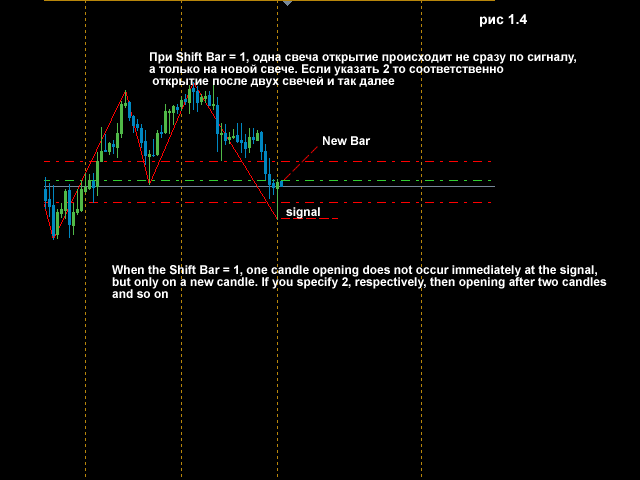
- Open a new bar – open orders on a new bar after an indicator signal is received.
- Timeframe of a newbar – period to wait for a new bar to open.
- Not to repeat if the order was closed with profit – do not open a trade if the indicator signal persists and the last order closed with a positive profit.
- Not to repeat if the order is closed with stoploss - do not open a trade is the indicator signal persists and the last order closed with a negative profit.
- Shift Bar - shift relative to the current bar by the specified number of periods back.
Additional settings for MovinAverage - the indicator has all the basic features plus:
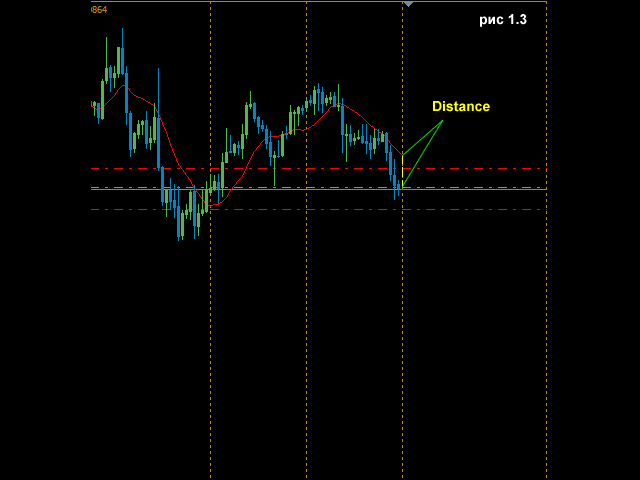
- Distance - when this parameter is set, an order is opened when the MovingAverage moves from the price to a specified Distance in points, in case it is a BUY signal, and when the MovingAverage moves from the price to a specified Distance in points, in case it is a SELL signal (0 - disabled). See figure 1.3.
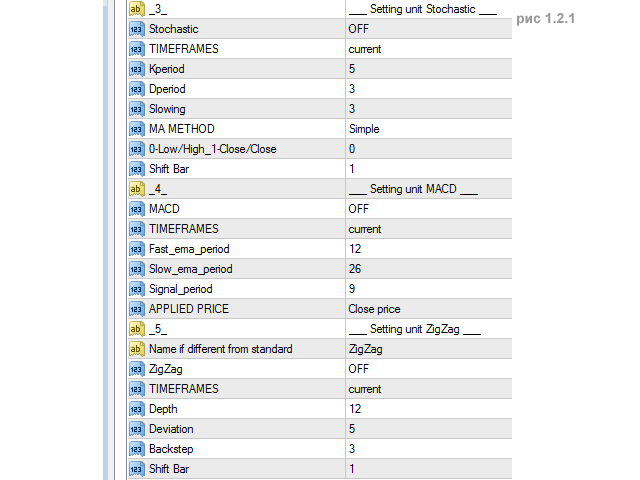
Additional settings for Stochastic - the indicator has all the basic features plus:
- Sale level if K and D period above this level - use the indicator levels. This level opens a sell trade if Kperiod and Dperiod are above the selected level, and Dperiod crosses Kperiod downwards (if set to off, this level is disabled);
- Purchase level if K and D period below this level - this level opens a buy trade if Kperiod and Dperiod are below the selected level, and Dperiod crosses Kperiod upwards (if set to off, this level is disabled);
Additional settings for Stochastic - the indicator has all the basic features plus:
- Name if different from standard - enter the indicator name if it differs from the standard name.

本店最新上架
-
- MT4 MT5跟单EA 本地跟单远程跟单 绝不

- ¥1100.00
-
- 在MetaTrader市场购买MetaTrader 5的&#

- ¥3988.00
-
- 在MetaTrader市场购买MetaTrader 5的&#

- ¥3988.00
-
- 在MetaTrader市场购买MetaTrader 5的&#

- ¥3988.00
-
- 在MetaTrader市场购买MetaTrader 5的&#

- ¥3988.00
全网为您推荐
-
- AlgoTradeSoft

- ¥3988.00
-
- 国际期货套利软件

- ¥3988.00
-
- MT4 MT5跟单EA 本地跟单远程跟单 绝不
- ¥1100.00
-
- 在MetaTrader市场购买MetaTrader 5的&#
- ¥3988.00
-
- 在MetaTrader市场购买MetaTrader 5的&#
- ¥3988.00


