 客服热线:
 手机版
 二维码





































The 123 Pattern Market Scanner
This EA is the 28-common-pairs Scanner in the Forex Market. It based on the theory of 123 Pattern with a set of SMAs, Heiken Ashi for detecting Trade signals. You can choose any time frame to scan as you like.
123 Pattern Theory
Buy Condition:
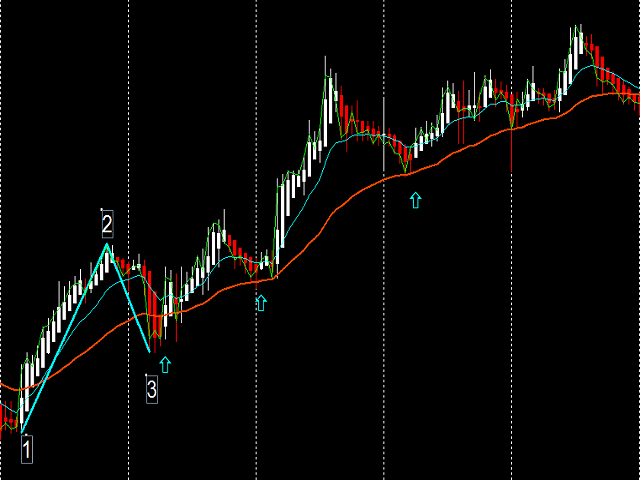
- Fast MA is above Slow MA (Uptrend /confirm/ied) while Heiken Ashi pull back and begin to continue going up with the trend.
Sell Condition:
- Fast MA is below Slow MA (Downtrend /confirm/ied) while Heiken Ashi pull back and begin to continue the downtrend.
(Attached picture describes this theory)
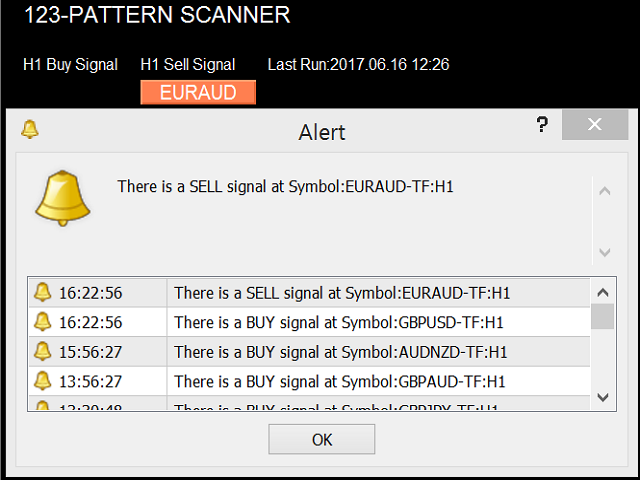
The EA will constantly scan the symbols according to the current timeframe selected in metaTrader 4 to find the symbols that match these conditions. If any symbols match the above Buy (Long) or Sell (Short) condition, it will create a button on the Buy/Sell column. The user only needs to click the button and the utility will automatically open the chart at that time frame to check and decide to make a trade.
The EA does not contain Trading functions but it's scanning the pairs in a predefined period of time. Whenever a pair matches the logic, it will create a button on the screen and send alerts and messages to metaQuotes ID. The user only needs to click the button and the utility will automatically open the chart at that time frame to check and decide to make a trade.
Configuration
All the configurations can be found in the input parameter. Some important inputs:
- Scanning Frequency: the number of seconds that EA scan the market.
- Symbol suffix: adding suffix of the symbol according to your broker or your account type.
- Font Name: the font that shows for text on the screen.
- Font Size: the size of font to adjust for best view on the screen.
- Message Text: text color.
- Up Color: the color for Buy Button.
- Down Color: the color for Sell Button.
- First Row: the space of first row that you want to show the panel.
- Left Margin: the space of left margin.
- Column Space: the space between columns.
- Button Width: the width of the Buy/Sell buttons.
- Row Space: the space between rows.
- Show Notification: enable or disable sending signals via metaQuotes ID.
- Broker Time's Offset to GMT: The difference (hour) of Broker Time and GMT.
Notice
This is the main setup that I and others are using and achieving great results with its help.
Please refer to the bigger timeframe to have a clear precise view of the trend, then decide you trade.
A semi-auto trading EA is available for our customer, please feel free to email us (ngcongkhai@gmail.com) to get it as your tool.
28 pairs including:
"AUDCAD","AUDCHF","AUDJPY","AUDNZD","AUDUSD","CADCHF","CADJPY","CHFJPY","EURAUD","EURCAD",
"EURCHF","EURGBP","EURJPY","EURNZD","EURUSD","GBPAUD","GBPCAD","GBPCHF","GBPJPY","GBPUSD",
"NZDCAD","NZDCHF","NZDJPY","NZDUSD","USDCAD","USDCHF","USDJPY","XAUUSD"


本店最新上架
-
- MT4 MT5跟单EA 本地跟单远程跟单 绝不

- ¥1100.00
-
- 在MetaTrader市场购买MetaTrader 5的&#

- ¥3988.00
-
- 在MetaTrader市场购买MetaTrader 5的&#

- ¥3988.00
-
- 在MetaTrader市场购买MetaTrader 5的&#

- ¥3988.00
-
- 在MetaTrader市场购买MetaTrader 5的&#

- ¥3988.00
全网为您推荐
-
- AlgoTradeSoft

- ¥3988.00
-
- 国际期货套利软件

- ¥3988.00
-
- MT4 MT5跟单EA 本地跟单远程跟单 绝不
- ¥1100.00
-
- 在MetaTrader市场购买MetaTrader 5的&#
- ¥3988.00
-
- 在MetaTrader市场购买MetaTrader 5的&#
- ¥3988.00


