 客服热线:
 手机版
 二维码






































FxAdvisor
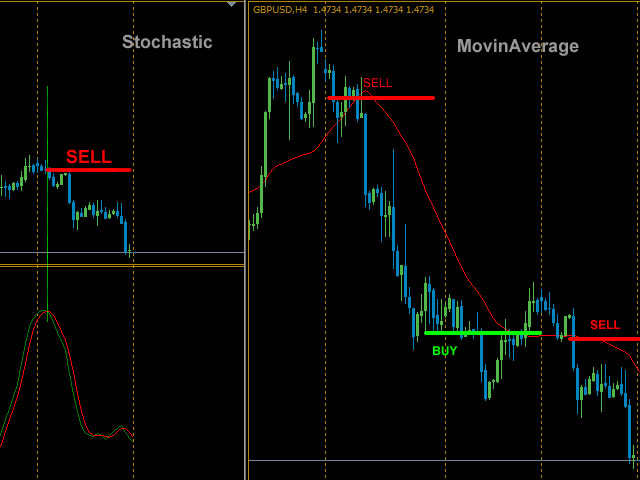
The Expert Advisor consists of three popular indicators:
- MovingAverage;
- Stochastic;
- MACD.
It is possible to use all three indicators both together, and individually, selecting the necessary combination.
Basic settings of the Expert Advisor
- Magic - magic number of orders;
- Volume - trade volume;
- Slippage - slippage when opening orders;
- Stop Loss - close order at a certain loss in points;
- Take Profit - desired profit in points;
- Trailing Stop - move StopLoss to order's opening price when a positive profit specified in points is reached;
- Step Trailing- step for Trailing Stop to follow the price once Stop Loss is moved to the order's opening price;
- Martingale - double the order's volume (if off Martingale - disabled).
Setting unit MovinAverage - the indicator has all the basic features plus:
- MovingAverage - on/off (disable the indicator, i.e. the MovinAverage indicator will not be taken into account when analyzing other indicators for opening positions);
- Shift - (shift relative to the current bar by the specified number of periods back).
A signal to sell in the MovinAverage indicator is the Bid price crossing the indicator line from top to bottom, a buy signal is the Ask price crossing the indicator line upwards.
Distance - when this parameter is set, an order is opened when the MovingAverage moves from the price to a specified distance. (If Distance=0, this parameter is disabled).
Setting unit Stochastic - the indicator has all the basic features plus:
- Stochastic - on/off (disable the indicator, i.e. the Stochastic indicator will not be taken into account when analyzing other indicators for opening positions);
- Shift - (shift relative to the current bar by the specified number of periods back);
- Sale level if K and D period above this level - use the indicator levels. This level opens a sell trade if Kperiod and Dperiod are above the selected level, and Dperiod crosses Kperiod downwards (if set to off, this level is disabled);
- Purchase level if K and D period below this level - this level opens a buy trade if Kperiod and Dperiod are below the selected level, and Dperiod crosses Kperiod upwards (if set to off, this level is disabled);
- Sale level if K and D period above this level and Purchase level if K and D period below this level can have the following values: 5, 10, 15, 20, 25, 30, 35, 40, 45, 50, 55, 60, 65, 70, 75, 80, 85, 90, 95.
Setting unit MACD - the indicator has all the basic features plus:
- on/off (disable the indicator, i.e. the MACD indicator will not be taken into account when analyzing other indicators for opening positions);
Additional settings of the Expert Advisor
- The choice of day of the week – select days of the week when trade is allowed, if not allowed and there are open trades, trade will continue until they are completed.
- Maximum volume - maximum allowed volume if the volume increase is enabled (Losing volume, increased by two).
- Open a new bar – opening an order on a new bar after receiving a signal of the indicator. Timeframe of a new bar – the period, on which we should wait for the opening of a new bar.
- Not to repeat if the order was closed with profit – do not open a trade if the signal from the indicator is active and the last order was closed with positive profit.
- Not to repeat if the order is closed with stoploss - do not open a trade if the signal from the indicator is active and the last order is closed with negative result.
- Close by opposite signal – close open orders in case of an opposite signal of the indicator.
As you can see from the above settings, the EA has been implemented in such a way that it is possible to select the values and parameters that are most convenient for the user.
The EA is suitable both for novice traders, who are trading strategy, and for professionals.
The algorithm of the EA: whenever a buy or sell signal is received from one or several indicators, the EA opens a trade (sell or buy). Positions are closed only by Stop Loss or Take Profit. If an open trade is present, another one will not be opened until the current one is closed.
In case Martingale is enabled (on), if a position is closed at a loss, the next position will be opened with a doubled volume (Volume of the previous trade, multiplied by 2. Example: an unprofitable trade closed at a loss with Volume = 0.02, the next trade will be opened with Volume = 0.04. A buy or sell order will be opened depending on the signal received from one or several indicators).

本店最新上架
-
- MT4 MT5跟单EA 本地跟单远程跟单 绝不

- ¥1100.00
-
- 在MetaTrader市场购买MetaTrader 5的&#

- ¥3988.00
-
- 在MetaTrader市场购买MetaTrader 5的&#

- ¥3988.00
-
- 在MetaTrader市场购买MetaTrader 5的&#

- ¥3988.00
-
- 在MetaTrader市场购买MetaTrader 5的&#

- ¥3988.00
全网为您推荐
-
- AlgoTradeSoft

- ¥3988.00
-
- 国际期货套利软件

- ¥3988.00
-
- MT4 MT5跟单EA 本地跟单远程跟单 绝不
- ¥1100.00
-
- 在MetaTrader市场购买MetaTrader 5的&#
- ¥3988.00
-
- 在MetaTrader市场购买MetaTrader 5的&#
- ¥3988.00


