Usage Instructions for user
- Attach the Indicator to any chart.
- Select the desired Input in the Input Tab from the Indicator Dialog box that pops up.
- Select Ok to confirm and continue.
Description
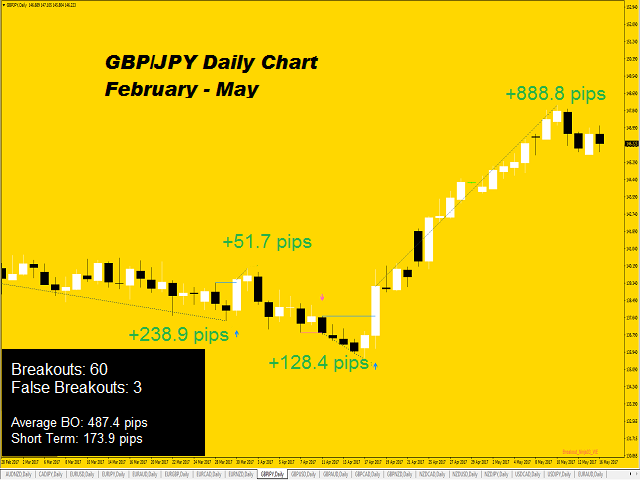
- This Indicator detects breakout using advanced detection strategy. It consists of various inputs options including “Show Arrows”, “Show Max Profits”, “Show Analyzer”, etc which can be helpful for the user to enter trades or determine the profit or loss that would have occurred using previous data, arrows and lines. User can select for notifications, alerts, emails, sound alerts or on-screen comments from Input dialog box.
Input Keywords
- Period - Period to check for Price Breakout.
- Maximum History Bars - Number of Bars in the History to use for calculation and indicator display.
- Show Arrows - Show Buy and Sell Arrows on Breakout /confirm/iation.
- Show S/R - Show Support/Resistance Line on Bars and Verified Zones.
- Show Max Profits - Show Expected Profit/Loss on Placed Orders on Breakout.
- Max Profit Text Size - Set Profit Projection Text Size.
- Show Analyzer - Show Analyzer Window on the left bottom corner of the chart with various information such as Breakouts, False Breakouts, etc.
- Analyzer X-Offset - Distance of Analyzer Window from the left corner of the chart.
- Analyzer Y-Offset - Distance of Analyzer Window from the bottom of the chart.
- Analyzer Text Size - Set the Text Size of the Analyzer Window.
- Colors - Set color of various objects of the indicator such as “Sell Signal” , “Profit Pips”, etc.
- Enable Pop-Up alerts - Pop-Up alert Notification when a Buy or Sell Signal is detected.
- Enable Email alerts - Send Email when a Buy or Sell Signal is detected.
- Enable Push Notification alerts - Send Push Notification on user’s mobile when a Buy or Sell Signal is detected.
- Enable Sound alerts - Play Sound when a Buy or Sell Signal is detected.
- Sound alert Name - Enter Sound alert file name to play when a Buy or Sell Signal is detected.
- Enable Screen Comments - Show on-screen comments on the left-upper corner of the chart when a Buy or Sell Signal is detected.
|
|
ta itemprop="image" content="https://c.mql5.com/31/179/breakout-ninja-price-action-breakout-screen-7268.PNG" />
|
|
 客服热线:
 手机版
 二维码