 客服热线:
 手机版
 二维码






































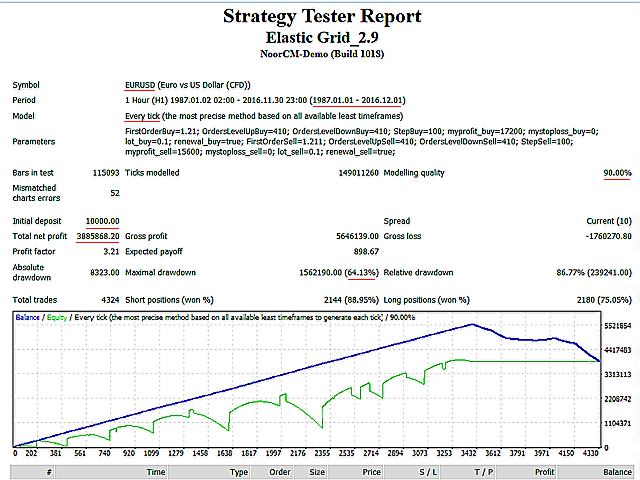
Elastic Grid
The Elastic Grid is a multi-functional grid Expert Advisor, designed for full or partial automation of various ideas related to grid trading. The EA trades on any timeframe and symbol. It can also trade several symbols with any amount of decimal places. It does not interfere with manual trading and other EAs' operation or any indicators. It allows to adjust its settings on the fly, works only with its own orders displaying all necessary data on them when needed.
Key features of the Expert Advisor
- Automatic creation of a grid of pending orders with the specified step in any or both directions from the specified price. Supports completely independent settings for grids with different order types. Each of these grids can exist separately.
- Dynamic changes in the number of orders that have already been placed directly in the process of trading. That is, the range covered by the grid can be changed at any time. At the same time, only the pending orders will be deleted or added. if an order became market order and is beyond the grid, it is up to trader to decide whether it should be closed manually or not.
- The same applies to the grid step. Step can also be changed at any moment, and market orders, which may be left from the previous settings, can be either left (separate statistics will be sept for them) or mass close them with a single button.
- Automatic placement of take profits and stop losses for each order of the EA with the value specified in the settings. Both TP and SL for all active orders can be changed at any moment. For market orders, that may be left from the previous grid settings, a separate mechanism of mass changing those values is also provided. In both cases, both TP ans SL may remain equal to zero.
- Automatic reinvestment of profitable orders. That is, if an order closed by TP, a new pending order with the same settings will be created in its place, and technically, such a grid can operate indefinitely. This feature is also optional and can be easily disabled in the settings.
- Special button for the automatic closing of all market orders only on the currency pair the EA is working on. Pending orders of the EA are deleted by zeroing their number directly in the settings.
- Special information panel...
The Main EA Parameters
Settings for BUY GRID - settings for grid orders with the BUY type
- First Price for BUY orders- initial price for the orders with the BUY type (specified by trader, can be any)
- Quantity BuyUP from FirstPriceBuy - the number of BUY type orders above the initial price (can be zero)
- Quantity BuyDOWN from FirstPriceBuy- the number of BUY type orders below the initial price (can be zero)
- Step for BUY orders- grid step between orders with the BUY type (measured in points of the selected pair)
- Take profit for BUY orders - take profit for the orders with the BUY type (can be zero)
- Stop loss for BUY orders - stop loss for the orders with the BUY type (can be zero)
- Lot for BUY orders - lot size the orders with the BUY type
- Renewal for BUY orders - enable automatic reinvestment of closed orders for the grid with the BUY type orders
Settings for SELL GRID - settings for grid orders with the SELL type
- First Price for SELL orders- initial price for the orders with the SELL type (specified by trader, can be any)
- Quantity SellUP from FirstPriceSell - the number of SELL type orders above the initial price (can be zero)
- Quantity SellDOWN from FirstPriceSell- the number of SELL type orders below the initial price (can be zero)
- Step for SELL orders- grid step between orders with the SELL type (measured in points of the selected pair)
- Take profit for SELL orders - take profit for the orders with the SELL type (can be zero)
- Stop loss for SELL orders - stop loss for the orders with the SELL type (can be zero)
- Lot for SELL orders - lot size the orders with the SELL type
- Renewal for SELL orders - enable automatic reinvestment of closed orders for the grid with the SELL type orders
For more information about the EA settings see the Comments



 nload="if(window.viewGallery_GalleryManager) viewGallery_GalleryManager.ImageonLoad(this,7);" />
 nload="if(window.viewGallery_GalleryManager) viewGallery_GalleryManager.ImageonLoad(this,8);" />
 nload="if(window.viewGallery_GalleryManager) viewGallery_GalleryManager.ImageonLoad(this,9);" />
本店最新上架
-
- MT4 MT5跟单EA 本地跟单远程跟单 绝不

- ¥1100.00
-
- 在MetaTrader市场购买MetaTrader 5的&#

- ¥3988.00
-
- 在MetaTrader市场购买MetaTrader 5的&#

- ¥3988.00
-
- 在MetaTrader市场购买MetaTrader 5的&#

- ¥3988.00
-
- 在MetaTrader市场购买MetaTrader 5的&#

- ¥3988.00
全网为您推荐
-
- AlgoTradeSoft

- ¥3988.00
-
- 国际期货套利软件

- ¥3988.00
-
- MT4 MT5跟单EA 本地跟单远程跟单 绝不
- ¥1100.00
-
- 在MetaTrader市场购买MetaTrader 5的&#
- ¥3988.00
-
- 在MetaTrader市场购买MetaTrader 5的&#
- ¥3988.00


