 客服热线:
 手机版
 二维码




































ImBrike EA Pro
The ImBrike Expert Advisor is a trading system based on breakout and slope of trend indicators. Smart closing of orders is possible under three conditions: by indicators, by TakeProfit or StopLoss. False trades can be filtered using a system of filters, such as the trend filter based on CCI, daily volatility ratio and divergence of trend indicators.
All orders are protected by a smart hidden stop loss calculated based on the current market conditions. Users can specify fixed stop loss and take profit in the EA settings.
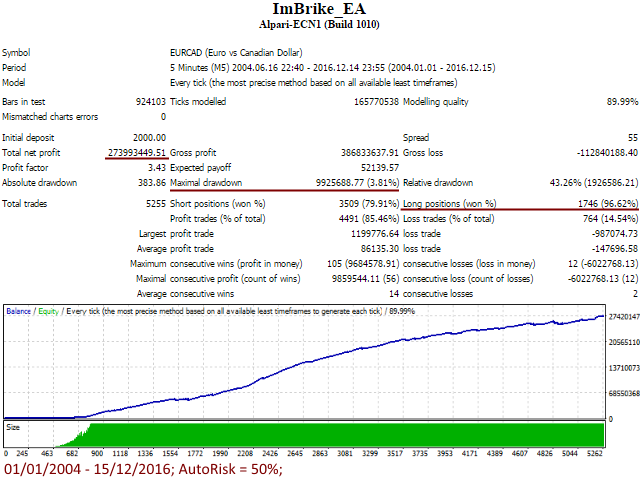
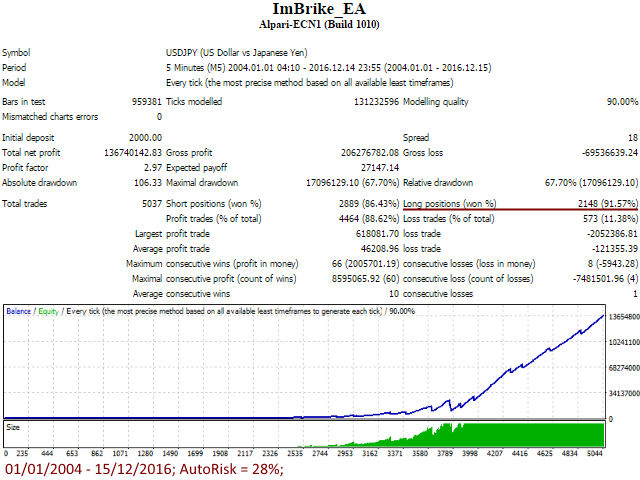
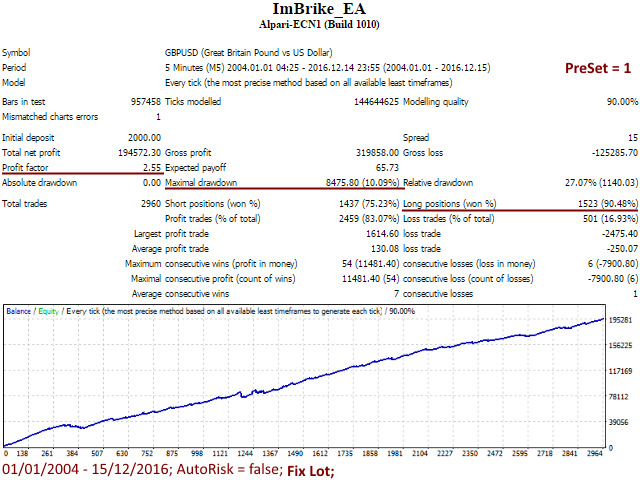
Apart from closing positions by take profit, the EA can also close them if a signal weakens or market conditions change. This allowed the EA to show a high percentage of profitable deals (91.9 %), as well as a low drawdown within 12 years.
Recommended currency pairs and timeframes
M5 (or М1): GBPUSD, EURUSD, USDJPY, EURAUD, USDCAD, AUDCAD, EURCAD
Features
- No martingale
- Stop loss is always used to secure your investment
- No pipsing or scalping - depends on the spread
- Easy to use (No complicated settings)
How to set the GMT Offset – read here (in Russian)!
Parameters
- PreSet – For the GBPUSD and EURUSD pairs, it is possible to select preset 1 or 2. PreSet = 2 has a smaller number of deals. More detailed information on the difference between presets can be found in the screenshots.
- MA_Period - applied Moving Average period.
- BB_Period - Bollinger Bands period.
- BB_EntryShift – Coefficient of indentation of Bollinger Bands.
- MinProfitProfit - if market conditions change, the robot tries closing all open positions with a minimum profit set in MinProfitProfit.
- TakeProfit - manual take profit. If 0, the take profit is calculated automatically based on conditions and the current volatility.
- StopLoss - manual stop loss. If 0, the take profit is calculated automatically based on conditions and the current volatility.
- Show_TP_SL - If False, the TakeProfit and StopLoss will not be available to the broker. If you want to always set the TakeProfit and StopLoss, simply set to True.
- LimitOrders - Number of simultaneously open orders.
- FilterChannelClose - additional deal closing filter. If > 0, enabled. The higher the value, the less the amount of deals. The parameter also affects profitability.
- FilterChannelNoOpen - additional deal opening filter. If > 0, enabled. The higher the value, the less the amount of deals. The parameter also affects profitability.
- UseFilterCCI - Set to True to enable filter based on the CCI indicator.
- CCI_Timeframe - Time frame of the CCI indicator.
- CCI_Level - if the indicator value is above/below the specified value, deals will not be opened.
- FixedLots - fixed lot size.
- RiskPercent - lot size (in %) based on equity (5-10% is recommended; for more efficiency, set 15-20%, but remember that drawdowns and loss risks are increased accordingly).
- ManualGMTOffsetBroker- your broker's GMToffset.
- MagicNumber - identifier of the EA's orders. Attention! MagicNumber should be different for each pair.
- OrderComments - comments for opened orders.
- MaxSpread - maximum spread, at which orders can be opened.
- MaxSlippage - maximum slippage.
- UseNFA - set to True if you are a US-registered trader. Do not change it if you are not sure. When set to True trading results may differ slightly.



 nload="if(window.viewGallery_GalleryManager) viewGallery_GalleryManager.ImageonLoad(this,7);" />
 nload="if(window.viewGallery_GalleryManager) viewGallery_GalleryManager.ImageonLoad(this,8);" />
 nload="if(window.viewGallery_GalleryManager) viewGallery_GalleryManager.ImageonLoad(this,9);" />
 nload="if(window.viewGallery_GalleryManager) viewGallery_GalleryManager.ImageonLoad(this,10);" />
 nload="if(window.viewGallery_GalleryManager) viewGallery_GalleryManager.ImageonLoad(this,11);" />
本店最新上架
-
- MT4 MT5跟单EA 本地跟单远程跟单 绝不

- ¥1100.00
-
- 在MetaTrader市场购买MetaTrader 5的&#

- ¥3988.00
-
- 在MetaTrader市场购买MetaTrader 5的&#

- ¥3988.00
-
- 在MetaTrader市场购买MetaTrader 5的&#

- ¥3988.00
-
- 在MetaTrader市场购买MetaTrader 5的&#

- ¥3988.00
全网为您推荐
-
- AlgoTradeSoft

- ¥3988.00
-
- 国际期货套利软件

- ¥3988.00
-
- MT4 MT5跟单EA 本地跟单远程跟单 绝不
- ¥1100.00
-
- 在MetaTrader市场购买MetaTrader 5的&#
- ¥3988.00
-
- 在MetaTrader市场购买MetaTrader 5的&#
- ¥3988.00


