 客服热线:
 手机版
 二维码






















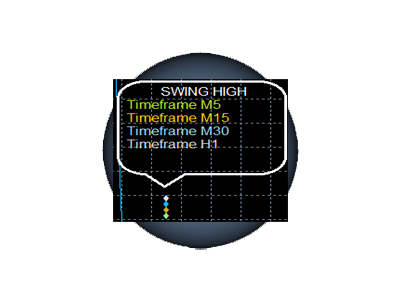














Swing High Multi Time frame Indicator
Swing High Multiple Time frame Indicator is on the most advanced indicators based on Swing High trading strategy. It supports multiple time frames i.e. by attaching the indicator on a single chart one can see the Swing Low values for all the other time frames on a single chart. One would just have to select the time frames for which he wants to see the calculated values.
Features
- On the chart, one can set the option to view the Swing High calculated values and the Swing High graph along with the Swing High values marked on the graph for all the time frames.
- Set the condition to check the perfect bar condition for Swing High calculation.
- Set the number of bars before the current bar to check for the perfect bar criterion.
- Set the number of bars after the current bar to check for the perfect bar criterion.
- View the Swing values of different time frames on a single chart.
- View the graph of different time frames on a single chart along with Swing High calculated values marked on the graph for different time frames.
- Option to view the swing high points on the chart or along with the point values.
- Change the default colors of the text blocks, chart lines and set your own colors.
Input Parameters
- SHOW_SWING_HIGH_M1: Enable/Disable for Swing High calculations on M1 chart
- SHOW_SWING_HIGH_M5: Enable/Disable for Swing High calculations on M5 chart
- SHOW_SWING_HIGH_M15: Enable/Disable for Swing High calculations on M15 chart
- SHOW_SWING_HIGH_M30: Enable/Disable for Swing High calculations on M30 chart
- SHOW_SWING_HIGH_H1: Enable/Disable for Swing High calculations on H1 chart
- SHOW_SWING_HIGH_H4: Enable/Disable for Swing High calculations on H4 chart
- SHOW_SWING_HIGH_D1: Enable/Disable for Swing High calculations on D1 chart
- SHOW_SWING_HIGH_W1: Enable/Disable for Swing High calculations on W1 chart
- SHOW_SWING_HIGH_MN1: Enable/Disable for Swing High calculations on MN1 chart
- M1_color: Set the text color for M1 calculated value. Create it as you like it best.
- M5_color: Set the text color for M5 calculated value. Create it as you like it best.
- M15_color: Set the text color for M15 calculated value. Create it as you like it best.
- M30_color: Set the text color for M30 calculated value. Create it as you like it best.
- H1_color: Set the text color for H1 calculated value. Create it as you like it best.
- H4_color: Set the text color for H4 calculated value. Create it as you like it best.
- D1_color: Set the text color for D1 calculated value. Create it as you like it best.
- W1_color: Set the text color for W1 calculated value. Create it as you like it best.
- MN1_color: Set the text color for MN1 calculated value. Create it as you like it best.
- SWING_HIGH_PLOT_LINE: Enable/Disable Swing High point that will marked on the chart
- SHOW_VALUE: Enable/Disable Swing High point that will marked on the chart
- SWING_HIGH_LEFT_BAR_PERFECT: Enable this value to check for perfect bar condition on the left of current bar
- SWING_HIGH_LEFT_BAR_NUMBER: Set how many bars before the current bar the perfect bar condition should check. Set this parameter, if have you have enabled the previous parameter.
- SWING_HIGH_RIGHT_BAR_PERFECT: Enable this value to check for perfect bar condition on the right of current bar
- SWING_HIGH_RIGHT_BAR_NUMBER: Set how many bars after the current bar the perfect bar condition should check. Set this parameter, if have you have enabled the previous parameter.
- SWING_HIGH_LINE_WIDTH: Set the line width for swing high line. Create it as you like it best.
- SWING_HIGH_LINE COLOR: Set the line color for swing high line. Create it as you like it best.
- SWING_HIGH_DIAMOND_SIZE: Set the size of swing high points which is shown in diamonds shape
- SWING_HIGH_DIAMOND_COLOR: Set the color of swing high points on the chart. Create it as you like it best.
- Diamond_gap (in pips): Set the distance between each swing high point values so that they don't overlap each other and become difficult to read
How to Use
Enable the time frames for which you want the Swing High plot.
Example: Suppose you want the plot for H1 time frame then set the SHOW_SWING_HIGH_H1 input parameter as true.
Swing High Multi Time frame is one most useful tools available. It is the most easy way to analyze swing high plots for different time frames at a single place.


本店最新上架
-
- MT4 MT5跟单EA 本地跟单远程跟单 绝不

- ¥1100.00
-
- 在MetaTrader市场购买MetaTrader 5的&#

- ¥3988.00
-
- 在MetaTrader市场购买MetaTrader 5的&#

- ¥3988.00
-
- 在MetaTrader市场购买MetaTrader 5的&#

- ¥3988.00
-
- 在MetaTrader市场购买MetaTrader 5的&#

- ¥3988.00
全网为您推荐
-
- AlgoTradeSoft

- ¥3988.00
-
- 国际期货套利软件

- ¥3988.00
-
- MT4 MT5跟单EA 本地跟单远程跟单 绝不
- ¥1100.00
-
- 在MetaTrader市场购买MetaTrader 5的&#
- ¥3988.00
-
- 在MetaTrader市场购买MetaTrader 5的&#
- ¥3988.00


