 客服热线:
 手机版
 二维码





































Carousel FX AVG
The Carousel FX AVG is stable intraday Expert Advisor for automated Forex trading.
One of the features of the Carousel FX AVG Expert Advisor is the intraday trading according to the mathematical model that calculates the movement of the quotes. It also performs hedging opposite to the open unprofitable positions within the specified channel. Channel is based on the historical data of the quote movement for the last 8 years.
Market entry is are made at the opening of the Tokyo session. As a rule, the target profit is taken before the US session opens or during the US session before the European session closes.
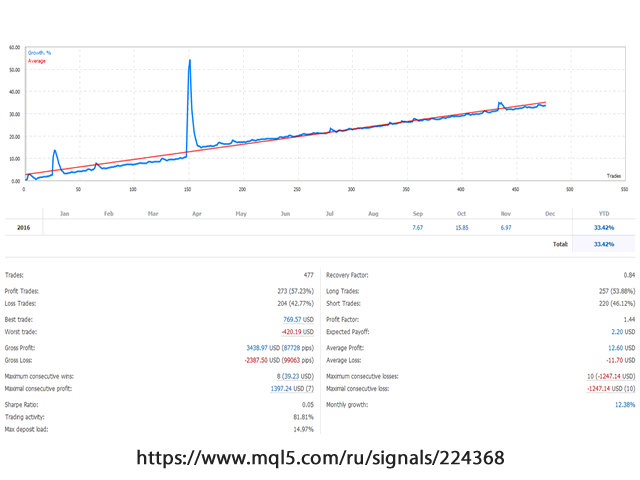
Signal monitoring and copying https://www.mql5.com/en/signals/513563
Trading Settings
- Timeframe = all options present in the metaTrader4 terminal are available. The selected timeframe GRAPHICS OF QUOTATIONS IN THE TERMINAL does not affect the frequency of calculation of market situation for making a decision. It is not necessary to use the chart with the timeframe selected in the settings. The selected working timeframe and timeframe of the opened chart do not affect each other. You can select any timeframe for the opened chat for easy viewing.
- StartTrade = time for opening starting positions.
- TakeProfit = take profit in points
- PipDD = the distance of position loss in points, after which the EA will open an averaging position or a pending order depending on the value of the PipsIndent parameter.
- COEFFICIENT AVG Step = step coefficient of the averaging order. The next averaging order will be set at an equal distance between the already existing last two positions + multiplying by COEFFICIENT AVG Step.
- PipsIndent = offset from the current price for placing the averaging pending order. If it is set to 0 (zero), a position will be opened.
- COEFFICIENT Lot = multiplier for the averaging position based on the volume of the nearest unprofitable position.
- СountDDpositioun = the number of unprofitable positions, after which the KoefLot parameter is applied to the opened positions.
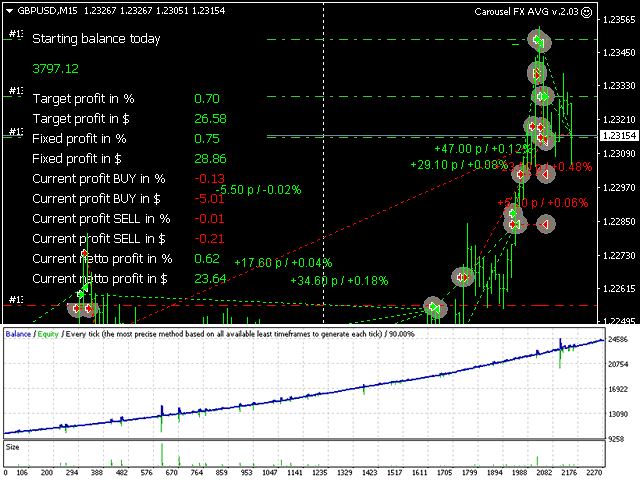
- AverageProfitProc = profit percentage of the balance when averaging. The profit percentage is calculated for buy and sell deals separately. The current profitability of positions is displayed on the info panel on the chart.
- FixedVolume = fixed volume of the opened position. It works when the Volume10000 parameter is set to 0 (zero).
- Volume10000 = automatic calculation of the volume for the opened position per 10,000 units of the account balance.
- TimeFixingTargetValue = specify the time within the day in the format of 00:00. This is the time for calculating the daily profit target based on the balance.
- TargetProfitPair = target profit within the day, when it is reached, all positions will be closed and target profit will be taken. If the target profit is not reached within the current day, the EA recalculates the target profit at the next time specified in the settings.
- UseSoundCloseAll = false/true enable sound alert when taking intraday target profit.
- SoundClose = carouselAVG_fixed_profit_endtrade.wav name of the sound file for playing.
- UseSoundOpen = false/true enable sound sending notification when an averaging position is opened.
- SoundOpen = carouselAVG_open_pos.wav name of the sound file for playing.
- UseSoundCloseAvg = false/true enable sound alert when moving profit to breakeven.
- SoundCloseavg = carouselAVG_averaged_pos.wav name of the sound file for playing.
- Comm = Comment which will be displayed in the deal history of the terminal Does not have to be filled. For example, you may enter your contact details or site address (useful if you use the EA on the investor/client account). Visible for broker administrators.
- Slip = allowed slippage in points when opening deals.
When there are updates or new settings for the Carousel AVG EA, we will inform you via the newsletter of our site or via email address registered during the purchase of the EA.
本店最新上架
-
- MT4 MT5跟单EA 本地跟单远程跟单 绝不

- ¥1100.00
-
- 在MetaTrader市场购买MetaTrader 5的&#

- ¥3988.00
-
- 在MetaTrader市场购买MetaTrader 5的&#

- ¥3988.00
-
- 在MetaTrader市场购买MetaTrader 5的&#

- ¥3988.00
-
- 在MetaTrader市场购买MetaTrader 5的&#

- ¥3988.00
全网为您推荐
-
- AlgoTradeSoft

- ¥3988.00
-
- 国际期货套利软件

- ¥3988.00
-
- MT4 MT5跟单EA 本地跟单远程跟单 绝不
- ¥1100.00
-
- 在MetaTrader市场购买MetaTrader 5的&#
- ¥3988.00
-
- 在MetaTrader市场购买MetaTrader 5的&#
- ¥3988.00


