 客服热线:
 手机版
 二维码




































RRex
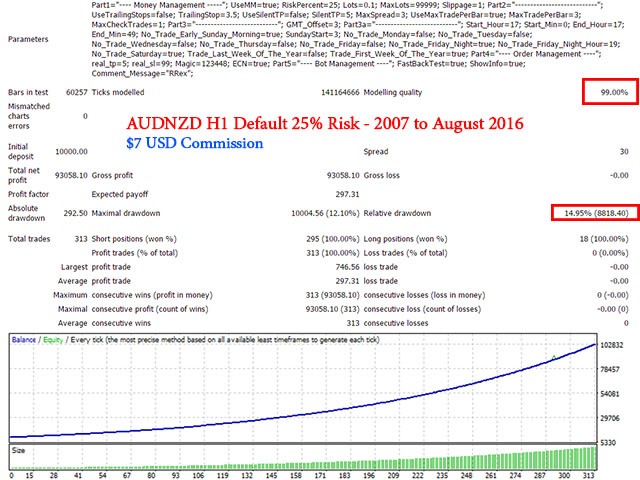
This EA is to be used on the AUDNZD H1 timeframe. It uses complex algorithms to trade effectively on ranging markets during high probability ranging hours. Attach it to the AUDNZD H1 chart, key in the right GMT Offset setting and it is ready to go.
Real account monitoring
https://www.mql5.com/en/signals/214698
Requirements
- Timeframe: AUDNZD H1
- Account type: ECN
- Account currency: USD
- Low spreads for AUDNZD (below 3 pips spread)
- <150 ms latency
Parameters
- Risk Management - default is set to true, if you want to use fixed lots, set this to false
- Risk Percent - determine your risk appetite
- Lots - fixed lots size when you set "Risk Management" to false
- Maximum Lots - maximum lots that you want to trade at
- Slippage - order slippage level
- Enable Trailing Stops - toggle the trailing stop function
- Trailing Stop (pips) - trailing stop level
- Enable Silent TakeProfit - set the real take profit level (true/false)
- Silent TakeProfit (pips) - should always be lower than TakeProfit. For example, if TakeProfit is 6 pips, then this value should be anywhere from 1.0 to 5.9 pips
- Maximum Spread - maximum spread rate
- Enable Max trades per Bar - maximum number of trades per bar
- Maximum Trades Per Bar - maximum number of trades allowed per bar
- Maximum Trades - maximum trades at any given moment
- GMT Offset - if your broker is on +3 GMT, then set it to "3", if it is on +2 GMT, then set it to "2"
- Start Hour - start hour
- Start Minute - start minute
- End Hour - end hour
- End Minute - end minute
- No Trading on Early Sunday Morning - enable/disable trading on early Sunday morning
- Sunday Start Hour - hour, at which the robot starts trading on early Sunday morning
- No Training on Monday - enable/disable trading on Monday
- No Trading on Tuesday - enable/disable trading on Tuesday
- No Trading on Wednesday - enable/disable trading on Wednesday
- No Trading on Thursday - enable/disable trading on Thursday
- No Trading on Friday - enable/disable trading on Friday
- No Trading on Friday Night - enable/disable trading on Friday night
- No Trading After Friday Night Hour - disable trading after this hour on Friday night to allow the robot to prevent holding trading positions over the weekend
- No Trading on Saturday - enable/disable trading on Saturday
- Trade on the Last Week of the Year - if you want to trade during the last week of the year, set this to true
- Trade on the First Week of the Year - if you want to trade during the first week of the year, set this to true
- TakeProfit - take profit level in pips
- Stoploss - stop loss level in pips
- Magic - unique magic number to manage each individual EA's trades
- ECN - enable/disable for ECN style order management
- Fast Backtest - set this to false if you want the information screen to show up during backtest
- ShowInfo - toggle the display information on the screen
- Comment Message - EA's comment message


本店最新上架
-
- MT4 MT5跟单EA 本地跟单远程跟单 绝不

- ¥1100.00
-
- 在MetaTrader市场购买MetaTrader 5的&#

- ¥3988.00
-
- 在MetaTrader市场购买MetaTrader 5的&#

- ¥3988.00
-
- 在MetaTrader市场购买MetaTrader 5的&#

- ¥3988.00
-
- 在MetaTrader市场购买MetaTrader 5的&#

- ¥3988.00
全网为您推荐
-
- AlgoTradeSoft

- ¥3988.00
-
- 国际期货套利软件

- ¥3988.00
-
- MT4 MT5跟单EA 本地跟单远程跟单 绝不
- ¥1100.00
-
- 在MetaTrader市场购买MetaTrader 5的&#
- ¥3988.00
-
- 在MetaTrader市场购买MetaTrader 5的&#
- ¥3988.00


