 客服热线:
 手机版
 二维码





































Signals By Levels
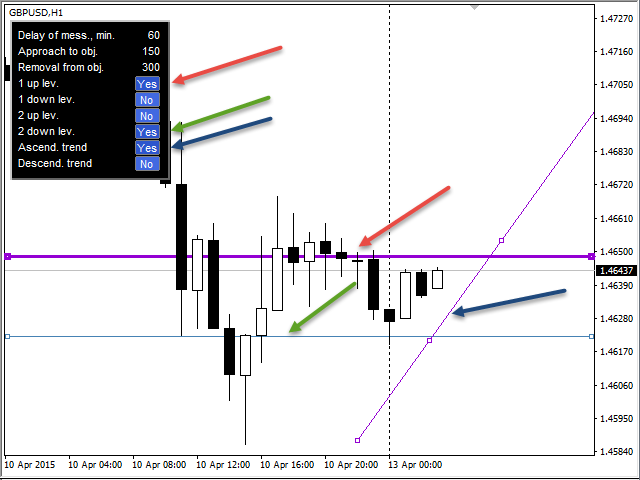
The indicator sends messages to e-mail and mobile terminal when the price approaches the horizontal levels and trend lines that are drawn using the handy panel! The levels and trend lines are deleted and placed to the chart using one click on the panel, and they can be dragged on the chart by mouse! It is possible to set the interval between messages in the settings, the interval is applied to each object separately!
Indicator Settings
===*** Main settings ***=== - below is the list of the main settings
- Delay of messages, min. - the interval between messages sent from one object in minutes
- Sending the message before closing candle, min. - the number of minutes until the candle closes, when sending messages is allowed. Used if signal are generated at candle closure
- Sending Push messages - send messages to the mobile terminal (Android and iOS)
- Sending EMail - send messages to EMail
===*** Levels settings ***=== - below is the list of settings for levels
- First up level - first upper level
- First down level - first lower level
- Second up level - second upper level
- Second down level - second lower level
- Ascending trend line - upward trend line
- Descending trend line - downward trend line
- Space from the price to levels, pips - the distance in pips from the price to draw the objects by default
- Approach to levels, pips - the distance from the object to start sending messages, when the price approaches
- Move away from levels, pips - the distance from the object to stop sending messages, when the price moves away (together, the previous two parameters set the range above and below the object to send messages)
- Signal type - signal type (two options: send messages when candle closes or immediately)
"===*** Trend lines settings ***===" - below is the list of settings for trend lines
- Ascending trend line - upward trend line
- Descending trend line - downward trend line
- Space from the price to trend lines, pips - the distance in pips from the price to draw the lines by default
- Approach to trend lines, pips - the distance from the line to start sending messages, when the price approaches
- Move away from trend lines, pips - the distance from the line to stop sending messages, when the price moves away (together, the previous two parameters set the range above and below the object to send messages)
- Signal type - signal type (two options: send messages when candle closes or immediately)
本店最新上架
-
- MT4 MT5跟单EA 本地跟单远程跟单 绝不

- ¥1100.00
-
- 在MetaTrader市场购买MetaTrader 5的&#

- ¥3988.00
-
- 在MetaTrader市场购买MetaTrader 5的&#

- ¥3988.00
-
- 在MetaTrader市场购买MetaTrader 5的&#

- ¥3988.00
-
- 在MetaTrader市场购买MetaTrader 5的&#

- ¥3988.00
全网为您推荐
-
- AlgoTradeSoft

- ¥3988.00
-
- 国际期货套利软件

- ¥3988.00
-
- MT4 MT5跟单EA 本地跟单远程跟单 绝不
- ¥1100.00
-
- 在MetaTrader市场购买MetaTrader 5的&#
- ¥3988.00
-
- 在MetaTrader市场购买MetaTrader 5的&#
- ¥3988.00


