 客服热线:
 手机版
 二维码





































VisualInfoMove
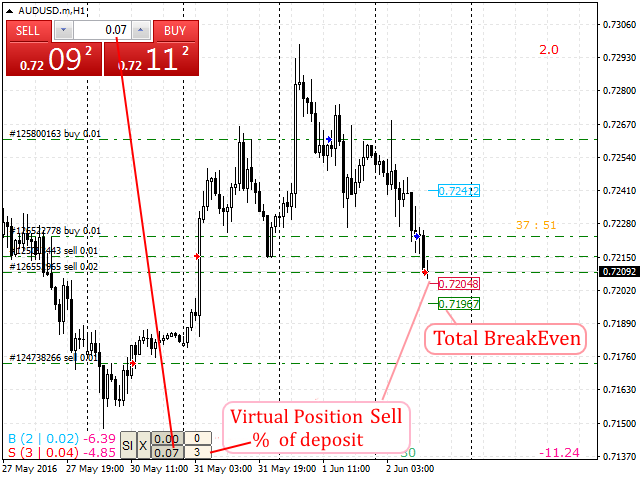
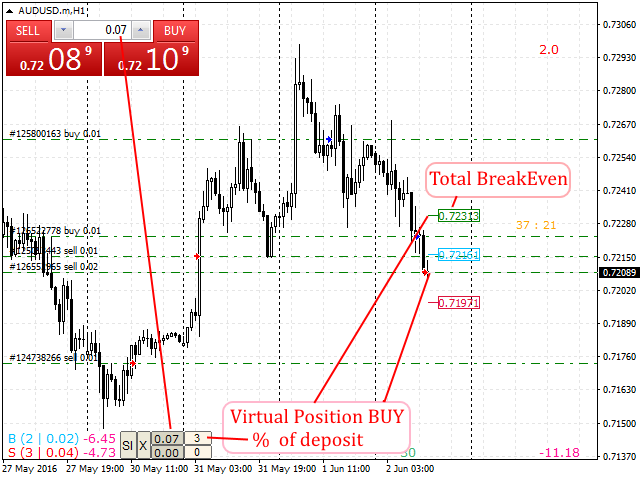
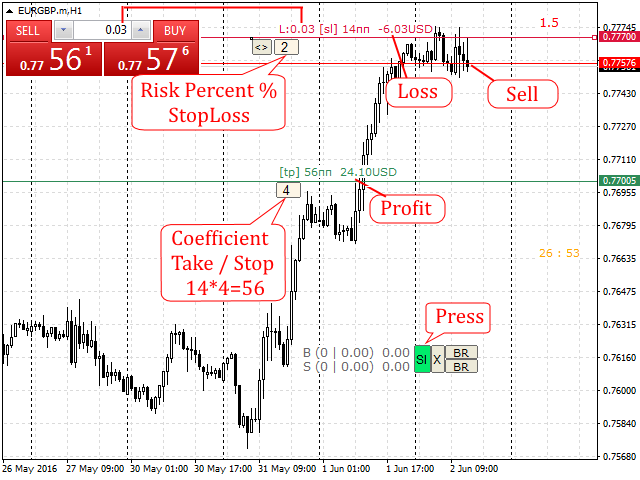
Automatic lot calculation per stop level: calculates the lot considering the risk. It is possible to enter a percentage of the deposit and set the line to the planned stop level. As a result, the lot for entry will be calculated. Also, the TakeProfit level will be calculated taking into account the profit/loss ratio, and their profit/loss in the deposit currency. Thus, the final result of the trade can be seen, which is an integral part of successful trading.
Features
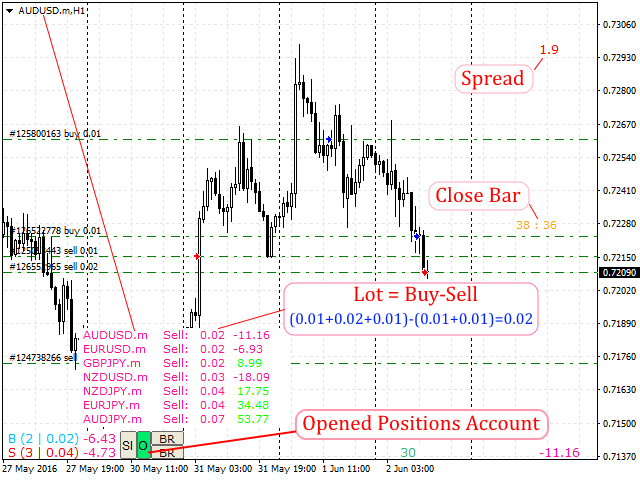
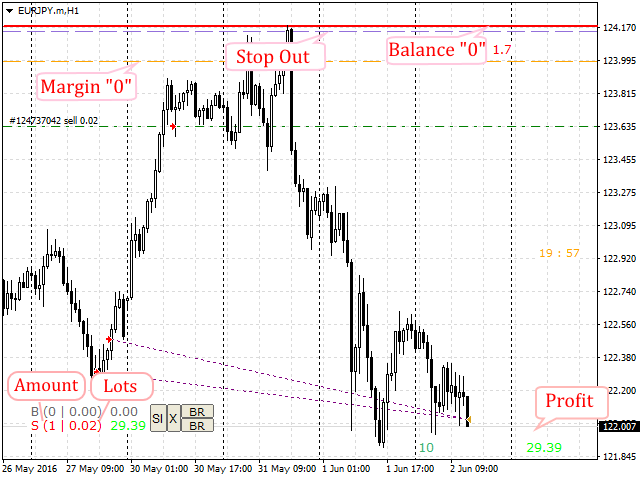
- The indicator displays the number of position, the total volume and profit of all Buy and Sell orders, informative when trading Locks
- Displays the total profit on symbol of all positions
- Displays the spread in real time
- Displays an icon on the open positions
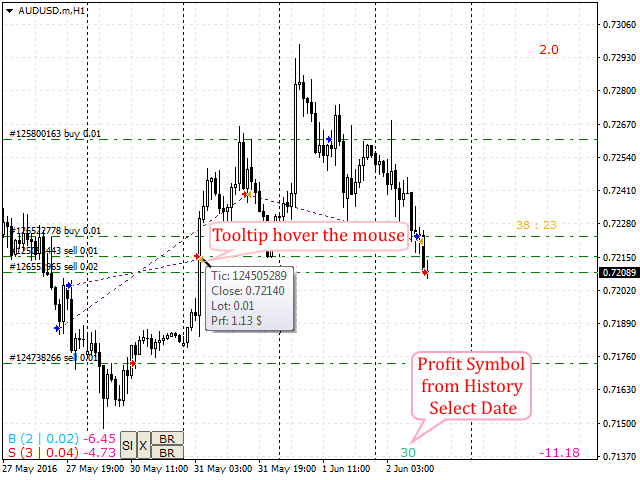
- Displays the yield on the symbol for the selected period (date) considering the Magic, it is possible to analyze the robot trading and manual trading separately
- Time till the bar is completed.
- Displays the markers from the "Account history" tab on the chart - tooltip on hovering: volume, profit, open/close price
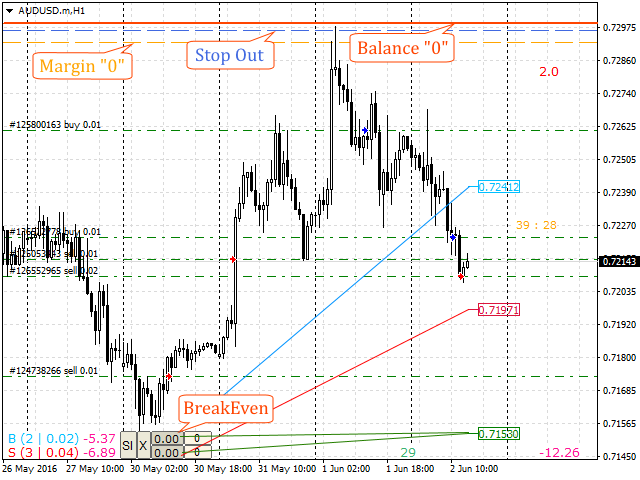
- Calculates the breakeven point, it is possible to add a virtual position as a specified percentage of the deposit for the approximation of the breakeven point
- Displays the levels of free margin, forced position closure (StopOut) and the zero equity levels
- Displays the summarized open positions of the entire account and their profit, "X" button
- All icons can be dragged to any point on the chart using the mouse
Attention
Does not work in the tester!
Main Settings
_______Settings3_______= "= = = = = = Profit/loss settings for the selected period
- Select date history = '05.01.2016' - calculation start date
- Magic = -1 - Manual = "0", All = "-1", or specify the required value
- Font size = 9 - font size
- color "0" = DimGray - Zero value text color
- color Profit = MediumSeaGreen - positive value text color
- color Loss = FireBrick - negative value text color
_______Settings4_______= "= = = = = = Trade display on the chart
- Show marker Trades = true - display marker on the open position (yes/no)
- Show marker History = true - display markers of closed positions from the "Account History" tab (yes/no)
- Magic = -1 - Manual = "0", All = "-1", or specify the required value
- Marker Buy = Blue - Buy marker color
- Marker Sell = Red - Sell marker color
- Marker Close = Goldenrod - closure marker color
- Profitable lines between the opening / closing = Purple - trend line color of a profitable trade
- Unprofitable lines between the opening / closing = Gray - trend line color of an unprofitable trade
- Line TakeProfit = Magenta - "TakeProfit" placement line color
- Line StopLoss = DarkOliveGreen - "StopLoss" placement line color
Recommendations
it is recommended to use the "EasyTrade" trading panel for comfortable trading


 nload="if(window.viewGallery_GalleryManager) viewGallery_GalleryManager.ImageonLoad(this,7);" />
 nload="if(window.viewGallery_GalleryManager) viewGallery_GalleryManager.ImageonLoad(this,8);" />
本店最新上架
-
- MT4 MT5跟单EA 本地跟单远程跟单 绝不

- ¥1100.00
-
- 在MetaTrader市场购买MetaTrader 5的&#

- ¥3988.00
-
- 在MetaTrader市场购买MetaTrader 5的&#

- ¥3988.00
-
- 在MetaTrader市场购买MetaTrader 5的&#

- ¥3988.00
-
- 在MetaTrader市场购买MetaTrader 5的&#

- ¥3988.00
全网为您推荐
-
- AlgoTradeSoft

- ¥3988.00
-
- 国际期货套利软件

- ¥3988.00
-
- MT4 MT5跟单EA 本地跟单远程跟单 绝不
- ¥1100.00
-
- 在MetaTrader市场购买MetaTrader 5的&#
- ¥3988.00
-
- 在MetaTrader市场购买MetaTrader 5的&#
- ¥3988.00


