 客服热线:
 手机版
 二维码






































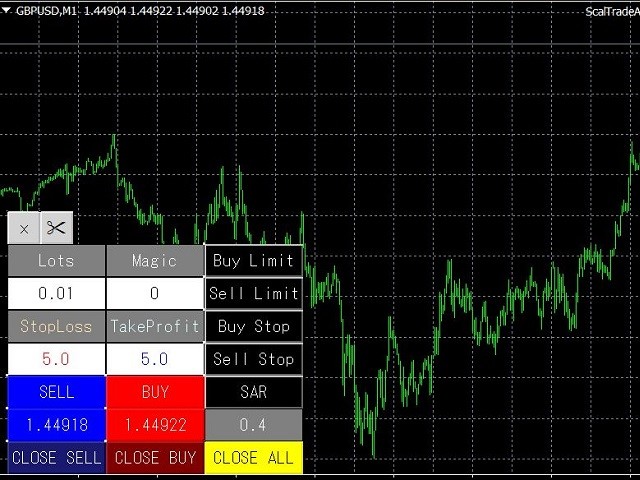
ScalTradeAssist
ScalTradeAssist is a supporting tool for all Manual Forex Traders.
It works perfectly for situations like:
- “Broker restricts to set StopLoss tightly close to the opened position”
- “Wish to close the position as soon as arrives the certain target but I don't know how to do it”
- You can do everything above with this tool!
As the name of the tool shows, this robot was developed as a scalping tool however, ScalTradeAssist would allow us to manage almost all functions that we'd like to do for manual trading on Forex.
Personally I find ScalTradeAssist as one of the greatest Forex tools however I must agree that this robot counts on various "virtual functions".
As mentioned below, virtual pending orders work fine in case of a PC trouble since there are not any pending orders for your broker so when your PC is offline none of orders will be executed, this is really safe.
However as for "virtual stoploss" and "virtual takeprofit" things are different. If your PC is disconnected temporarily your orders are left without TakeProfit or StopLoss, meaning it could be risky.
This could be solved by another tool, AutoOrderModifyEAPro, which allows you to have full controls of positions by Magic Number. (ScalTradeAssist can order positions with whatever MagicNumber you wish to use).
On the other hand, if you wish to use ScalTradeAssist with "magic number control function", please try the ScalTradeAssitPro, pro version has Trailing, Break Even, Line trading besides Magic Number controls.
Functions
- Virtual Stoploss/Limit: See the image and you will find two lines, red and blue. Red means stoploss and blue is for limit. You can move the lines by your mouse, this is just amazing.
- Auto lot size calculation
- Auto Reversing Entry
- Virtual Pending Orders
- Pyramiding entry
- Spread Control
- One Click Order
- One Click Closing
For further functions, please refer the comments on the forum.
Parameters
- UseVirtualStop: To enable virtual pending stop orders (True/False)
- VirtualStopRange(pips): Range parameter of virtual pending stop orders after the order execution. In case of BUY the robot will show it below the TakeProfit with the selected pips, and vice versa for SELL.
- UseVirtualLimit: To enable virtual pending limit orders. (True/False)
- VirtualLimitRange(pips): Range parameter of virtual pending limit orders after the order execution. In case of BUY the robot will show it above the TakeProfit with the selected pips, and vice versa for SELL.
- VirtualLineRedraw(pips): The parameter to re-draw the line when there's a big gap between the parameter in pips from the price of pending orders. This is for the high volatility time after the big events, this way the robot will not execute orders.
- OpenMagicNumber: You can decide your proper magic number here. You can leave it "0" if it's not important.
- MaxSpread: You can set the max spread here. The robot won't execute orders above the max spread.
- UseAutoLots: You can decide between True/False. In case you enable this function, configure the parameters on "Leverage" below.
- Lots: Set here the lot size you wish to trade. (UseAutoLots: False)
- Leverage: When you enable the auto lot size function, please figure the leverage size you wish to use so that the robot can calculate the lot size automatically.
- LotsDigits: The decimal setting for the lot size. (The vast majority of cases you don't have to touch this parameter)
- UseVirtualStopLoss: Select between True/False to use Virtual Stoploss or not.
- StopLoss(pips): The parameter for the Virtual Stoploss.
- TakeProfit(pips): The parameter for the Virtual TakeProfit.
- Slippage: Max slippage to be processed.
- SuccessSound: If you wish to change the sound effect of Order or Closing positions.
- CloseMode: You can select between CloseAll, Closeonly or DeleteOnly.
- UseMultipleClose: Configuration of the CLOSE SELL and CLOSE BUY buttons. When you leave this as True, the button will close all targets. False allows you to close one by one from the newest.
- UseStopAndReverse: Leave this True if you wish to use the auto reversing entry.


本店最新上架
-
- MT4 MT5跟单EA 本地跟单远程跟单 绝不

- ¥1100.00
-
- 在MetaTrader市场购买MetaTrader 5的&#

- ¥3988.00
-
- 在MetaTrader市场购买MetaTrader 5的&#

- ¥3988.00
-
- 在MetaTrader市场购买MetaTrader 5的&#

- ¥3988.00
-
- 在MetaTrader市场购买MetaTrader 5的&#

- ¥3988.00
全网为您推荐
-
- AlgoTradeSoft

- ¥3988.00
-
- 国际期货套利软件

- ¥3988.00
-
- MT4 MT5跟单EA 本地跟单远程跟单 绝不
- ¥1100.00
-
- 在MetaTrader市场购买MetaTrader 5的&#
- ¥3988.00
-
- 在MetaTrader市场购买MetaTrader 5的&#
- ¥3988.00


