 客服热线:
 手机版
 二维码






































VAMultiPanel
This is a multi-functional trading panel containing multiple sub-panels.
- "Volume calculator" allows you to calculate a lot size for a specified symbol according to a specified risk percentage from a deposit and stop loss in points. A stop loss should exceed zero, otherwise the calculator works incorrectly.
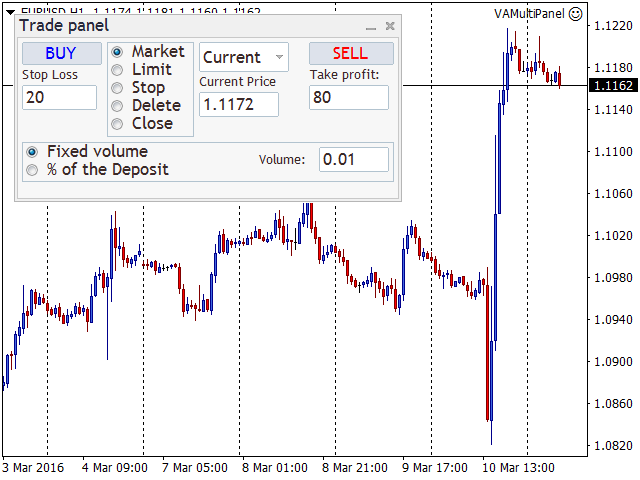
- "Trade panel" allows you to perform trading operations (opening market positions, placing pending orders, removing pending orders, and closing all positions). All trading operations are performed not only for the current symbol the panel is attached to, but also for the symbol specified in the list of symbols present in the Market Watch window. If you cannot find a certain symbol in the list, simply add it to the Market Watch window. The panel can automatically calculate an order volume according to the specified risk and stop loss. Note! Stop loss should exceed zero.
- "Pair Trading Panel" is designed for the pair trade. This panel allows you to simultaneously (in one click) sell and buy symbols selected in the settings. You can also close all positions instantly or after reaching a certain profit in deposit currency. Magic number (Magik Number) allows you to specify symbols to be closed.
- "Information panel" displays data on all open positions and pending orders (including the current floating profit/loss, as well as potential profit and loss depending on stop loss and take profit).
You can enable one of the described sub-panels on the chart via the settings. The panel functionality is to be enhanced. Stay tuned for the new versions.
Parameters
- Volume - default volume;
- The percentage of risk - default risk in % of a deposit;
- Stop Loss - default stop loss;
- Take Profit - default take profit;
- Mode - choose the sub-panel to be currently displayed on the chart;
- Magik Number - magic number.



本店最新上架
-
- MT4 MT5跟单EA 本地跟单远程跟单 绝不

- ¥1100.00
-
- 在MetaTrader市场购买MetaTrader 5的&#

- ¥3988.00
-
- 在MetaTrader市场购买MetaTrader 5的&#

- ¥3988.00
-
- 在MetaTrader市场购买MetaTrader 5的&#

- ¥3988.00
-
- 在MetaTrader市场购买MetaTrader 5的&#

- ¥3988.00
全网为您推荐
-
- AlgoTradeSoft

- ¥3988.00
-
- 国际期货套利软件

- ¥3988.00
-
- MT4 MT5跟单EA 本地跟单远程跟单 绝不
- ¥1100.00
-
- 在MetaTrader市场购买MetaTrader 5的&#
- ¥3988.00
-
- 在MetaTrader市场购买MetaTrader 5的&#
- ¥3988.00


