 客服热线:
 手机版
 二维码






































FG MA Trader
For many traders the 200 MA is considered one of the main trend indicators. once price crosses this line it is often indicative of a long term trend in the direction it has crossed. The FG_MA_Trader EA seeks to leverage that premise and enter the market based on a simple set of rules.
Multiple trade close options.
Multiple Trailing stoploss options.
Support for alert only and Email.
Application of the EA:
The FG_MA_Trader EA should be applied to the tester and back-tested for at least a year. Modify the settings carefully to attain the best results possible. once you are happy with the results, save the configuration and then once applied live, load the settings relevant to the pair you are running it on.
Try and avoid using it at times when the market is flat and choppy and the 200 runs through the middle. Rather turn on alerting only and check decisions manually. An undulating market works best for this EA and since it tries to find the big changes in trends a stop loss that affords it room to move will be required.
The settings for each pair will be unique, changing even one setting a small amount could lead to a big change. For some currency pairs only a break even and a high take profit are needed to maximize profits, with others a trailing stop loss and with others the alligator close. Back test at least a year try and optimize settings. Try and attain a Profit factor of 1.8 or higher with a relative drawdown of under 30%.
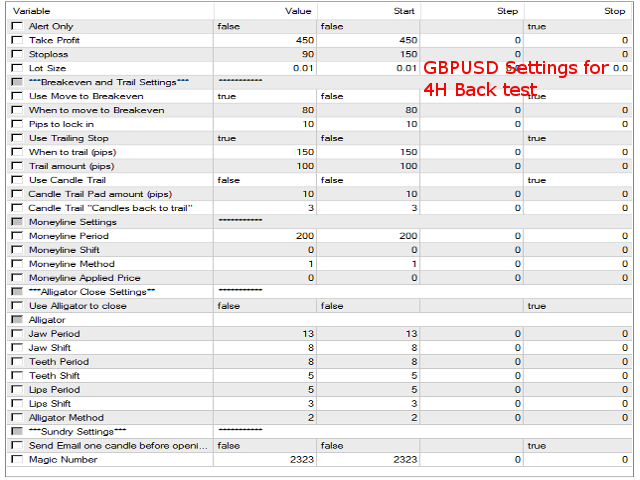
The screenshots of settings for 3 of the pairs on 4 hour time-frames have the settings I've found most optimum for those pairs.
User Inputs
- alert Only: Default false: If set to true this will print and arrow on the chart 1 bar before the EA would potentially open a trade.
- Take Profit: Default: 500: This is the number of pips to set the take profit to. This cannot be 0.
- Stoploss: Default 50: This is the number of pips to set the stop loss to. This cannot be 0.
- Lot Size: Default 0.01: This is the default lot size to be traded.
- Use Move To Breakeven: Default true : This moves the stop loss to To the PipsToLockin amount once the When To Move To Breakeven is breached.
- When To Move To Breakeven: Default 30: The amount of pips in the positive before moving the stoploss to the Pips to lock in value.
- Pips to lock in: Default 5: The number of pips to lock in once the breakeven setting has been breached. This is often set to the spread + a few of the currency pair in question.
- Use Trailing Stop: Default true: This enables the trailing stop loss.
- When To Trail: Default 75: Amount of pips to start trailing at. once this setting has been reached the EA will trail the stoploss the Trail Amount behind the current price.
- Trail amount: Default 50: Amount of pips to trail once the EA starts to trail the stop loss.
- Use Candle Trail: Default false: If true then Use Trailing Stop must be set to false. This enables trailing the stop loss to the amount of candles back set in Candles Back with and additional buffer which is set in Candle Trail Pad.
- Candle Trail Pad: Default 10: The amount of pips to add onto the value of the amount of candles behind current price.
- Candle Trail Candles Back: Default 3: The value of the candle from the current bar to set the stop loss to.
- Use Alligator Close: Default false: This utilizes using the teeth of the alligator indicator to close a trade. Ie if price opens on one side of the “lips” and closes on the other, it will close the trade.
Alligator
The settings for the alligator should not be changed. The reason for having them all configurable is if you want to use the teeth to close the trade as apposed to the lips. You could then set the lips settings to the same as the teeth.
The alligator setting are defaulted to the default alligator settings on metaTrader4.
Miscellaneous
- Send Email 1 candle before trade: Default false: If set to true, the EA will send an email notifying you that the EA will be trading on the following candle provided the necessary conditions are met. Email settings used are those configured on the MT4 platform.
- Magic Number: Default 2323: This number uniquely identifies trades. Should you have the same EA running on the 2 different charts of the same pair, this number will need to be changed to a unique number for each pair or the EAs will start to interfere with each other.
Happy Trading!
Forexgreenies


 nload="if(window.viewGallery_GalleryManager) viewGallery_GalleryManager.ImageonLoad(this,7);" />
 nload="if(window.viewGallery_GalleryManager) viewGallery_GalleryManager.ImageonLoad(this,8);" />
 nload="if(window.viewGallery_GalleryManager) viewGallery_GalleryManager.ImageonLoad(this,9);" />
本店最新上架
-
- MT4 MT5跟单EA 本地跟单远程跟单 绝不

- ¥1100.00
-
- 在MetaTrader市场购买MetaTrader 5的&#

- ¥3988.00
-
- 在MetaTrader市场购买MetaTrader 5的&#

- ¥3988.00
-
- 在MetaTrader市场购买MetaTrader 5的&#

- ¥3988.00
-
- 在MetaTrader市场购买MetaTrader 5的&#

- ¥3988.00
全网为您推荐
-
- AlgoTradeSoft

- ¥3988.00
-
- 国际期货套利软件

- ¥3988.00
-
- MT4 MT5跟单EA 本地跟单远程跟单 绝不
- ¥1100.00
-
- 在MetaTrader市场购买MetaTrader 5的&#
- ¥3988.00
-
- 在MetaTrader市场购买MetaTrader 5的&#
- ¥3988.00


