 客服热线:
 手机版
 二维码






































R GriD EA
The operation strategy of the R GriD Expert Advisor is simple and designed for the intraday fluctuation of the price. At the specified time (the function can be disabled or used at your discretion) the R GriD EA places two market orders in different directions. Depending on the direction the price goes, the R GriD EA places locking positions to the unprofitable order, building a grid of orders with a common TP, waiting for the price rollback.
The locking positions are placed as pending orders, but when the Grid minDelayBars parameter is used (recommended to use), the EA can trade using market orders. The Grid minDelayBars parameter is responsible for the order placement delay (in bars), which allows to avoid deep drawdown, for example, during news release. To better understand the EA operation principle, please see how it works in the strategy tester.
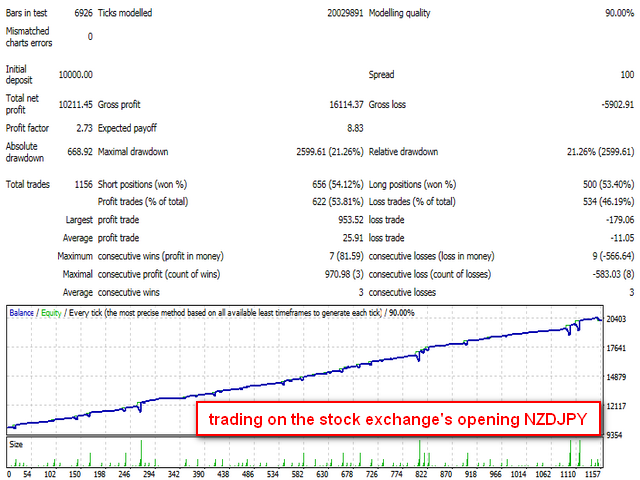
According to the results of tests, a properly configured R Grid EA shows excellent trading results during a flat (for example, during the Asian session), goes out of drawdowns with dignity during prolonged trends. The detailed testing results for 2015, EA settings, and also the recommendations for working with it can be seen here.
The EA setting allow to configure it to both the aggressive and the conservative trading.
Parameters of the R GriD EA:
Stop Loss, Take Profit
- StopLoss: "0" - disabled
- TakeProfit: "0" - disabled
- IsTakeProfit: use a common Take Profit for the order grid
- TakeProfit Ave: size of the Take Profit of the order grid
MM, lot size
- Lots: fixed lot size; used if Lots Mode - "Fixed"
- Lots Mode: lot calculation mode: Fixed - fixed; Balance - % of the account balance; Equity - % of the account equity; FreeMargin - % of the free margin
- Lots PercBalans: % for lot calculation; used for the Balance, Equity, FreeMargin modes
- LotsMax: maximum lot size; if "0" - no limits
Settings of the locking order
- MG Lots Koef: increase/decrease coefficient of the locking order
- IsMG Lots KoefMode: "true" - use the coefficient; "false" - use "by how much"
- MG Cycle MaxOrders: the maximum number of opened orders in the martingale chain
- IsMG Cycle NextLot: when the maximum number of opened orders in the martingale chain is reached, the size of the next lot is: "true" - initial; "false" - continue with the last
Working with Orders
- OrderSend Errattempts: number of attempts to open orders in case of opening errors
- Spread Max: the maximum spread at which the positions are allowed to be opened: if "0" - disabled
Operation hours
- IsTime: order opening by time
- TimeStart: operation start time (specify hours and minutes)
- TimeStop: operation end time (specify hours and minutes)
- TimeStart Minute: operation start time (specified in minutes from 0:00); if "-1", uses TimeStart
- TimeStop Minute: operation end time (specified in minutes from 0:00); if "-1", uses TimeStop
Grid Settings
- Grid LevelNum: the number of grid levels
- Grid LevelStep: level step in points
- IsGrid MG LevelStep: enables dynamic step
- 1Grid LevelStep Koef: increase/decrease coefficient of the level step for the first zone
- 2Grid LevelStep Num: number of the level, from which the coefficient for the second zone is used
- 2Grid LevelStep Koef: increase/decrease coefficient of the level step for the second zone
- IsGrid LevelStep KoefMode: "true" - use the coefficient; "false" - use "by how much"
Additional Settings
- Grid DeltaAnte: the distance before the level to enter by market orders, in points; if "-1" - disabled
- Grid DeltaPost: the distance after the level to enter by market orders, in points; if "-1" - disabled
- Grid minDelay NBars: the minimum delay, in bars, for placing a pending order; if "0" - disabled
- Grid minDelay Timeframe: the period on which the bars are calculated for the delay of the pending order placement; "0" - current chart period
Tool settings
- IsAutoDigits - automatic increase if 5-digits
- Timeframe: the period of the current chart
- Slippage: the maximum allowed slippage in points
- Omagic: the unique number of the EA
- Comment: order comment text
- IsComment App: adds to the comment: order type, level number




 nload="if(window.viewGallery_GalleryManager) viewGallery_GalleryManager.ImageonLoad(this,7);" />
 nload="if(window.viewGallery_GalleryManager) viewGallery_GalleryManager.ImageonLoad(this,8);" />
本店最新上架
-
- MT4 MT5跟单EA 本地跟单远程跟单 绝不

- ¥1100.00
-
- 在MetaTrader市场购买MetaTrader 5的&#

- ¥3988.00
-
- 在MetaTrader市场购买MetaTrader 5的&#

- ¥3988.00
-
- 在MetaTrader市场购买MetaTrader 5的&#

- ¥3988.00
-
- 在MetaTrader市场购买MetaTrader 5的&#

- ¥3988.00
全网为您推荐
-
- AlgoTradeSoft

- ¥3988.00
-
- 国际期货套利软件

- ¥3988.00
-
- MT4 MT5跟单EA 本地跟单远程跟单 绝不
- ¥1100.00
-
- 在MetaTrader市场购买MetaTrader 5的&#
- ¥3988.00
-
- 在MetaTrader市场购买MetaTrader 5的&#
- ¥3988.00


