客服热线:
客服热线: 手机版
手机版 二维码
二维码
































HungrySpider
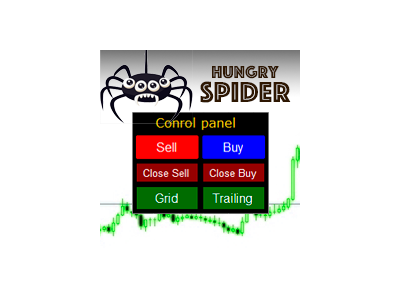
Hungry Spider EA is a convenient trading panel and a useful assistant to manage your trades and to set a grid of orders (not pending orders) with a push notification option.
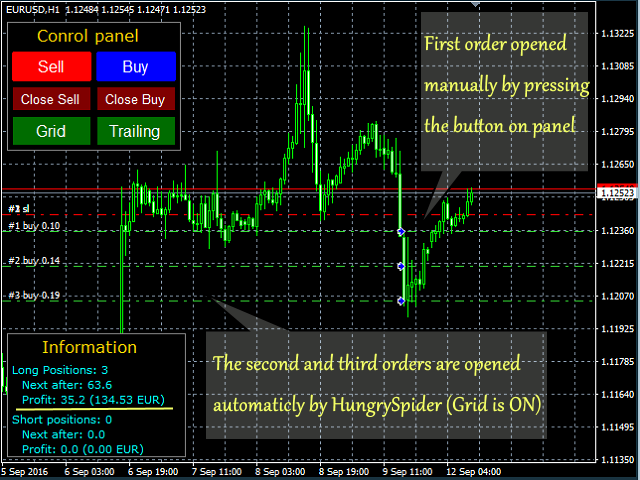
Hungry Spider is a trading panel to help you save time while trading. The EA does not open orders, but it sets a grid. The grid then opens at actual prices without using pending orders. The grid can be turned on and off in a single click. The EA includes a Trailing Stop function, which can also be activated in a single click. Instead of working based on the average value of current orders, the Trailing Stop function also takes into account the volume of orders, which is very important. Hungry Spider can be used in real trading, and it also allows testing new strategies in the Strategy Tester by providing Buy and Sell buttons, providing a considerably faster testing process.
The purpose of the grid is the following: if the price goes against your order, with the grid you will only need to move half way back in order to enter a profit area, or even less if using a Martingale multiplier.
The EA can send Push notifications to a mobile to notify you of any updates. Thus you save time and can feel more confident.
What are the advantages of not using pending orders?
- You will not need to send frequent requests to open/delete a pending order.
- You can quickly disable the grid in just one click, no need to delete multiple pending orders one by one.
Tips on the Expert Advisor Use
- only enter the market only in the trend direction or during flat, setting the stop loss on the channel border.
- Recommended balance: 300 for 0.01 lot.
- Use less volatile currency pairs
- Prohibit the EA to open a grid during high impact news
- Before using the Expert Advisor test it in the strategy tester, and select optimal parameters for your trading style
- Do not use Martingale, it is only included for those who want to rapidly accelerate their deposit while having high risks.
- You can set Magic = 0, and trade as usual, the EA will assume that open orders belong to it, it is very convenient if you use pending orders - the EA will manage them upon activation.
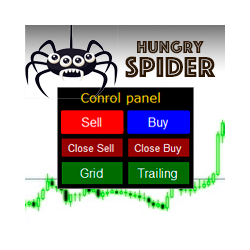
6 buttons will appear on the chart after you launch the EA.
- Sell – open a Sell order
- Buy – open a Buy order
- Close Sell – close all Sell orders
- Close Buy – close all Buy orders
- Grid – Open a grid of orders. Red: is the opposite of the Green - enabled.
- Trailing – trailing stop function. Red: is the opposite of the Green - enabled.
Input Parameters
- Lot – Lot value for the EA's orders.
- Maximum lot for Martingail – Maximum allowable lot value with for the Martingale system.
- Martingail – lot multiplier for the Martingale system.
- StopLoss – the value of the Stop Loss level.
- TakeProfit – the value of the Take Profit level.
- Grid Step – the step between orders in the grid.
- Trailing stop – the value of the Trailing Stop level.
- Trailing start – minimum profit level to start trailing.
- Magic – EA's magic number.
- Slippage – allowable slippage value.
- Spread maximum – maximum allowable spread when opening an order.
- Push notifications – enable pushes.
- Show info – show current grid info on the chart.
- Panel Side – the chart side to locate the panel.
- Panel X Coordinate – panel offset.
Note:
- The number of points should be specified fir 2 or 4 digits. The EA can auto determine the number of decimal places.
- Parameters: Lot, Maximum Lot, StopLoss, TakeProfit, TrailingStop are automatically verified with your broker. If the parameters are greater or less than allowed values, the Expert Advisor will warn you and will use the minimum/maximum allowed value.
- For manual orders, Stop Loss and Take Profit are determined based on inputs; orders from the grid inherit these values from parent a order.


本店最新上架
-
- MT4 MT5跟单EA 本地跟单远程跟单 绝不

- ¥1100.00
-
- 在MetaTrader市场购买MetaTrader 5的&#
- ¥3988.00
-
- 在MetaTrader市场购买MetaTrader 5的&#
- ¥3988.00
-
- 在MetaTrader市场购买MetaTrader 5的&#

- ¥3988.00
-
- 在MetaTrader市场购买MetaTrader 5的&#

- ¥3988.00
全网为您推荐
-
- AlgoTradeSoft

- ¥3988.00
-
- 国际期货套利软件

- ¥3988.00
-
- MT4 MT5跟单EA 本地跟单远程跟单 绝不
- ¥1100.00
-
- 在MetaTrader市场购买MetaTrader 5的&#
- ¥3988.00
-
- 在MetaTrader市场购买MetaTrader 5的&#
- ¥3988.00