客服热线:
客服热线: 手机版
手机版 二维码
二维码






























Breakout Robot
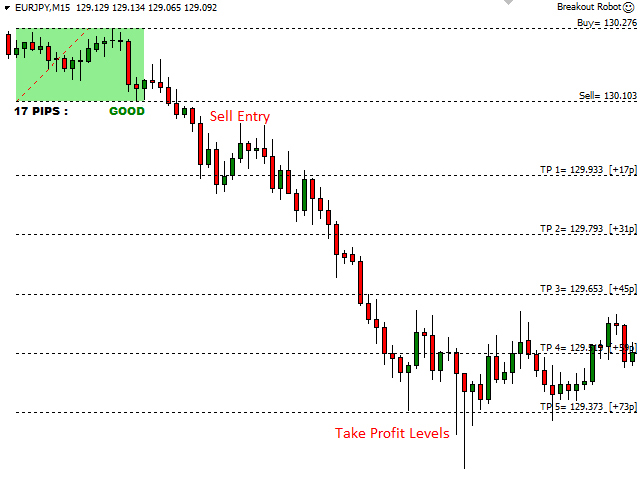
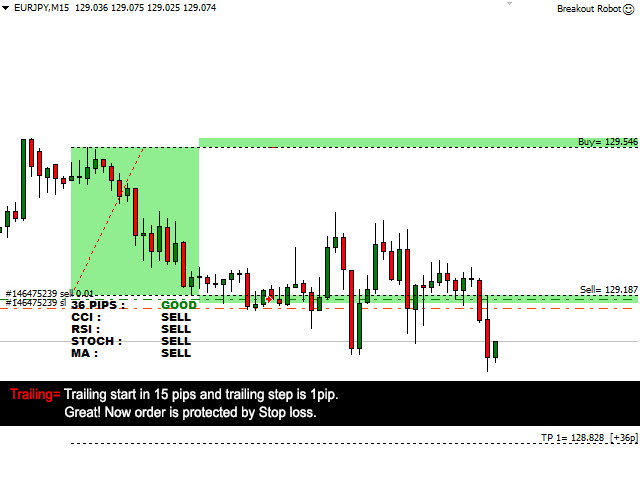
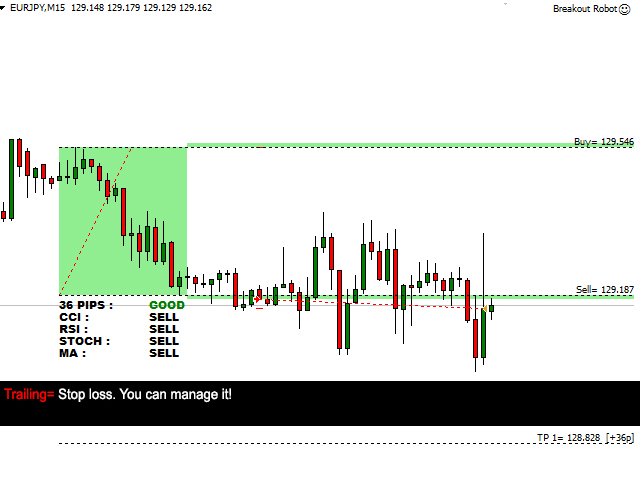
The Breakout Robot Expert Advisor is specially designed for automate the most popular EURJPY Breakout Strategy. It is simply draw a box using the high and low values between 22.00 - 2:00 GMT. After that the EA put BUY/SELL orders when price break above/below the box. The best time frame is M15 and EA allow you to modify the complete setup to run your own breakout strategy that based on same rules.
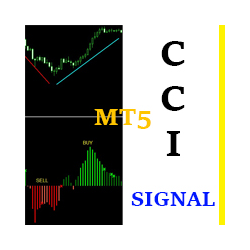
The most important feature is you can filter that breakout signal by most popular CCI, RSI, Stochastic and Moving Average Indicators like a Pro Trader. And can use profit protection system to lock profit before start trailing process. As well as can change trailing step and enable/disable each all functions.
Parameters
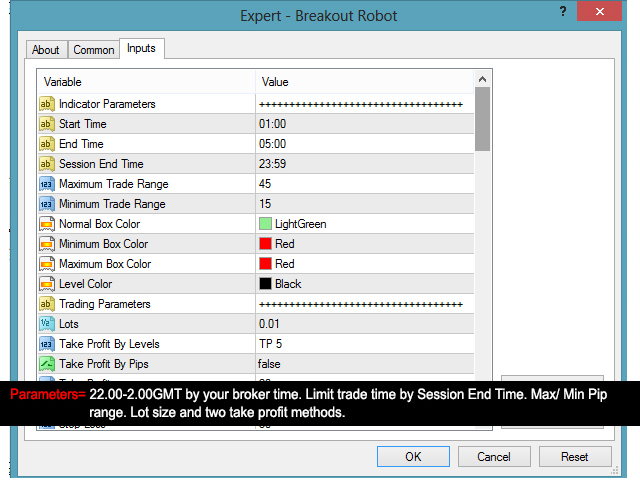
- Indicator Parameters
- Start Time - Box begin time
- End Time - Box end time
- Session End Time - Trade session end time
- Maximum Trade Range - Maximum box size by pips
- Minimum Trade Range -Minimum box size by pips
- Normal Box Color - Box color for normal trade range
- Minimum Box Color - Box color for minimum trade range
- Maximum Box Color - Box color for maximum trade range
- Level Color - Color For Lines
- Trading Parameters
- Lots - Lot size.
- Take Profit By Levels - Take profit by indicator levels
- Take Profit By Pips - Enable/Disable take profit by pips
- Take Profit - Take profit by pips
- Stop Loss By Pips - Enable/Disable take profit by pips
- Stop Loss - Stop loss by pips
- Profit Protection - Enable/ Disable profit protection
- Profit Protection Start In Pips - SL move in [x] pips
- Profit Protection In Pips - SL move to [x] pips from order open level
- Trailing - Enable/ Disable trailing
- Trailing Start In Pips - Trailing start level by [x] pips
- Trailing Step - SL move by [x] pips
- Magic Number - Number for each symbol window and trade type that you run the EA simultaneously.
- Basic Signal Filters
- Trade Above The Maximum Range - Enable/ Disable open trades with maximum box
- Trade Below The Minimum Range - Enable/ Disable open trades with minimum box
- Buy Orders Per Day - Limit buy orders per day
- Sell Orders Per Day - Limit sell orders per day
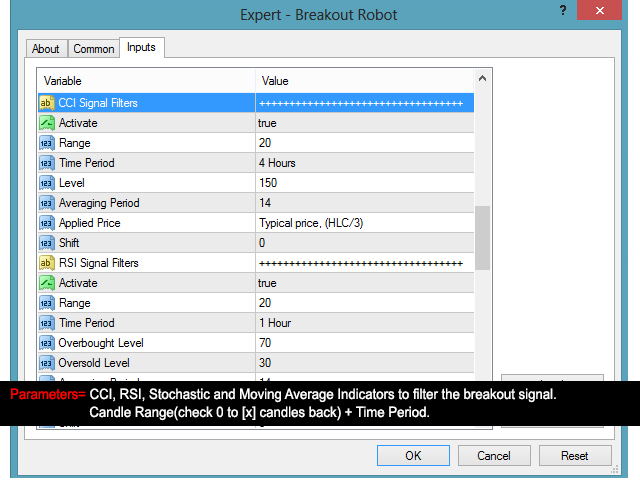
- CCI Signal Filters
- Activate - Activate/Deactivate CCI signal filter option
- Range - Use CCI values between [x] to 0 candle
- Time Period - Time period
- Level - CCI level for open order
- Averaging Period - Averaging period for calculation
- Applied Price - Applied price
- Shift - Index of the value taken from the indicator buffer
- RSI Signal Filters
- Activate - Activate/Deactivate RSI Signal Filter Option
- Range - Use RSI values between [x] to 0 candle
- Time Period - Time period
- Overbought Level - RSI level for open sell order
- Oversold Level - RSI level for open buy order
- Averaging Period - Averaging period for calculation
- Applied Price - Applied price
- Shift - Index of the value taken from the indicator buffer
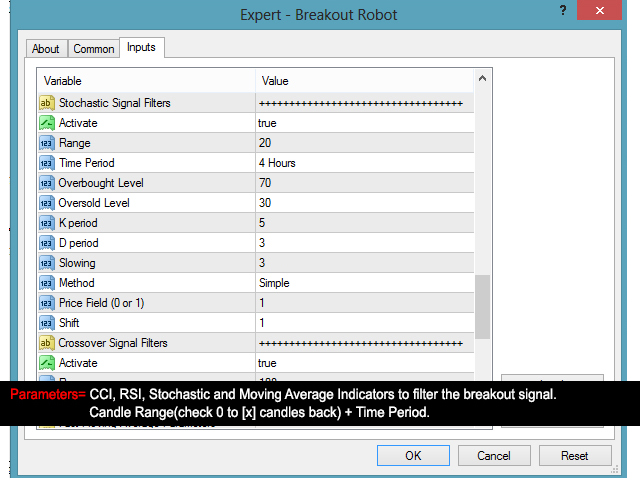
- Stochastic Signal Filters
- Activate - Activate/Deactivate Stochastic Signal Filter Option
- Range - Use Stochastic values between [x] to 0 candle
- Time Period - Time period
- Overbought Level - Stochastic level for open sell order
- Oversold Level - Stochastic level for open buy order
- K period - Period of the %K line
- D period - Period of the %D line
- Slowing - Slowing value
- Method - Moving Average method
- Price Field (0 or 1) - Price field parameter. Can be one of this values: 0 - Low/High or 1 - Close/Close
- Shift - Index of the value taken from the indicator buffer
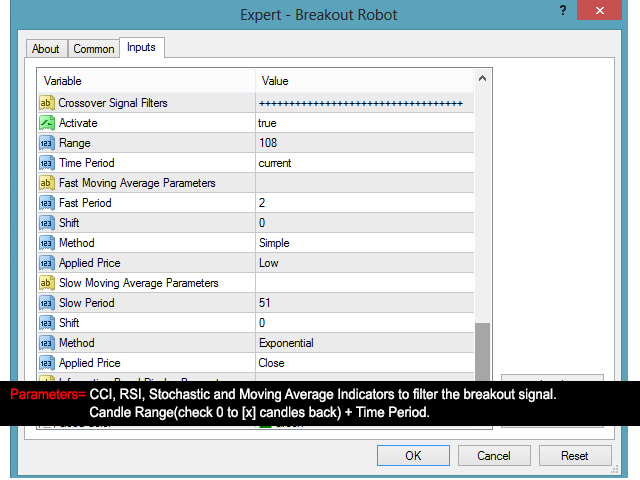
- Crossover Signal Filters
- Activate - Activate/Deactivate Crossover Signal Filter Option
- Range - Use MA values between [x] to 0 candle
- Time Period - Time period
- Fast Moving Average Parameters
- Fast Period - Averaging period for calculation
- Shift - MA shift. Indicators line offset relate to the chart by timeframe
- Method - Moving Average method
- Applied Price - Applied price
- Slow Moving Average Parameters
- Slow Period - Averaging period for calculation
- Shift - MA shift. Indicators line offset relate to the chart by timeframe
- Method - Moving Average method
- Applied Price - Applied price



 nload="if(window.viewGallery_GalleryManager) viewGallery_GalleryManager.ImageonLoad(this,7);" />
 nload="if(window.viewGallery_GalleryManager) viewGallery_GalleryManager.ImageonLoad(this,8);" />
 nload="if(window.viewGallery_GalleryManager) viewGallery_GalleryManager.ImageonLoad(this,9);" />
 nload="if(window.viewGallery_GalleryManager) viewGallery_GalleryManager.ImageonLoad(this,10);" />
 nload="if(window.viewGallery_GalleryManager) viewGallery_GalleryManager.ImageonLoad(this,11);" />
本店最新上架
-
- MT4 MT5跟单EA 本地跟单远程跟单 绝不

- ¥1100.00
-
- 在MetaTrader市场购买MetaTrader 5的&#
- ¥3988.00
-
- 在MetaTrader市场购买MetaTrader 5的&#
- ¥3988.00
-
- 在MetaTrader市场购买MetaTrader 5的&#
- ¥3988.00
-
- 在MetaTrader市场购买MetaTrader 5的&#

- ¥3988.00
全网为您推荐
-
- AlgoTradeSoft

- ¥3988.00
-
- 国际期货套利软件
- ¥3988.00
-
- MT4 MT5跟单EA 本地跟单远程跟单 绝不
- ¥1100.00
-
- 在MetaTrader市场购买MetaTrader 5的&#
- ¥3988.00
-
- 在MetaTrader市场购买MetaTrader 5的&#
- ¥3988.00