客服热线:
客服热线: 手机版
手机版 二维码
二维码

































Scalper GBPvsUSD
The indicator-free EA for GBPUSD, which was written on long-term observations of the behavior of the GBPUSD currency pair. Night scalper. Works in the Asian session. It trades limit orders in both directions. Makes candlestick analysis on the history, and then decides to open limit pending orders to buy, sell or both sides. All trades are protected by stop loss and take profit levels. It works with two levels of stop loss and take profit: with virtual, which is not seen by the broker and on which there is a closing of transactions, as well as with real levels for the broker. Can calculate the volume of orders using not the entire Deposit, and leave part of the Deposit in reserve.
The default settings for trading GBPUSD on the H1. An account with market order execution and minimum spreads from 0 pips (ECN, STP) is desirable. Minimum leverage is 1:500, minimum Deposit is 100 usd.
For the correct operation of the EA, you need to correctly set the GMT of your broker. You need to install GMT broker in winter time only. For example: your broker in winter GMT+2, then set the parameter Broker GMT (winter)=2 and the transition to daylight saving time, this parameter is not changed.
Here, monitoring from a real account, which proves and shows how the EA trades much better than the strategy tester can show: https://www.mql5.com/ru/signals/439567
INPUT PARAMETER
The values of the parameters are set as for 4 digit quotes, for 5 digit EA will recalculate itself.
--- GENERAL SETTING ---
Select Language - select the language to display information on the chart and in the log
New Cycle - Enables or disables a new cycle to open positions
Max Spread - Maximum spread at which it is allowed to open orders
Broker GMT (winter) - GMT of your broker in winter time. When changing to daylight saving time, this parameter is not changed
Send Push if Drawdown ( 0.00-not use) - Send information about exceeding drawdown to the terminal on your smartphone or tablet
Send trading operations - Send information about trading operations to the terminal on your smartphone or tablet
--- MonEY MANAGEMENT ---
Reserve % - what percentage of funds to leave in reserve. Effective only when the use Autolot option is enabled
Stop Out Level % - Percentage of remaining funds to close all orders
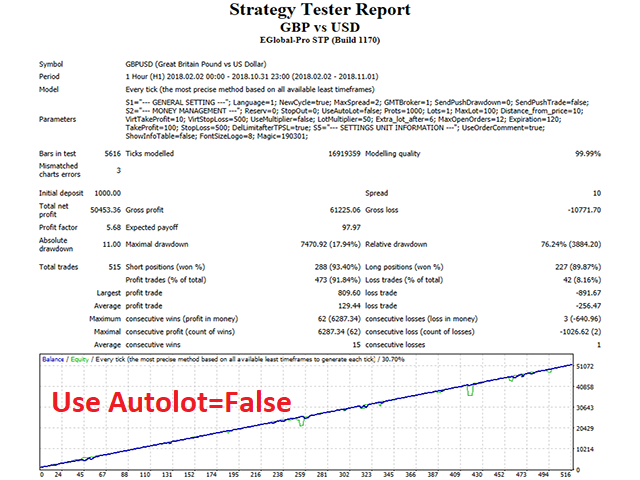
Use Autolot - Use or not to Use automatic calculation of the lot
Autolot Size - Tools for automatic lot calculation
Initial Lot - Initial lot Volume. If Use Autolot=False, this value will be a fixed lot, if Use Autolot=True, the volume will be calculated as: Initial Lot * Deposit / Autolot Size
Max Lot - maximum allowed order volume
Distance from price - Distance from Bid price to place a pending order
Virtual Take Profit - Virtual take profit level (not visible to the broker), specified in points
Virtual Stop Loss - Virtual stop loss level (not visible to the broker), specified in points
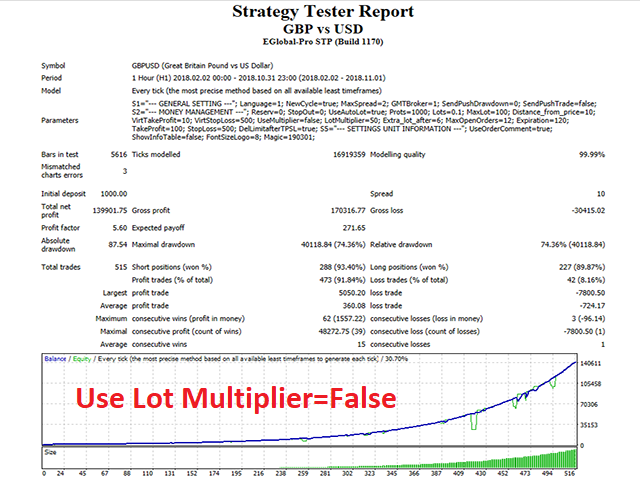
Use Lot Multiplier - Use the multiplier for the extra orders
Lot Multiplier - Multiplier For extra orders
Extra lot after order - After how many open, market orders to open extra lot
Max Open Orders - Maximum number of market orders in one direction
Order Expiration, minutes - Pending orders lifetime
Take Profit for broker - Take profit Level for the broker, specified in points
Stop Loss for broker - Stop loss Level for the broker, specified in points
Delete Limit orders after TP/SL - Delete or not pending orders if virtual TP/SL is triggered
--- SETTINGS UNIT INFORMATION ---
Use Order Comment - Use or not comments for orders
Show Info Table - Show information about trading on non-chart
Font Size - Font size for information Windows
Magic Number - Magic number to distinguish your orders

本店最新上架
-
- MT4 MT5跟单EA 本地跟单远程跟单 绝不

- ¥1100.00
-
- 在MetaTrader市场购买MetaTrader 5的&#
- ¥3988.00
-
- 在MetaTrader市场购买MetaTrader 5的&#
- ¥3988.00
-
- 在MetaTrader市场购买MetaTrader 5的&#

- ¥3988.00
-
- 在MetaTrader市场购买MetaTrader 5的&#

- ¥3988.00
全网为您推荐
-
- AlgoTradeSoft

- ¥3988.00
-
- 国际期货套利软件

- ¥3988.00
-
- MT4 MT5跟单EA 本地跟单远程跟单 绝不
- ¥1100.00
-
- 在MetaTrader市场购买MetaTrader 5的&#
- ¥3988.00
-
- 在MetaTrader市场购买MetaTrader 5的&#
- ¥3988.00