客服热线:
客服热线: 手机版
手机版 二维码
二维码

































Timed Exit EA
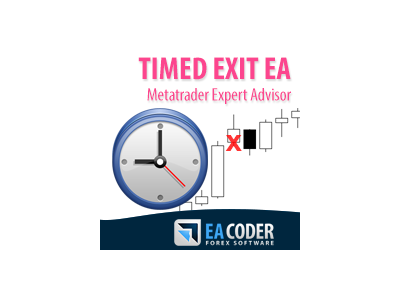
The most simple and easy to use Timed Exit EA to close all trades automatically at specific time each day (hours:minutes:seconds) (by Rimantas Petrauskas)
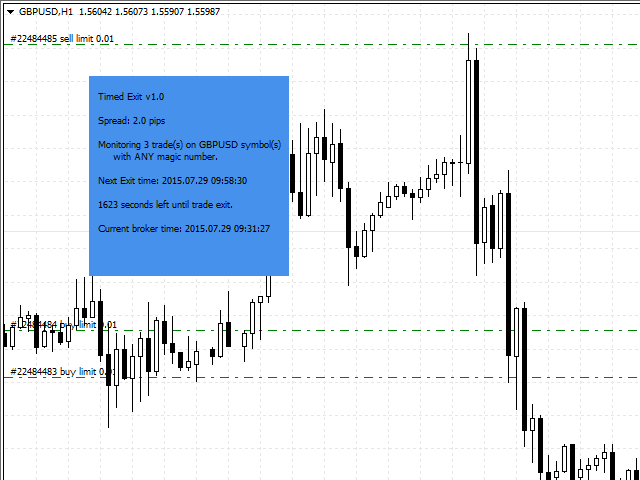
The main idea of this EA is to automatically close trades daily at your specified time. For example if you set EA to close all trades at 15:29:30, EA will do this each day when markets are open. This way you can set the EA to close all trades before the news.
EA should be attached to a separate chart of any time frame on your MT4 and it will start monitoring trades immediately. By default EA has "Time Exit" function disabled. Learn how to use the EA on a demo account first before you enable this option on your live account. EA will only see the trades of that currency pair (instrument) that it is attached to. By default EA will close all market/pending orders on the currency pair (instrument) it is attached to. It is also possible to filter trades by magic number. EA can also be applied to a non-Forex pairs/instruments like Indices, Commodities, etc.
Timed Exit EA Inputs explained
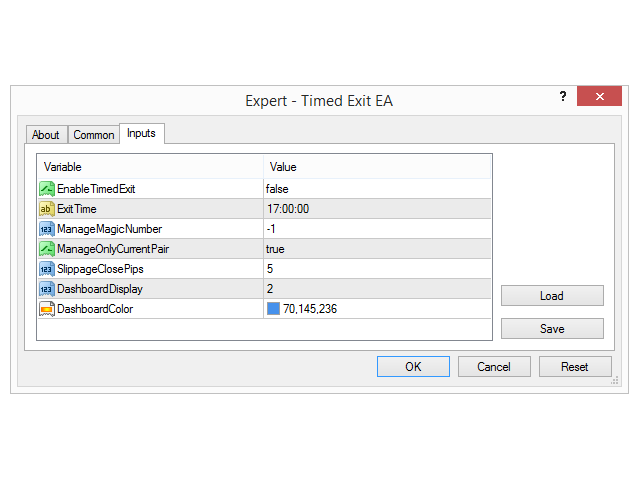
- EnableTimedExit - this tells the EA whether the EXIT function is enabled or disabled. By default it is disabled for security reasons. You can to turn it on by setting the value to TRUE.
- ExitTime - this tells the EA at what time exactly the trades should be closed. Input format is HH:MM:SS or HH:MM and EA will not work if you enter anything else. Note that EA uses broker time, which is also displayed in the dashboard and your MT4 Market Watch window.
- ManageMagicNumber - this tells the EA to close trades only with certain magic number you choose. If this value is set to zero EA will see only manually opened trades. If you set this to -1 (negative one) EA will see all of the trades running on the account (default value).
- ManageonlyCurrentPair - this tells the EA if it should monitor trades only of the currency pair (instrument) it is currently running on, or it should monitor trades of any currency pair. By default it is set to TRUE and EA will see only trades of the currency pair it is running on.
- SlippageClosePips - this is the slippage setting EA will use to exit the market (close the trade). Note that not all brokers use this and this has no effect on ECN/STP accounts. If you do not know what that is simply leave it as is.
- DashboardDisplay - this option controls how the EA dashboard is displayed. 0 = hide the dashboard; 1 = show only text without background; 2 = show text with background (default value).
- DashboardColor - this is where you can set background color of the EA dashboard.
You can run multiple instances of the EA if you open additional chart window for each EA instance. You can have any combinations of EA settings you want. This way you can set trades to be closed at multiple times, multiple currency pairs, and multiple choices of magic numbers.
本店最新上架
-
- MT4 MT5跟单EA 本地跟单远程跟单 绝不

- ¥1100.00
-
- 在MetaTrader市场购买MetaTrader 5的&#
- ¥3988.00
-
- 在MetaTrader市场购买MetaTrader 5的&#
- ¥3988.00
-
- 在MetaTrader市场购买MetaTrader 5的&#

- ¥3988.00
-
- 在MetaTrader市场购买MetaTrader 5的&#

- ¥3988.00
全网为您推荐
-
- AlgoTradeSoft

- ¥3988.00
-
- 国际期货套利软件

- ¥3988.00
-
- MT4 MT5跟单EA 本地跟单远程跟单 绝不
- ¥1100.00
-
- 在MetaTrader市场购买MetaTrader 5的&#
- ¥3988.00
-
- 在MetaTrader市场购买MetaTrader 5的&#
- ¥3988.00