客服热线:
客服热线: 手机版
手机版 二维码
二维码

































LogicalTraderEA
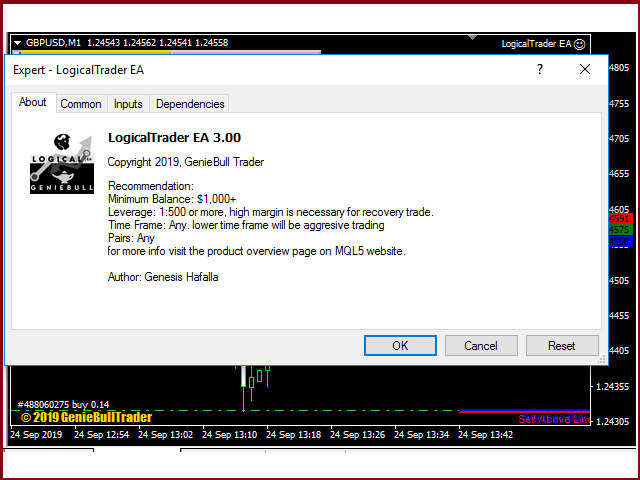
LogicalTraderEA is a Hedging expert advisor which uses a grid recovery strategy.
Trading Strategy
LogicalTraderEA trades on all types of pairs. It works most efficiently on an account with a high margin, which plays a huge role in any strategy. The user has to be able to consider withdrawal as a part of the strategy.
This EA works on all time frames without losing its efficiency, but it works most efficiently in the H1 time frame. I have already set the most optimal default parameters in accordance with the strategy.
It is highly reliable, as it has been developed considering trading on a real account.
The initial trade will open if it crosses above the resistance line and below the support line of the time frame you have attached on the EA. Recovery trade will open if it is above the "Sell above line" and below the "Buy below line"
It will automatically close via trailing stop.it is optimized to the best settings to adapt to any time frame and symbol. Long trades will only trail if open trade size of buy is greater than short trades, and short trades will trail if it is greater than long trades.
Aggressiveness will depend on the time frame you have attached the EA; the lower the value, the more aggressive.
I Added Close All Button on the chart that close all trade that made by this EA on the chart.
The EA will automatically reject an order, if the margin is not enough or the Maximum number of order allowed by your broker is reached.
Recommendation:
Attach it to multiple pairs to diversify your account. I recommend 6 - 10 pairs if you have an account balance of more than $1000 with X 500 leverage or more.
Parameters
- MagicNumber - return an identifying (magic) number of the currently selected order.
- Max Slippage - The difference between the expected price of a trade, and the price the trade actually executes at which you allow the EA to execute an order.
- Support && Resistance Period - the period of bars the line of support and resistance will base its value from the current bar.
- next open trade of grid after close bar - will only open next trade of grid after close bar count.
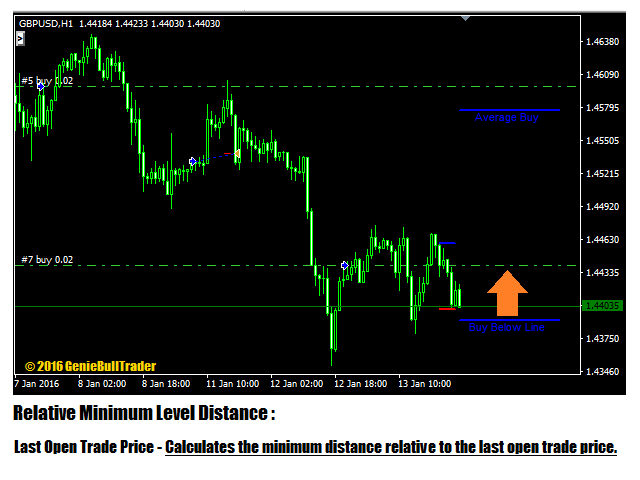
- Relative Minimum Level Distance - The relative minimum distance on which the recovery trade will open, Buy below and Sell above level.
- 1. Last Open Trade Price - Calculates the minimum distance relative to the last open trade price.
- 2. Average Price - Calculates the minimum distance relative to the average price.
- Minimum Distance Multiplier-The multiplier of which the minimum level distance is calculated. "Average true range X Multiplier."
- Virtual Stop Order - Activate or Deactivate Virtual Stop Order.
- Virtual Stop Distance Multiplier - Multiplies the distance of stop order relative from the highest buy and lowest Sell. Highest buy + (ATR*Multiplier) + or Lowest Sell - (ATR*Multiplier).
~~~~~Lot Sizing Settings~~~~~
- Starting Lot Option - The Option to choose Fix or Account Balance Sizing;
- 1. Fix - Fix initial trade size.
- 2. Account Balance Sizing(.01 per Account balance) - calculates initial trade relative to account balance, "(Account balance / Input) * .01"
- Multiplier - multiples the initial lot size to the total trades count.
~~~~~alerts~~~~
- Send_Email
- Audible_alerts
- Push_Notifications
~~~~~Time and Day Filter Settings~~~~~
- Daily Start Time - hour starts to open a trade.
- Daily Stop Time- hour ends to stop opening a trade.
- Monday - allow the EA to trade on Monday.
- Tuesday - allow the EA to trade on Tuesday.
- Wednesday - allow the EA to trade on Wednesday.
- Thursday - allow the EA to trade on Thursday.
- Friday - allow the EA to trade on Friday.
~~~~~Other Settings~~~~~
- Equity Trail Profit All Target % -Target equity % to activate the Equity trailing stop.
- Equity Trail Profit All Stop % - The subtrahend of the "Trail profit all target" to get the equity stop loss.
- Function Call Timer - The frequency of the event occurrence.
Function Call timer will only be adjusted if your terminal can not set millisecond timer.

本店最新上架
-
- MT4 MT5跟单EA 本地跟单远程跟单 绝不

- ¥1100.00
-
- 在MetaTrader市场购买MetaTrader 5的&#
- ¥3988.00
-
- 在MetaTrader市场购买MetaTrader 5的&#
- ¥3988.00
-
- 在MetaTrader市场购买MetaTrader 5的&#

- ¥3988.00
-
- 在MetaTrader市场购买MetaTrader 5的&#

- ¥3988.00
全网为您推荐
-
- AlgoTradeSoft

- ¥3988.00
-
- 国际期货套利软件

- ¥3988.00
-
- MT4 MT5跟单EA 本地跟单远程跟单 绝不
- ¥1100.00
-
- 在MetaTrader市场购买MetaTrader 5的&#
- ¥3988.00
-
- 在MetaTrader市场购买MetaTrader 5的&#
- ¥3988.00