 客服热线:
 手机版
 二维码





































Trading Volume
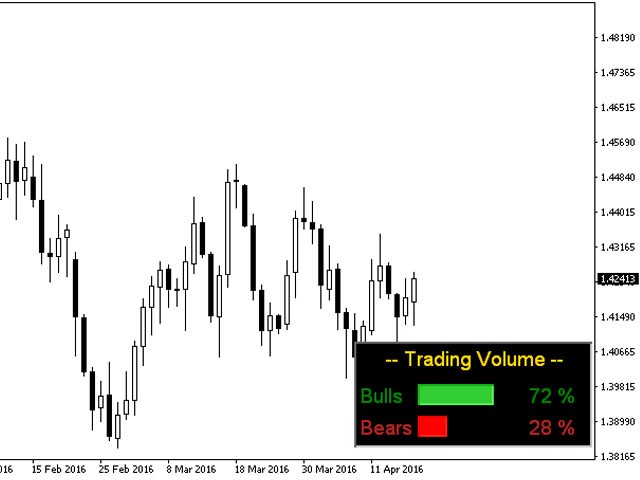
Trading Volume indicator shows the volume of Buying and Selling Trades on the Current Bar Or on average of specific number of last bars as you want . Both volumes are shown simultaneously with green and red colors for Buying and Selling Trading Volumes respectively. And a Percentage ratio of both Volumes appears too in same colors. And Buying and Selling Volumes Expressed By Bulls & Bears .
Notice : This indicator Works on any timeframe and any Pair of Currencies
Calculation Methods:
There are three ways of calculations to be made (you can select your suitable way from inputs)
First: if you choose (CalculationBy = BidRatio)
The indicator calculates Buying and Selling Volumes based on
Bid Price(Close Price)
Means that Bulls = Bid Price - Low Price
Bears = High Price – Bid Price
Second: if you choose (CalculationBy = OpenRatio)
The indicator calculates Buying and Selling Volumes based on
Open Price
Means that Bulls = High Price - Open Price
Bears = Open Price – Low Price
Third: if you choose (CalculationBy = BodyRatio)
The indicator calculates Buying and Selling Volumes based on
The Candle Body Length divided on total candle length with respect to its direction
Input Settings:
- First Parameter (CalculationBy) Explained above in detail.
- Second Parameter (InpPeriod) it indicates to the number of bars to Calculate their average by indicator
if you want to apply indicator on the current bar only enter (0). - Third Parameter (Position) it indicates to the position that indicator Panel appears on.
- Fourth Parameter (X_Offset) to move indicator Panel Horizontally.
- Fifth Parameter (Y_Offset) to move indicator Panel Vertically.


本店最新上架
-
- MT4 MT5跟单EA 本地跟单远程跟单 绝不

- ¥1100.00
-
- 在MetaTrader市场购买MetaTrader 5的&#

- ¥3988.00
-
- 在MetaTrader市场购买MetaTrader 5的&#

- ¥3988.00
-
- 在MetaTrader市场购买MetaTrader 5的&#

- ¥3988.00
-
- 在MetaTrader市场购买MetaTrader 5的&#

- ¥3988.00
全网为您推荐
-
- AlgoTradeSoft

- ¥3988.00
-
- 国际期货套利软件

- ¥3988.00
-
- MT4 MT5跟单EA 本地跟单远程跟单 绝不
- ¥1100.00
-
- 在MetaTrader市场购买MetaTrader 5的&#
- ¥3988.00
-
- 在MetaTrader市场购买MetaTrader 5的&#
- ¥3988.00


