 客服热线:
 手机版
 二维码






































CAP Prime Scalper EA
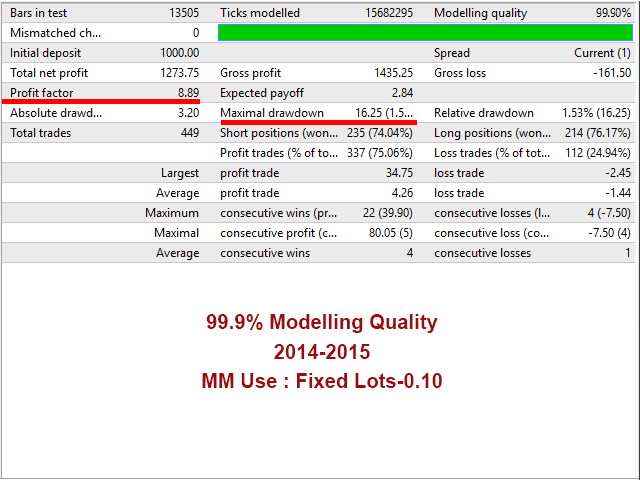
CAP Prime Scalper EA is a Forex scalping EA that uses a smart system to detect key breakout signals then cuts the profit of the move as much as possible while minimizing the loss. The robot automatically analyzes the market volumes and volatility and follows strong supply and demand movements. It smoothly sets breakeven levels and features the built-in smart mechanism for partial closure of profitable trades. It also has option to stop trading before important news releases to avoid slippage and spread widening. Uses fixed stop loss and trailing stop of profitable trades in its operation. Is optimized using real ticks with 99.90% model quality.
This EA is very easy to setup, you just need to set few parameters and it will run automatically. It has the functions of the multi-currency trading. The Virtual Mode allows you to place orders and net profit levels without a broker.
Key Advantages
- Fully automated trading 24/5.
- No need in a large initial deposit.
- No Martingale, No Grid.
- Always uses Stop Loss to protect capital.
- Position trailing stop is used.
- Both a fixed lot and a free margin percentage are used.
- Ability to set time limitations for the EA operation.
Trading Requirements
Caution is advised. In order to be profitable with this EA, you need the following:
- Default setting are already configured for EURUSD (M30, H1, H4) and GBPUSD (M30, H1, H4).
- A good broker with low slippage.
- Low spreads (recommended: EURUSD spreads below 5 points).
- Low stops level (recommended: stop level 0 points).
- Latency of VPS / hosting must be below 4ms (recommended: use MQL5 hosting).
- Small spread significantly increases the EA's efficiency.
- Use only five-digit accounts.
Real account monitoring: here
Working currency pair/timeframe: EURUSD, GBPUSD H1.
Recommendations
For correct robot operation, it is important to have a good communication channel for connection with the broker server. Therefore, it is recommended to use the VPS chosen based on the closest location to the broker to achieve the lowest possible ping, which provides better conditions for the robot to place orders.
Input Parameters
For a complete description of the input parameters of the EA, kindly read the user guide.
- Lots Management
- LotsType - Select any of lots management type.
- EquityPercent - Lot is chosen automatically based on percentage of the equity.
- FixedLots - Fixed Lots.
- UseMarginPercent - Lot is chosen automatically based on percentage of the full margin value. For example, if you set 100% then EA open lots size based on 100% of free margin.
- XBalance - Lot will increase based on XBalance amount. Calculated as (Your Current Balance/XBalance * LotsizePerXBalance = Your current lots size).
- LotsizePerXBalance - Lot size of XBalance.
- EA Configurations
- TakeProfit - Take Profit (in points).
- Initial StopLoss - Initial Stop Loss (in points).
- Hidden StopLoss - Hidden Stop Loss (in points).
- AskPriceShift/BidPriceShift - Parameter representing the breakout points shift value.
- ATR Period - ATR Period.
- Signal Frequency - Parameter representing the signal points. Increase value for better performance and less trades.
- Volatility Scale - Volatility range for price analysis.
- Break Even Setting
- Active Break Even - True/False.
- Trailing Stop Setting
- Active Trailing - True/False.
- Split Lot Size Setting
- SplitProfitLots - Enable profitable order division mode.
- Start Split - Points of profit to start dividing a profitable deal.
- Split Lots Percentage - Lots percentage for each profitable deal division.
- Time Configurations
- Configure your trading time.
- Basic Configurations
- Maximum Spread - Maximum spreads limit.
- CloseOrderOnSpread - Delete pending order if Spreads reach Max Spreads.
- Custom Commission (USD per lot) - Commission for per standard lot (not used by most of brokers).
- SLWithSpreads - If true, Spreads will add with Stop loss.
- ResetSLforSlippages - If true, Stop loss will be reset if stop loss change for slippages.
- Slippage - Maximum slippage value.
- Magic - Magic Number.
Author
Mohammad Ali, technical analyst and speculator, software engineer and founder of Capilta Technology.




本店最新上架
-
- MT4 MT5跟单EA 本地跟单远程跟单 绝不

- ¥1100.00
-
- 在MetaTrader市场购买MetaTrader 5的&#

- ¥3988.00
-
- 在MetaTrader市场购买MetaTrader 5的&#

- ¥3988.00
-
- 在MetaTrader市场购买MetaTrader 5的&#

- ¥3988.00
-
- 在MetaTrader市场购买MetaTrader 5的&#

- ¥3988.00
全网为您推荐
-
- AlgoTradeSoft

- ¥3988.00
-
- 国际期货套利软件

- ¥3988.00
-
- MT4 MT5跟单EA 本地跟单远程跟单 绝不
- ¥1100.00
-
- 在MetaTrader市场购买MetaTrader 5的&#
- ¥3988.00
-
- 在MetaTrader市场购买MetaTrader 5的&#
- ¥3988.00


