 客服热线:
 手机版
 二维码




































VR Locker
The VR Locker Expert Advisor implements a trading strategy that uses positive Locks.
The main task of the EA is to create positive locks, to create a safety cushion.
Description of the trading strategy
The EA opens two market orders in different directions with the same volume. Depending on where the price goes, the EA uses a grid of orders to "spread" the orders.
once the distance between the orders becomes equal to or greater than specified in the settings, the EA proceeds to of a new lock.
When working with locks, an amount of floating profit is accumulated, which can be used by trader as a reserve - safety cushion.
The EA works in two stages:
- Accumulation of positive locks and creating the safety cushion.
- Working with positive locks, opening the locks or using with manual trading tactics.
Main advantages of the program
- Suitable both for novice and experience traders.
- Wide selection of settings.
- Works on all timeframes.
- Works on any financial instrument.
- It can be used with other EAs or in conjunction with manual trade.
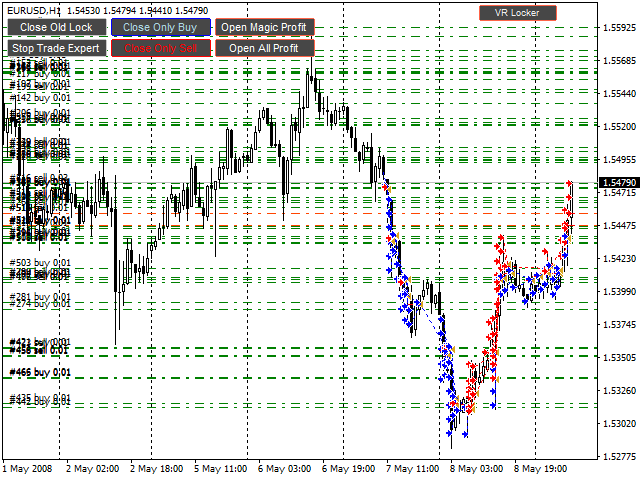
- The EA displays information on the profit on each lock.
The EA control buttons on the chart
- Close Old Lock - close old lock.
- Stop Trade Expert - logically and smoothly stop the EA operation once the current lock is created.
- Close only Buy - force close all buy orders.
- Close only Sell - force close all sell orders.
- Open Magic Profit - open the table on profit by Magic numbers
- Open All Profit - open the table on profit for the last 10 days
Tips for working with this Expert Advisor from the author
- When working with the program, use the H1 timeframe or higher.
- The EA was tested and developed for currency pairs, but it can work on bitcoin and other cryptocurrencies.
- Configure the EA on demo accounts.
- Accumulate a large number of locks. once 30-50 locks are made, move all buy/sell orders to breakeven or enable trailing stop.
- Let the profit grow, this will reduce the psychological burden.
- You can open the locks according to your trading strategy.
- Adhere to the money management rules.
- Remember the risks associated with trading in financial markets.
- When broadcasting the EA signals, accept new clients only after a lock is formed. (Use the Stop Trade Expert button to stop trading before accepting subscribers.) Failure to comply with this rule can result in losses on subscriber accounts.
Program Settings
- Start Lots - initial trading lot.
- Type Lots - subsequent lot calculation type.
- Start Lot - calculation of the lot size is not performed, lot size for all orders is set as in Start Lots.
- Martingale Lot - lot size is calculated as the last order lot multiplied by 2.
- Summ Start Lot - lot size is calculated as the last order lot + Start Lots.
- Fibo Lot - lot size is calculated according to the Fibonacci principle, the lot size of the next order is the sum of lot of the previous two orders.
- Lock Type - type of distance calculation in locks.
- Point - value is taken from Lock Type Value.
- Bands Channel - value of the lock is the difference between the upper and lower lines of Bollinger Bands.
- Donchian Channel - value of the lock is the difference between the upper and lower values of the Donchian channel.
- Last Candle High-Low - value of the lock is the difference between High and Low of the previous candle.
- Lock Type Value
- For Point - the number of points.
- For Bands Channel - period of the Bollinger Bands indicator.
- Fro Donchian Channel - period for calculating the Donchian channel.
- For Last Candle High-Low - irrelevant.
- Close Lock Value - the number of locks to start closing the oldest lock.
- Order Step - step between orders in the order grid.
- Profit Plus - the minimum profit received when closing a series of orders.
- Slippage - slippage.
Magic numbers from 1 to 50 inclusive are reserved for the program.


ta itemprop="image" content="https://c.mql5.com/31/197/vr-locker-screen-7115.png" />




本店最新上架
-
- MT4 MT5跟单EA 本地跟单远程跟单 绝不

- ¥1100.00
-
- 在MetaTrader市场购买MetaTrader 5的&#

- ¥3988.00
-
- 在MetaTrader市场购买MetaTrader 5的&#

- ¥3988.00
-
- 在MetaTrader市场购买MetaTrader 5的&#

- ¥3988.00
-
- 在MetaTrader市场购买MetaTrader 5的&#

- ¥3988.00
全网为您推荐
-
- AlgoTradeSoft

- ¥3988.00
-
- 国际期货套利软件

- ¥3988.00
-
- MT4 MT5跟单EA 本地跟单远程跟单 绝不
- ¥1100.00
-
- 在MetaTrader市场购买MetaTrader 5的&#
- ¥3988.00
-
- 在MetaTrader市场购买MetaTrader 5的&#
- ¥3988.00


