 客服热线:
 手机版
 二维码






































OandaX OrderBook Image History
The OandaX product series is designed to display additional data on orders and positions provided by the Oanda FxLabs service.
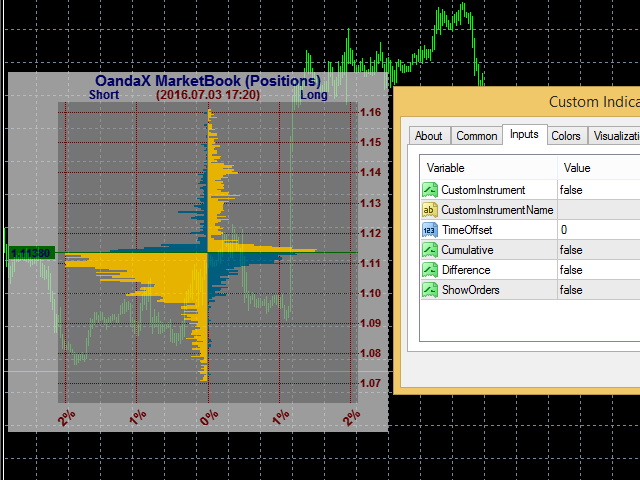
The OandaX OrderBook Image History indicator is designed to display the history histogram of orders or positions on the instrument, nearest to the time specified by user on the chart. For the constant update of data it is necessary for the OandaX Download Manager EA to be running in the terminal. To display the previously downloaded data the EA is not required.
- OrderBook or Open Orders. It is a histogram that shows the distribution of limit and stop orders by price levels. The limit orders include the Buy Limit orders and Take Profit levels. The stop orders include the Sell Limit orders and Stop Loss.
- Position book or Open Positions. This histogram shows the distribution of prices, at which the active position of traders were opened at the time the histogram was formed
The above information is available for 16 instruments: AUDJPY, AUDUSD, EURAUD, EURCHF, EURGBP, EURJPY, EURUSD, GBPCHF, GBPJPY, GBPUSD, NZDUSD, USDCAD, USDCHF, USDJPY, XAUUSD, XAGUSD. mode.
The minimum step of history data is 20 minutes, but depending on the history depth the step can increase up to 24 hours, there can also be unexpected gaps.
Four display formats are available for both (orders and positions) histograms
- basic; displays a basic level histogram without further processing
- cumulative; the values of all the previous levels are added to each level
- simple difference; instead of short and long orders (positions), their difference is displayed
- cumulative difference; difference for the cumulative histogram
The data is downloaded and saved by UTC time, therefore, for the correct display of the histogram time, set the correct time zone of your broker server relative to UTC in the indicator settings
Indicator Settings
- Use Custom Instrument - True, if you have non-standard instrument names or if you need to display a histogram of another instrument on the chart;
- Custom Instrument Name - instrument name in the format of Oanda FxLabs. For EURUSD - EUR_USD, for Gold, XAUUSD - XAU_USD, for Silver, XAGUSD - XAG_USD;
- Server UTC Time Offset - time zone of your server relative to UTC
- Show Histogram Cumulative - if True, draws cumulative histogram, i.e. the values of previous levels are added to each subsequent level;
- Show Histogram Difference - if True, displays difference horizontal, i.e. displays not buy or sell levels for the horizontal level, but their difference. Also works for the cumulative mode.
- Show Orders (Positions if False) - if True, displays histogram of orders, if False displays histogram of positions, i.e. level distribution of the prices the current positions were opened at.


本店最新上架
-
- MT4 MT5跟单EA 本地跟单远程跟单 绝不

- ¥1100.00
-
- 在MetaTrader市场购买MetaTrader 5的&#

- ¥3988.00
-
- 在MetaTrader市场购买MetaTrader 5的&#

- ¥3988.00
-
- 在MetaTrader市场购买MetaTrader 5的&#

- ¥3988.00
-
- 在MetaTrader市场购买MetaTrader 5的&#

- ¥3988.00
全网为您推荐
-
- AlgoTradeSoft

- ¥3988.00
-
- 国际期货套利软件

- ¥3988.00
-
- MT4 MT5跟单EA 本地跟单远程跟单 绝不
- ¥1100.00
-
- 在MetaTrader市场购买MetaTrader 5的&#
- ¥3988.00
-
- 在MetaTrader市场购买MetaTrader 5的&#
- ¥3988.00


