 客服热线:
 手机版
 二维码




































Binary Options Engine Free EA
Binary Options Engine EA is an exclusive expert advisor to easily create complete Expert Advisor to trade Binary Options in an automated way.
Binary Options Engine EA is able to use any indicator complying with the framework Engine Indicator (https://www.mql5.com/en/market/product/21022)
You can use any strategy for Binary Options and create an indicator combining other indicators and conditions representing your strategy.
The result will be an indicator representing signals for CALL and PUT orders like arrows.
Binary Options Engine EA will then be able to trade those signals.
The purpose of Binary Options Engine EA is to simplify the process for developing EAs for Binary Options EA and dispose of all required features in one single EA.
Features of the Binary Options Engine EA are:
- processing of signals to place trades to MT4 for brokers supporting Binary Options
- sending signals to external binary options platforms (for web brokers for instance)
- manage martingales up to 10 levels
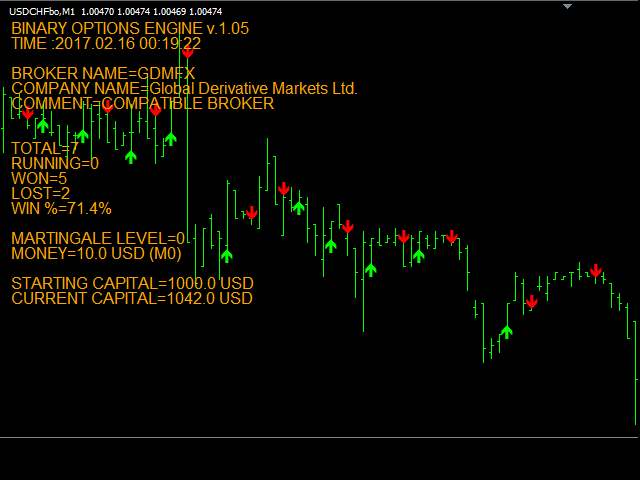
- display results of trading (trades won, lost, % win, etc)
- generate statistics about your strategy using the strategy tester
- test profitability of your strategy using the strategy tester
Main inputs of the EA are:
- TradeWithMT4 (false/true) - To authorize trading with metaTrader 4 Binary Options brokers.
- MaxMartingaleLevel (0-9) - Number of martingales that can be used by EA, 0 means no martingale.
- Money0 to Money9 - Amount of money to be traded for each martingale level.
- Expiry (60S to 60M) - Expiry time to be used by EA for trades.
- IndicatorName - Name of the indicator to be used with the EA to generate the signals.
- IndiLineCall (0-7) - Number of indicator buffer to be used for CALL signals.
- IndiLinePut (0-7) - Number of indicator buffer to be used for PUT signals.
- UseSimulation - Use internal capital to test EA with Strategy Tester independently from metaTrader 4 settings.
- BrokerReturn (0.8 means 80% return) - Broker return used for simulation with Strategy Tester.
- UseNewsFilter - To activate filtering of trades during news releases.
- StopBeforeNewsHigh - Number of minutes to stop trading before high impact news.
- StopAfterNewsHigh - Number of minutes to stop trading after high impact news.
- StopBeforeNewsMedium - Number of minutes to stop trading before low and medium impact news.
- StopAfterNewsMedium - Number of minutes to stop trading after low and medium news.
- Show_ (EUR, USD, GBP, etc) - Take into account news for this currency (true/false).
- ShowHighImpact - Activate filter for high impact news.
- ShowMediumImpact - Activate filter for medium impact news.
- ShowLowImpact - Activate filter for low impact news.
- ServerZone - GMT time zone of your MT4 broker server
- LocalZone - GMT time zone of your computer where EA is running
- UseTimeFilter (false/true) - to active time filter. Trades will only be placed during the specified time and days.
- StartSessionGMT - hour to start trading when time filter is activated
- EndSessionGMT - hour to stop trading when time filter is activated
- WorkSunday (true/false) - to activate or deactivate trade on this day if time filter is activated
- WorkMonday (true/false) - to activate or deactivate trade on this day if time filter is activated
- WorkTuesday (true/false) - to activate or deactivate trade on this day if time filter is activated
- WorkWednesday (true/false) - to activate or deactivate trade on this day if time filter is activated
- WorkThursday (true/false) - to activate or deactivate trade on this day if time filter is activated
- WorkFriday (true/false) - to activate or deactivate trade on this day if time filter is activated
EA can be used to trade directly with MT4, in this case you must check that:
- your broker supports binary options for MT4
- the symbol where EA is placed is a binary options symbol.
EA can also be used to send signals to external platforms and trade with binary options web brokers.
We offer free version of indicator to test the complete solution:
- framework Engine Indicator (https://www.mql5.com/en/market/product/21022)
Complete version of the EA can be purchased in MQL5: https://www.mql5.com/en/market/product/21023
The free version has same functionalities has the full version. The only difference is that the free version will only place trades of 1 USD.


本店最新上架
-
- MT4 MT5跟单EA 本地跟单远程跟单 绝不

- ¥1100.00
-
- 在MetaTrader市场购买MetaTrader 5的&#

- ¥3988.00
-
- 在MetaTrader市场购买MetaTrader 5的&#

- ¥3988.00
-
- 在MetaTrader市场购买MetaTrader 5的&#

- ¥3988.00
-
- 在MetaTrader市场购买MetaTrader 5的&#

- ¥3988.00
全网为您推荐
-
- AlgoTradeSoft

- ¥3988.00
-
- 国际期货套利软件

- ¥3988.00
-
- MT4 MT5跟单EA 本地跟单远程跟单 绝不
- ¥1100.00
-
- 在MetaTrader市场购买MetaTrader 5的&#
- ¥3988.00
-
- 在MetaTrader市场购买MetaTrader 5的&#
- ¥3988.00


