 客服热线:
 手机版
 二维码






































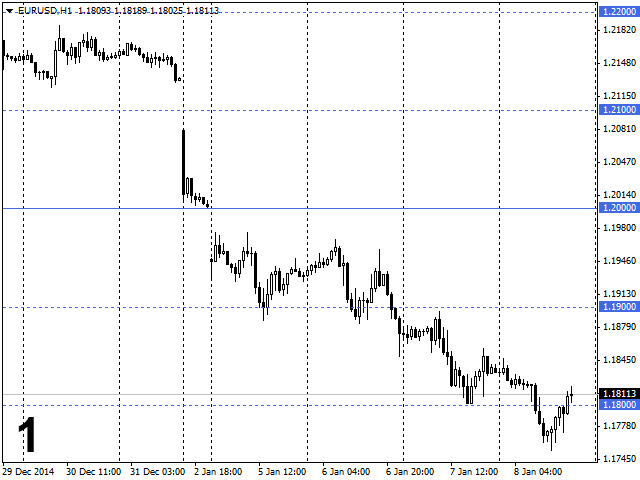
Grid levels
The indicator draws a grid of "Horizontal line" graphical objects.
All grid values are changed when moving the main line.
Recommendations
- Use the indicator for displaying rounded prices that are multiple of 1 000 or 500 (points*). Example:
- EURUSD 1.25000, 1.26000, 1.27000
- EURUSD 1.25500, 1.26500, 1.27500
- Distanceparameter
- For currency pairs – 1 000 (1 000 points*)
- For stocks – 100 ($1)
- Disable grid display for higher timeframes. Grid display can be set in the main line settings of Display tab
- Put different values in Name main level parameter if you use several indicators on one chart
Input Parameters
- Create main level – For creation of the main level
- Name main level – You have 20 preset names to choose (if you want to use several indicators on one chart)
- Number of levels – Number of levels in the grid
- Distance – Distance between the levels
- ---Setting main level--- For improved visibility
- Color – Change main level color
- Style – Change main level style
- Width – Change main level width
- ---Setting grid level--- For improved visibility
- Color – Change grid level color
- Style – Change grid level style
- Width – Change grid level width
- Draw object as background = True – Hide level prices and lines under the price chart
- ---Other settings--- For improved visibility
- Your name – Use Name main level variable for the main level name. Default = False (not used)
- Name main level – Main level custom name. Used if Your name = True.
- Save levels after removal of the indicator – Save levels when removing the indicator from the chart. Default = False (not used)
Screenshots
- EURUSD January 2015
- Input Parameters
- Using three indicators. For analyzing history. AUDUSD October 2012
- Three indicators. Example:
- PG** stocks 16.12.2014 (Intraday)
- Stop Loss 10-20 cents
- Take Profit 50 or 100 cents
- Using two indicators. EURUSD Daily late 2014
- Distance = 1000 – psychological levels multiple of 1 000 points*.
- Distance = 5000 – ranges of 5 000 points*.
- Sample trade where the indicator is used
- IBM stocks 08.01.2015 (Intraday)
- 1 – breakout and consolidation above 158.00
- Possible Buy/Long entry points are marked by arrows
- Sample trade where the indicator is used
- EURUSD 18.12.2014
- General downward movement
- 1 – active buys from the round level of 1.23000
- 2 – breakout and consolidation below the level of 1.23000
- The level is turning into a resistance line
- Possible Sell/Short entry points are marked by arrows
* For 5-digit quotes
** Procter & Gamble


本店最新上架
-
- MT4 MT5跟单EA 本地跟单远程跟单 绝不

- ¥1100.00
-
- 在MetaTrader市场购买MetaTrader 5的&#

- ¥3988.00
-
- 在MetaTrader市场购买MetaTrader 5的&#

- ¥3988.00
-
- 在MetaTrader市场购买MetaTrader 5的&#

- ¥3988.00
-
- 在MetaTrader市场购买MetaTrader 5的&#

- ¥3988.00
全网为您推荐
-
- AlgoTradeSoft

- ¥3988.00
-
- 国际期货套利软件

- ¥3988.00
-
- MT4 MT5跟单EA 本地跟单远程跟单 绝不
- ¥1100.00
-
- 在MetaTrader市场购买MetaTrader 5的&#
- ¥3988.00
-
- 在MetaTrader市场购买MetaTrader 5的&#
- ¥3988.00


