 客服热线:
 手机版
 二维码






































TrendNavigator
Here is the product, which truly reveals all the computing and graphical capabilities of the metaTrader terminal.
The TrendNavigator indicator helps you take the most effective trading decisions, features stunning accuracy, unlimited graphical capabilities and highly developed notification service.
- 3D graphics
- 4 unique trend determining algorithms
- 5 types of notifications of trend change which appear as Buy and Sell signals
- Very high accuracy
- Shows local lows and highs
- Free notification of new signals on your mobile phone
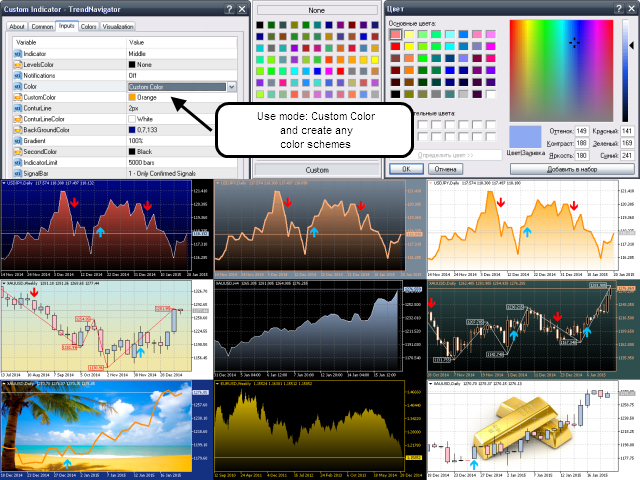
- Many built-in ready-to-use color schemes
- Possibility to create custom color schemes
- You can use your photos as chart background
- You can use your own audio files for indicator signals
- Can be used with any trading robots
Official product site: MoneyJinn.com
- All the color schemes that are built into the indicator are partially or completely protected against accidental changes.
To use the unlimited options for creating and editing your own color schemes, use the 'Custom Color' mode. - To change the current audio signal of the indicator, upload your own .wav file to the terminal folder /Sounds/.
The names of your audio signals should be TrendNavigator.wav or TrendNavigatorBuy.wav and TrendNavigatorSell.wav. - To use your photo as the graphic background created by the indicator, upload your own image file of .bmp format to the terminal folder: /MQL4/Images/.
The names of your image files should be: TrendNavigator.bmp or EURUSD.bmp and EURUSDM5.bmp. After you download your image file i, you can enable your own graphic background in the Custom Color mode by selecting any value of the BackGroundColor parameter.



本店最新上架
-
- MT4 MT5跟单EA 本地跟单远程跟单 绝不

- ¥1100.00
-
- 在MetaTrader市场购买MetaTrader 5的&#

- ¥3988.00
-
- 在MetaTrader市场购买MetaTrader 5的&#

- ¥3988.00
-
- 在MetaTrader市场购买MetaTrader 5的&#

- ¥3988.00
-
- 在MetaTrader市场购买MetaTrader 5的&#

- ¥3988.00
全网为您推荐
-
- AlgoTradeSoft

- ¥3988.00
-
- 国际期货套利软件

- ¥3988.00
-
- MT4 MT5跟单EA 本地跟单远程跟单 绝不
- ¥1100.00
-
- 在MetaTrader市场购买MetaTrader 5的&#
- ¥3988.00
-
- 在MetaTrader市场购买MetaTrader 5的&#
- ¥3988.00


