 客服热线:
 手机版
 二维码





































Mercury Hedger
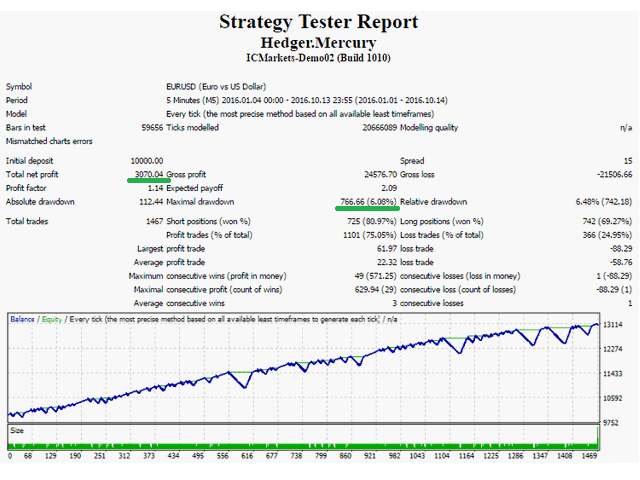
The Mercury Hedger EA is a trend scalper EA with elements of hedging. The standard parameters are optimized for trading the EURUSD M5 currency pair with the deposit of $10,000. The minimum deposit is $1000, provided the use of the starting lot of 0.01.
Parameters
EntrySettings - entry parameters
- EntryType: type of entry (A, B, C) - the traded PriceAction pattern;
- UseEntryReverse: reverse entry;
- UseTrendFilter: use confirmation from trend indicator;
- OpenOnNewBar: open new position only at the opening of a new bar;
MoneyManagementSettings - money management parameters
- Profit: amount of profit in the deposit currency, when reached, all positions are closed;
- ProfitType: type of profit:
- PerAvLot - profit in the deposit currency per one opened lot on the basis of the average number of opened lots;
- PerTotalLots - profit in the deposit currency per one opened lot on the basis of the total number of opened lots;
- Absolute - profit in the deposit currency;
- InitialLot: initial lot;
- InitialLotType: initial trade volume calculation type (Fixed, Auto);
- BalanceForInitialLot: minimum account balance for initial lot for InitialLotType=Auto;
- AbsoluteProfitLimit: maximum profit in account currency for PerAvLot, PerTotalLot modes;
- LotFactor: lot increase coefficient;
- LotManagementType: lot increase type:
- Multiply - multiplication by LotFactor;
- Increase - addition to LotFactor;
- MaximumDrawdownInPercents: the maximum drawdown (if 0, closure by maximum drawdown is inactive);
- DrawdownExitType: action when reaching the maximum drawdown:
- ExitByHedge - place a hedging order and stop trading;
- ExitByClose - close all positions and continue trading;
GridSettings - parameters for managing the hedging grid
- StepInPips: grid step in pips (automatic calculation for four and five digit quotes);
- UseStopOrders: use pending stop orders for entering (otherwise the hedging entries will be performed by market one the price reaches the level);
MiscellaneousSettings - Miscellaneous
- SlippageInPips: slippage in pips (automatic calculation for four and five digit quotes);
- Magic: order identifier;
ScheduleSettings - schedule
- StartHour: operation start hour;
- EndHour: operation end hour (inclusive);
- MondayStartHour: operation start hour on Monday;
- FridayEndHour: operation end hour on Friday;
User interface
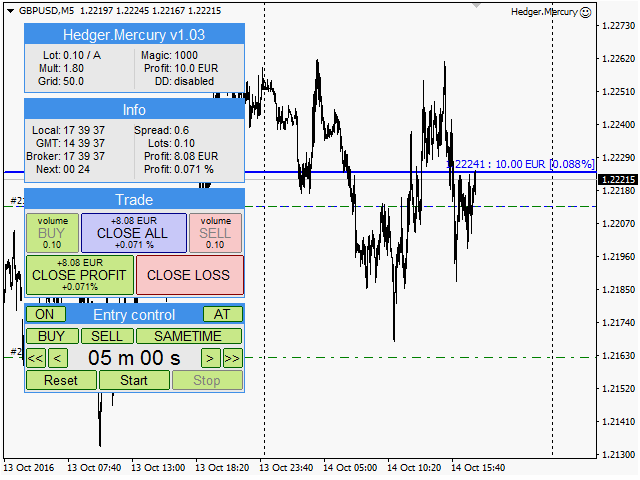
The EA info window - "Current settings"
The title bar contains the name of the EA and its version, for example: "Hedger.Mercury v1.05".
The window contains information on the following settings:
- Lot: initial lot;
- Mult: lot multiplier (in case the increase by summation is used, the field will be named Inc);
- Grid: step of the hedging grid in pips;
- Magic: order identifier;
- Profit: value of take profit in deposit currency. If the calculation per average lot is used, the " /av" suffix will be added, in case the calculation per total lot is used, the " /tot" suffix will be used;
- DD: the maximum drawdown, the "hedge" suffix will be added in case the action upon reaching ExitByHedge is specified;
The EA info window - "Info"
The window displays the following information:
- Time: local (Local), Greenwich Mean Time (GMT), broker time (Broker), time until the next candle is opened (Next);
- Spread: current spread;
- Lots: the total number of opened lots;
- Profit: current profit in the deposit currency and as a percentage;
The EA window - "Trade"
The trading panel is designed for opening orders manually (BUY and SELL buttons), as well as force-closing all positions (CLOSE ALL, CLOSE PROFIT, CLOSE LOSS buttons).
The EA window - "Entry control"
Controls for managing entries:
- The "ON/MNT/OFF" button is for temporarily disabling new entries (the button at the top left corner of the title bar). The button has three states:
- ON: New entries and position maintenance allowed;
- MNT: only maintenance of the current position is allowed (after it closes, new entries will not be made);
- OFF: New entries and maintenance prohibited;
- "AT" indicator - Automated trading indicator (if automatic trade is prohibited, the indicator will flash);
- Countdown timer serves for setting time to switch the "ON/MNT/OFF" button to "ON" state;
- Reset/Start/Stop - reset, start and stop the timer;
本店最新上架
-
- MT4 MT5跟单EA 本地跟单远程跟单 绝不

- ¥1100.00
-
- 在MetaTrader市场购买MetaTrader 5的&#

- ¥3988.00
-
- 在MetaTrader市场购买MetaTrader 5的&#

- ¥3988.00
-
- 在MetaTrader市场购买MetaTrader 5的&#

- ¥3988.00
-
- 在MetaTrader市场购买MetaTrader 5的&#

- ¥3988.00
全网为您推荐
-
- AlgoTradeSoft

- ¥3988.00
-
- 国际期货套利软件

- ¥3988.00
-
- MT4 MT5跟单EA 本地跟单远程跟单 绝不
- ¥1100.00
-
- 在MetaTrader市场购买MetaTrader 5的&#
- ¥3988.00
-
- 在MetaTrader市场购买MetaTrader 5的&#
- ¥3988.00


