 客服热线:
 手机版
 二维码




































Data Downloader
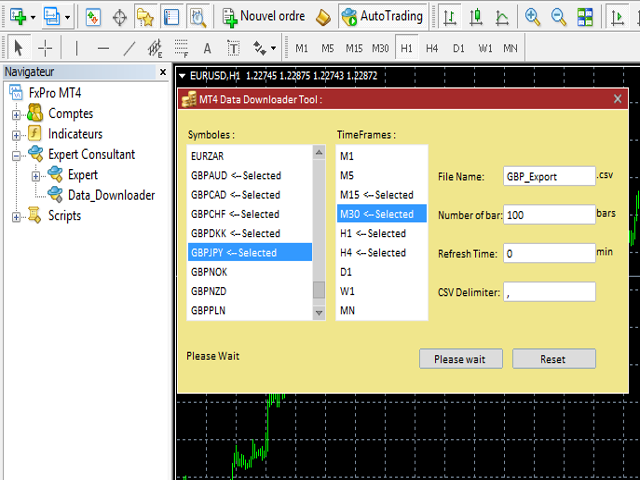
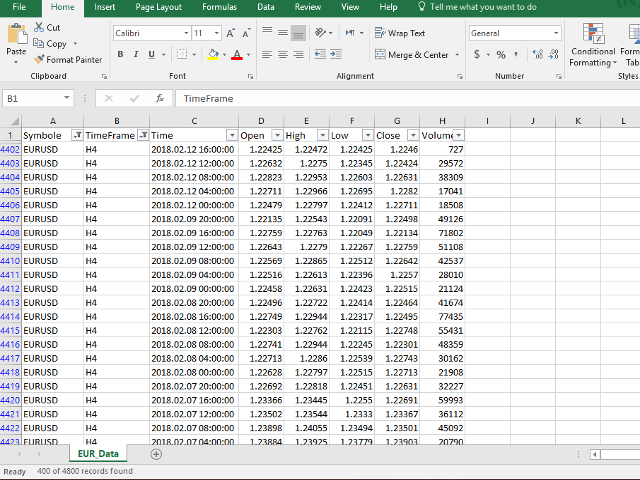
This tool will allow you to export candles data (Open, High, Low, Close, Volume) for any financial instrument present in your metaTrader 4.
You can download the data of multiple Symbols and Timeframes in the same csv file at once. You can schedule the frequency, simply choose the refresh interval (1 minute minimum, if 0 then the extraction will be done once) and the tool will do the work.
No need to open a lot of charts in order to get the last sync, the tool will download the data directly.
The Files will be stored in the folder: MQL4Files.
How it works
- Select the Symbols to download: Click on the item to select or deselect it.
- Select the Timeframes: Click on the item to select or deselect it.
- Put the name of the CSV file, e.g: EURUSD_M15, Data_export..., and don't use the characters / : * ? " < > |.
- Put the number of bars to download: Minimum 1 and 100000 Maximum.
- Put the Refresh Time for scheduling the download. For example, if you put 5 then the file will be updated every 5 minutes with the last number of bars provided before, 0 means that the file will be exported one time.
- Click on "Start Export" and the file will be downloaded, and press "Stop Export" if you need to stop schedule.

本店最新上架
-
- MT4 MT5跟单EA 本地跟单远程跟单 绝不

- ¥1100.00
-
- 在MetaTrader市场购买MetaTrader 5的&#

- ¥3988.00
-
- 在MetaTrader市场购买MetaTrader 5的&#

- ¥3988.00
-
- 在MetaTrader市场购买MetaTrader 5的&#

- ¥3988.00
-
- 在MetaTrader市场购买MetaTrader 5的&#

- ¥3988.00
全网为您推荐
-
- AlgoTradeSoft

- ¥3988.00
-
- 国际期货套利软件

- ¥3988.00
-
- MT4 MT5跟单EA 本地跟单远程跟单 绝不
- ¥1100.00
-
- 在MetaTrader市场购买MetaTrader 5的&#
- ¥3988.00
-
- 在MetaTrader市场购买MetaTrader 5的&#
- ¥3988.00


