 客服热线:
 手机版
 二维码




































Channel Trading Tool Pro
The EA automatically opens the orders when price crossing/touching lines, which were drawn by the user.
Two scenarios are possible.
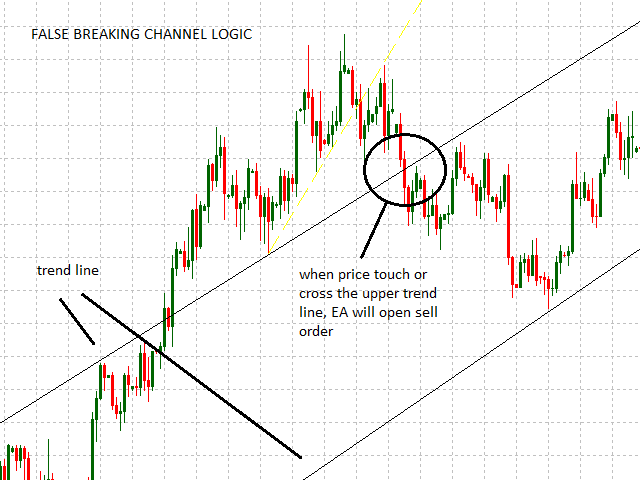
- When you expect the price to stay in the channel.
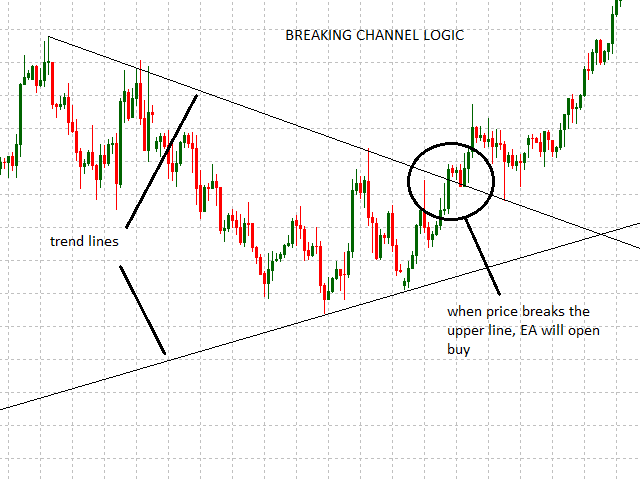
- When you expect that the price will not remain in the channel after the break off it.
If you want use first scenario - you must set in settings Trade mode = “False_Breaking_Channel”.
If you want use second scenario - you must set in settings Trade mode = “Breaking_Channel”.
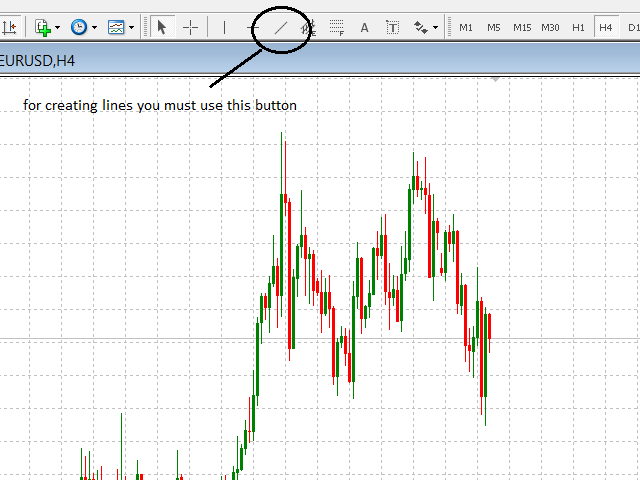
When you run EA, you must draw two trend lines at chart (it is also working in tester with visualization).
After this, EA find these lines – and you will see message on screen with lines prices of up and down lines. Also lines will change colors.
EA parameters
TRADE SETTINGS Block
- Trade mode. The basic setting allows you to select the operating mode.
- Close order by opposite signal. Allows you to set the mode, when a signal occurs, the order will closed from the opposite signal, if it exists in the market.
ORDER SETTINGS Block
Risk management Mode. Have 2 options. “Fixed_Lot” and “Percent_From_Equity”.
- If you set Risk management Mode=“Fixed_Lot”, below of this setting, in value “Lot / Percent” you can set fixed value of order lot.
- If you set Risk management Mode=“Percent_From_Equity”, below of this setting, in value “Lot / Percent” you can set percent from your account equity, for auto calculating lot.
- “Stop Loss (points, 0 - not use)”. Allows setting the order stop loss.
- “Take Profit (points, 0 - not use)”. Allows setting the order take profit.
TRAILING SETTINGS Block
- “Trailing Start”. Distance, from order open price to current price, after which, possible to move the stop loss from previous place at distance of the next setting, from current price.
- “Trailing Step”. After “Trailing Start” distance is reached, SL will be moved at this distance from current price.
Example: we have buy order at market.
- Order open price = 1.500
- Stop loss of the order = 1.400
- “Trailing Start” = 200
- “Trailing Step” = 100
When price will be at 1.700, SL will be moved to current price (1.700) minus “Trailing Step” (100).
So, SL will move to price 1.600. If price returns to 1.700 – you will have profit instead of loss.
It is easy, try run in strategy tester with visualization.

本店最新上架
-
- MT4 MT5跟单EA 本地跟单远程跟单 绝不

- ¥1100.00
-
- 在MetaTrader市场购买MetaTrader 5的&#

- ¥3988.00
-
- 在MetaTrader市场购买MetaTrader 5的&#

- ¥3988.00
-
- 在MetaTrader市场购买MetaTrader 5的&#

- ¥3988.00
-
- 在MetaTrader市场购买MetaTrader 5的&#

- ¥3988.00
全网为您推荐
-
- AlgoTradeSoft

- ¥3988.00
-
- 国际期货套利软件

- ¥3988.00
-
- MT4 MT5跟单EA 本地跟单远程跟单 绝不
- ¥1100.00
-
- 在MetaTrader市场购买MetaTrader 5的&#
- ¥3988.00
-
- 在MetaTrader市场购买MetaTrader 5的&#
- ¥3988.00


