 客服热线:
 手机版
 二维码






































Mr Lowry EA
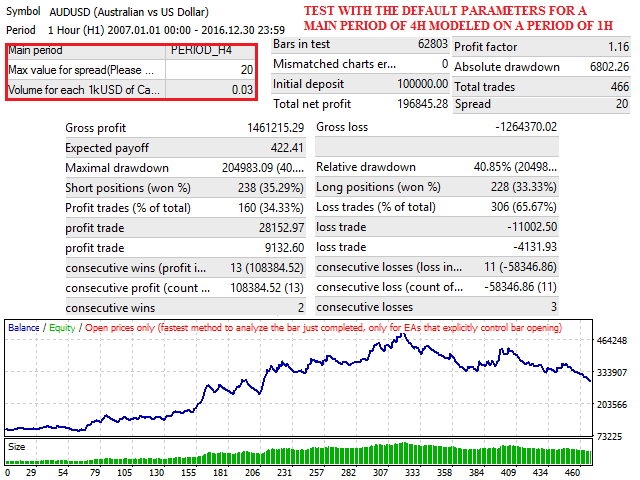
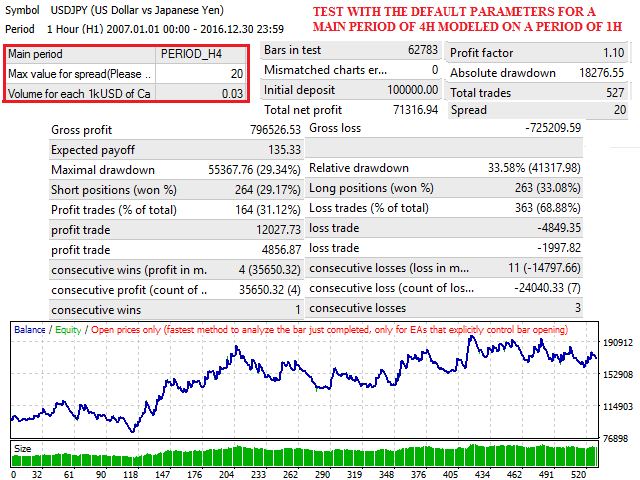
Mr. Lowry EA is the free version of Mr.LowryPro EA, an expert advisor who allows you to apply the strategy developed by Scott Lowry based on the crossing of moving averages in different situations, for example:
- You can define different periods of application. The program runs in the defined period regardless of the period in which the graph in which it is executed.
- You can define a maximum spread to execute operations, this allows you to save money by paying high commissions and maximizing your profits.
- You can define and optimize SL and TP.
- You can define the Size of the lot as a percentage of your capital. Is recommended that it be 0.01 to 0.05 Lots for each 1000Usd of Capital.
The input parameters are as follows
- Trading Style: Select "intraday" if you want your trades to close on the same day, "Swing" if you want your trades to close the same week and "Position trading" if you want to keep your trades open for more than a week.
- First Day of Trading: Select the day on which you want to start trading. (Default values have been optimized with GMT + 2 server time)
- Last Day of Trading: Select the day on which you want to end operations. (Default values have been optimized with GMT + 2 server time)
- Trading start time: Enter the time (0-24H) in which you want to start trading. (Default values have been optimized with GMT + 2 server time)
- Trading end time: Indicate the time (0-24H) in which you want to end operations. (Default values have been optimized with GMT + 2 server time)
- Main period: Select the period you want to operate.
- MagicNumber: Enter a magic number for the EA. If you use the EA multiple times on the same symbol use a different magic number for each chart.
- Max value for spread: Enter the maximum amount you want to pay spread.
- Volume: Indicate the number of lots you want to open for each Thousand dollars of Capital.
- Comment: Enter a comment for the operations.
- SL: Define a Stop loss in Pips.
- TP: Define a TP in Pips.
important: The values of the input parameters that come by default in the Expert Advisor are optimized with the historical data of the last 10 years for EUR / USD with 5 decimals in Main Period of 240 minutes. When you use this EA you should be aware that these results are no guarantee of success in the future and that no one but yourself is responsible for any decision or investment you make in the market.


 nload="if(window.viewGallery_GalleryManager) viewGallery_GalleryManager.ImageonLoad(this,7);" />
 nload="if(window.viewGallery_GalleryManager) viewGallery_GalleryManager.ImageonLoad(this,8);" />
 nload="if(window.viewGallery_GalleryManager) viewGallery_GalleryManager.ImageonLoad(this,9);" />
本店最新上架
-
- MT4 MT5跟单EA 本地跟单远程跟单 绝不

- ¥1100.00
-
- 在MetaTrader市场购买MetaTrader 5的&#

- ¥3988.00
-
- 在MetaTrader市场购买MetaTrader 5的&#

- ¥3988.00
-
- 在MetaTrader市场购买MetaTrader 5的&#

- ¥3988.00
-
- 在MetaTrader市场购买MetaTrader 5的&#

- ¥3988.00
全网为您推荐
-
- AlgoTradeSoft

- ¥3988.00
-
- 国际期货套利软件

- ¥3988.00
-
- MT4 MT5跟单EA 本地跟单远程跟单 绝不
- ¥1100.00
-
- 在MetaTrader市场购买MetaTrader 5的&#
- ¥3988.00
-
- 在MetaTrader市场购买MetaTrader 5的&#
- ¥3988.00


