 客服热线:
 手机版
 二维码




































TiDemo
Professional Trend Indicator
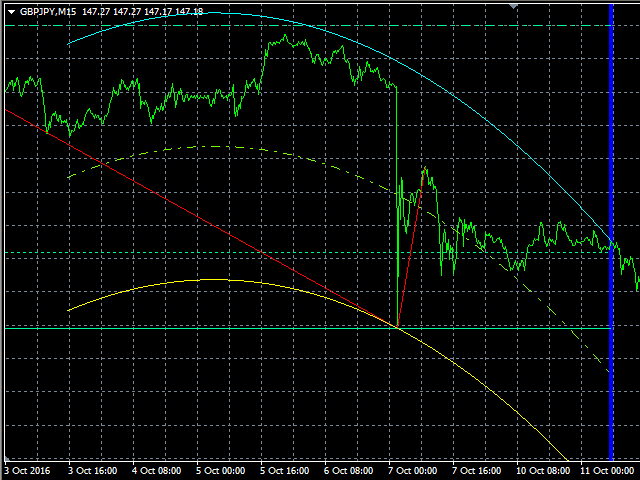
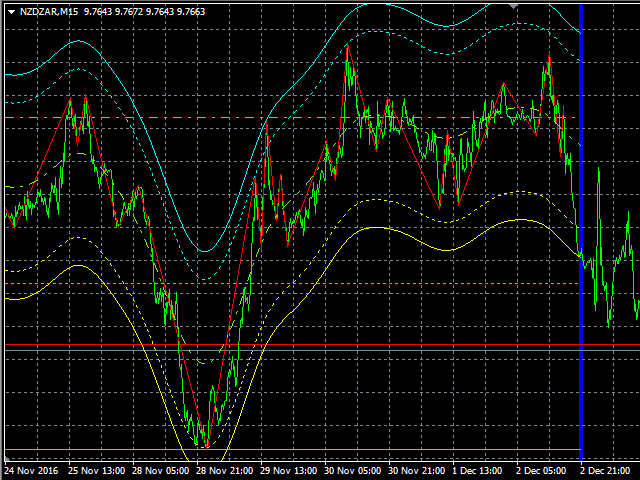
TiDemo indicator is based on its own oscillator and shows you trend changes.
This indicator is a Demo version of Ti indicator with some restrictions:
- It works only on symbol [EURUSD]
- It works only on timeframe [M15]
- There is no "Indicator_Output" Buffer, but you can retrieve other buffers information
Indicator includes adjustable Polynomial and MAs channels, Trend lines and Oscillator filter with whom you can adjust the spread of indicator.
You can run many instances, for all time frames at once, is very fast and has a built-in "slider history testing" technology and “Error control”.
Program is design to operate in 2 automatic modes:
1. Slider mode
Turns on when attaching the indicator to the Chart or Visual Tester.
Here you can test/set your settings back in history with “slider” up to 32767 bars.
So, while Visual Testing EA, you can attach the indicator and easily adjust input parameters for critical points.
On Tester (only) you can exit "Slider mode" by pressing the <Esc> key.
2. Expert mode
Turns on when starting the indicator with "iCustom" function.
It is designed only for EA use and “slider history testing” is disabled.
This indicator is designed primarily for professional use and is very useful where precise criteria is required for the most likely outcome.
TiDemo input parameters settings
The order from left to right is: name, [default value], min-max value.
- Channel_mode [TR_OFF CH_ON] - here you can select desired combination with trend lines
- Channel_type [POLY] - type of channel (polynomial or moving average)
- *Trend_logic [OUT_STOP_3] - trend output logic
- *Channel_logic [IN_STOP_1] - channel output logic
- Channel_bars [200] 4-6000 - channel bars when Auto_calc=[false]
- Equidistant [false] - switch on/off Equidistant Channel (true=on/false=off)
- Auto_calc [true] - switch on/off automatic calculation of channel bars
- Oscillator_coeff (xOscAVG) [4.0] 0.0-40.0 - oscillator coefficient (x average chart oscillation - 1x OscAVG~1x spread in points)
- Polynomial_ex [1] 0-10 - polynomial exponent
- MA_method [T3_Hull] - moving average method (ma method)
- MA_step [8] 0-100 - ma step
- MA_smooth [0] 0-100 - ma smoothness
- MA_v_factor [0.0] 0.0-50.0 - ma volume factor
- MA_lambda [0.0] 0.0-100.0 - ma lambda
- LastBar [0] 0-6000 - last bar for calculation (0 is current)
- PastBars [1000] 100-6000 - bars for calculation in the past (to the left)
*Output Trend/Channel logic description
middle_zone=(Middle_Trend_1/Middle_Channel_1) to (Middle_Trend_2/Middle_Channel_2)
out_zone_1=(Upper_Trend/Upper_Channel) to (Middle_Trend_2/Middle_Channel_2)
out_zone_2=(Lower_Trend/Lower_Channel) to (Middle_Trend_1/Middle_Channel_1)
- MIDDLE_STOP - above the (Middle_Trend/Middle_Channel) line - SELL, below the (Middle_Trend/Middle_Channel) line - BUY
- IN_STOP_1,2,3 - in middle_zone STOP trading, above the middle_zone - SELL, below the middle_zone - BUY
- OUT_STOP_1,2,3 - in out_zone_1 allow BUY and SELL, below the out_zone_1 - BUY in out_zone_2 allow BUY and SELL, above the out_zone_2 - SELL
For more details please see the description of Ti Full version.
Additional information
This demo version is built to demonstrate the main features and usability of Ti.
If you like to use Full version of Ti unlimited or within an EA you have to buy or rent this product.
Are you satisfied with our work? Share your experiences and leave a comment.
If you need help using our trading tools or you have an issue or question, please contact me.
Best regards!
VLabs


 nload="if(window.viewGallery_GalleryManager) viewGallery_GalleryManager.ImageonLoad(this,7);" />
 nload="if(window.viewGallery_GalleryManager) viewGallery_GalleryManager.ImageonLoad(this,8);" />
 nload="if(window.viewGallery_GalleryManager) viewGallery_GalleryManager.ImageonLoad(this,9);" />
 nload="if(window.viewGallery_GalleryManager) viewGallery_GalleryManager.ImageonLoad(this,10);" />
 nload="if(window.viewGallery_GalleryManager) viewGallery_GalleryManager.ImageonLoad(this,11);" />
本店最新上架
-
- MT4 MT5跟单EA 本地跟单远程跟单 绝不

- ¥1100.00
-
- 在MetaTrader市场购买MetaTrader 5的&#

- ¥3988.00
-
- 在MetaTrader市场购买MetaTrader 5的&#

- ¥3988.00
-
- 在MetaTrader市场购买MetaTrader 5的&#

- ¥3988.00
-
- 在MetaTrader市场购买MetaTrader 5的&#

- ¥3988.00
全网为您推荐
-
- AlgoTradeSoft

- ¥3988.00
-
- 国际期货套利软件

- ¥3988.00
-
- MT4 MT5跟单EA 本地跟单远程跟单 绝不
- ¥1100.00
-
- 在MetaTrader市场购买MetaTrader 5的&#
- ¥3988.00
-
- 在MetaTrader市场购买MetaTrader 5的&#
- ¥3988.00


