 客服热线:
 手机版
 二维码





































MQLTA Time Line Auto Close
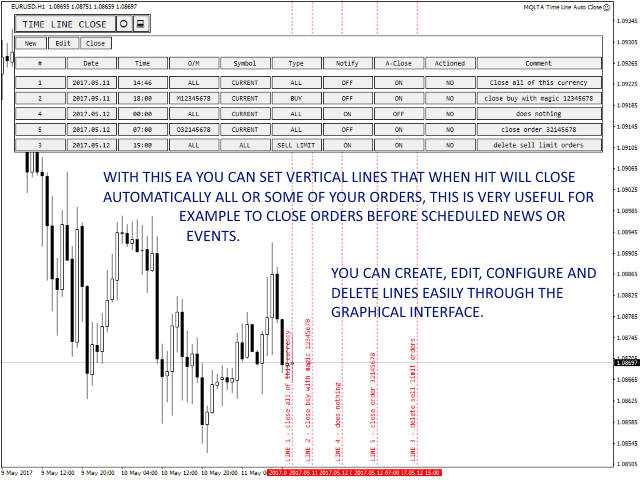
The Time Line Auto Close (TLAC) EA will allow you to create vertical lines (Time Lines) that will automatically close all, or some, of your open orders. You can create and manage multiple lines configuring for each one which orders will be closed and notifications. You can filter orders by currency, magic number, order number and order type. You can also configure notifications to be alerted before the lines will be activated.
How does it work?
With TLAC you can manage the time lines through the graphical interface so that all the settings can be easily applied and interpreted by the EA in the background.
How to Use the EA
All the buttons have integrated "tips" so if you stop the mouse on them you will see their function.
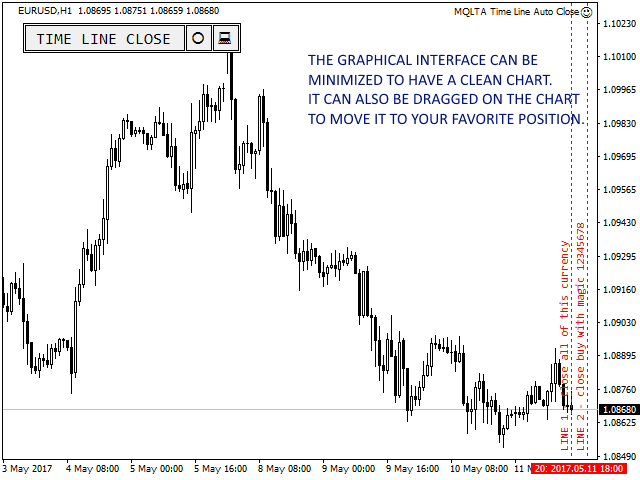
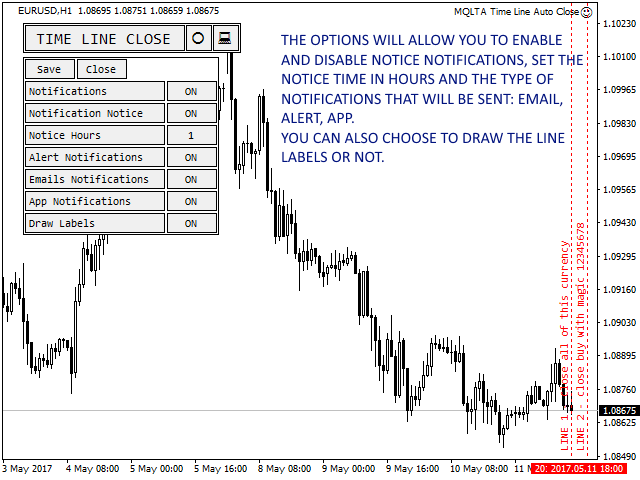
The graphical interface will start showing you the basic options for notifications and notice, choose your preferred settings and save.
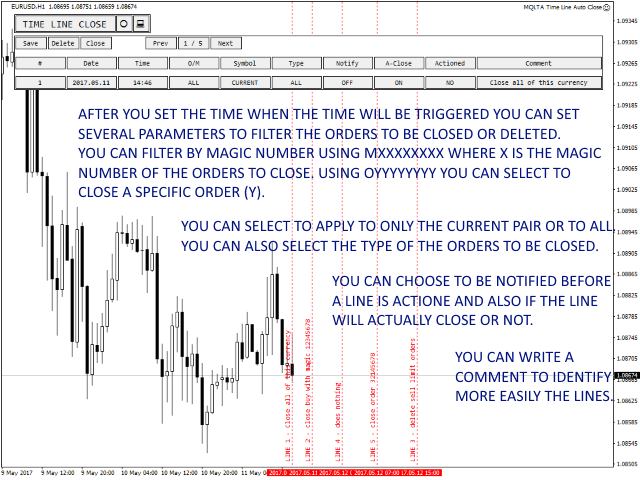
Open the graphical interface to create new lines, select the date and time when the orders will be closed and the settings to filter the orders:
- Order or Magic, you can close only an order with a specific Order Number specifying OXXXXXXXX where X is the order number, or close only orders with a specific Magic Number specifying MYYYYYYYY where Y is the Magic Number
- Symbol, you can select to close orders of the current Symbol (Pair) in the chart or to extend the selection to all the Symbols (pairs)
- Type, you can choose to close only orders matching a specific type, for example Buy or Sell Limit and so on
- Notice Notification, to be alerted before the line will be activated
- Auto Close, to actually enable if automatically close the orders or not
After every change remember to save and check your settings
Why you should use the TLAC Indicator?
The Time Line Auto Close EA is very useful if you need to schedule the closure or deletion of your orders.
For example, if you want to close some orders before a scheduled event or before the closure of the market on Friday.
How to Test and Backtest
Since the EA works on open orders this cannot be tested.
Notifications
The TLAC can be configured to send you notifications:
- Via Email
- Via App
- Via metaTrader alert
EA Parameters
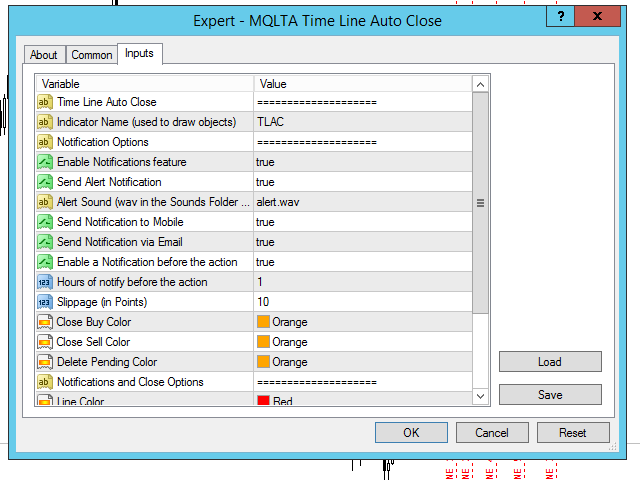
- Indicator Name (used for the panel) - Prefix for the created graphical objects, suggested to leave default
- Orders Filtering Options
- Enable Notification Feature, to enable or disable notifications
- Send alert Notification - true to send alert notification (popup screen in metaTrader)
- alert Sound (wav in the Sounds Folder of metaTrader) - the file name of the sound to play during the alert
- Send Notification to Mobile - true to send notification to the mobile app
- Send Notification via Email - true to send the notification via email
- Enable a Notification before the action, this is a notice notification sent before the line is actioned
- Hours to notify before the action, number of hours to notify before the line will be triggered
- Slippage, to select the maximum slippage to use, in points
- Close Buy Color - color for close buy arrow
- Close Sell Color - color for close sell arrow
- Delete Pending Color - color of delete arrow for the pending orders
- Line Color - the color of the line
- Line Style - the style of the line
- Draw Line Labels - to chose is drawing or not the labels of the lines
- Horizontal offset (pixels) - horizontal spacing of the panel from the border
- Vertical offset (pixels) - vertical spacing of the panel from the border
If you like this tool please take a minute to leave a review.
If you have suggestions to improve it please send me a message and we can discuss it further.
Feel free to visit my profile and "Add to friends" https://www.mql5.com/en/users/mql4autotrading.

本店最新上架
-
- MT4 MT5跟单EA 本地跟单远程跟单 绝不

- ¥1100.00
-
- 在MetaTrader市场购买MetaTrader 5的&#

- ¥3988.00
-
- 在MetaTrader市场购买MetaTrader 5的&#

- ¥3988.00
-
- 在MetaTrader市场购买MetaTrader 5的&#

- ¥3988.00
-
- 在MetaTrader市场购买MetaTrader 5的&#

- ¥3988.00
全网为您推荐
-
- AlgoTradeSoft

- ¥3988.00
-
- 国际期货套利软件

- ¥3988.00
-
- MT4 MT5跟单EA 本地跟单远程跟单 绝不
- ¥1100.00
-
- 在MetaTrader市场购买MetaTrader 5的&#
- ¥3988.00
-
- 在MetaTrader市场购买MetaTrader 5的&#
- ¥3988.00


