 客服热线:
 手机版
 二维码






































JustTradePanelIndicator
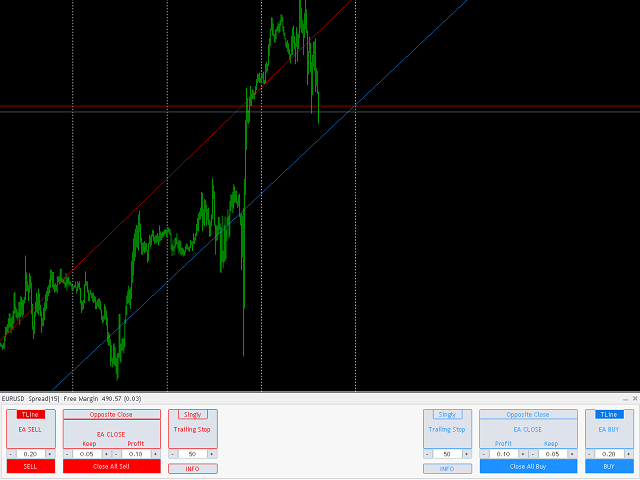
JustTradePanel - Application for manual and semi-automatic trading in the MT4 terminal. The application is presented in the form of a trading panel and individual functions can be easily turned on / off by pressing the appropriate control buttons.
The application consists of two parts, an adviser and an indicator. The panel requires both components. To download the adviser, go to https://www.mql5.com/en/market/product/43179
Launch order:
In the strategy tester, the advisor is launched first, then an indicator is added.
On a real or demo account, the indicator should be launched first and after that the adviser is added.
The application has the same functionality both on a real or demo account and in the MT4 strategy tester, so you can easily test your personal manual trading strategy in the MT4 strategy tester.
In addition to manual order management, the application has built-in functions for opening / closing orders in semi-automatic mode, namely:
- Opening orders when the price crosses the trend line set on the chart.
The trend line is added to the chart by pressing the appropriate control button and is adjusted automatically.
If the trend line is adjusted manually, the automatic correction mode is disabled.
You can restore the automatic correction of the trend line by deleting, and then adding the line again by pressing the corresponding button.
The maximum number of orders, the step between orders and the method of controlling the volume of orders are set in the application settings.
- Closing orders according to one or more criteria, namely:
Closing one or a group of orders if the total volume exceeds the specified value and at the same time the target profit is reached.
Closing orders when the price crosses the oncoming trend line set on the chart by the application and adjusted by the user.
Closing with Trailing Stop. The function can be applied individually to each order or to a group of orders.
Additionally, the application displays information about the total values of open positions, separately for Buy and Sell when you press the corresponding control key.
All controls (except for trend lines located directly on the price chart) are located in a separate subwindow of the indicator, which can be minimized at any time, so the panel never obscures the open price chart and does not affect the operation of other indicators.
All questions and suggestions about the application, please leave in the comments.
本店最新上架
-
- MT4 MT5跟单EA 本地跟单远程跟单 绝不

- ¥1100.00
-
- 在MetaTrader市场购买MetaTrader 5的&#

- ¥3988.00
-
- 在MetaTrader市场购买MetaTrader 5的&#

- ¥3988.00
-
- 在MetaTrader市场购买MetaTrader 5的&#

- ¥3988.00
-
- 在MetaTrader市场购买MetaTrader 5的&#

- ¥3988.00
全网为您推荐
-
- AlgoTradeSoft

- ¥3988.00
-
- 国际期货套利软件

- ¥3988.00
-
- MT4 MT5跟单EA 本地跟单远程跟单 绝不
- ¥1100.00
-
- 在MetaTrader市场购买MetaTrader 5的&#
- ¥3988.00
-
- 在MetaTrader市场购买MetaTrader 5的&#
- ¥3988.00


