 客服热线:
 手机版
 二维码





































Profits Enhacer EA
PROFITS ENHANCER EA
Profits Enhancer Expert is a Utility created to enhance trader’s profits. It is better used with a trending trading system to enhance its profits.
If you watch the screenshots, you will discover that it is carefully coded to minimize or remove risk totally and at the same time give good padding to your trading curbing risks and maximizing it to make profits instead of losses.
HOW?
- This Expert operates with only Pending orders namely: Buy-stops and Sell-stops.
- Make sure the trend is good in one direction and that it is starting early or will move strong in one direction for a long period.
- Upon clicking the on-chart button, it will open 10 pending orders either buy-stop or sell-stop (10 orders is just a default setting, you can input any number you want either more or less than the default setting number) and at the same time open a counter pending order with 10x lot size. For instance: If the pending orders opened was Buystops , it will open a Sellstop pending order as a counter order with 10x of the lot size. If those Buystops pending order is 0.1 lot size each, the counter pending order – Sellstop will be 10x of those lot sizes put together i. e 1.0
- If the original lot size for each of those pending orders is 0.2 each, the counter must be 2.0 AND that is if your pending orders are 10 in
number. Just make sure it is 10x to one another. Hope you understand. Please study the screenshot well.
- Apart from the default setting, you can customize/adjust the settings as you like but make sure the counter pending order is 10x of the overall lot size of each pending orders.
- The first pending orders must go towards the trend while the counter pending must be against the trend.
- The main reason for the counter pending order is to cushion the loss if the trend turned back and moved in counter direction, the counter pending order’s lot size will quickly obliterates the losses and turn it to profits but after that, it must be closed immediately because it is not meant to be our original trade but to remove or reduce the losses AS this trading style does not work with Stop-loss in any direction.
- Please use Demo account to practice this very well before committing to the real money trading.
- If you got the USE right, you will discover that it is risk free or rather the risk is small compared to profits it will assist you to make in the long run.
BUTTONS
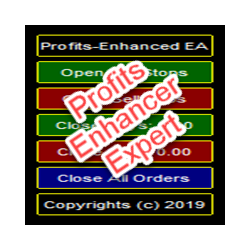
It has just 5 working, highly responsive and interactive buttons on the chart for operations:
1) Open Buystops
2) Open Sellstops
3) Close Buys
4) Close Sells
5) Close All Orders
Each of the Buttons' label speaks of its operations as it is. Very simple to use and get right.
Behind, the Parameter setting has TRAILING STOPand it is set to move 45pips behind the Current price as default, you can change it to any number you like. It is to turn your trades to risk-free trades and this will take place on all the orders.
As you use it with all carefulness, I wish you plenty pips to your profits.
Cheers.


本店最新上架
-
- MT4 MT5跟单EA 本地跟单远程跟单 绝不

- ¥1100.00
-
- 在MetaTrader市场购买MetaTrader 5的&#

- ¥3988.00
-
- 在MetaTrader市场购买MetaTrader 5的&#

- ¥3988.00
-
- 在MetaTrader市场购买MetaTrader 5的&#

- ¥3988.00
-
- 在MetaTrader市场购买MetaTrader 5的&#

- ¥3988.00
全网为您推荐
-
- AlgoTradeSoft

- ¥3988.00
-
- 国际期货套利软件

- ¥3988.00
-
- MT4 MT5跟单EA 本地跟单远程跟单 绝不
- ¥1100.00
-
- 在MetaTrader市场购买MetaTrader 5的&#
- ¥3988.00
-
- 在MetaTrader市场购买MetaTrader 5的&#
- ¥3988.00


